

What if enrolment could lead straight into the teaching administration that follows, instead of creating another set of details to copy and chase? When registrations are spread across forms, spreadsheets and email, staff can spend valuable time piecing together information before they can organise lessons. The right performing arts registration software can keep that information accessible and make the next steps clearer for everyone.
It’s understandable to want a simpler process without adding a system that creates more work. Registration is only the beginning: bookings need to become schedules, teachers need useful information, attendance needs recording and invoicing needs managing. Connecting these tasks can help staff spend more time supporting teaching and learning.
This guide explains how to assess registration software, organise enrolment workflows and consider essentials such as ease of use, cloud hosting and data protection. You’ll also see how Xperios for Performing Arts supports the administration around enrolment with bookings, scheduling, attendance tracking, invoicing and online portals for teachers, parents and students.
Key Takeaways
- Assess performing arts registration software by how well it supports your workflow, role access, reporting, security and ease of use.
- Map what happens after a form is submitted so booking and scheduling information can support the next teaching steps.
- Before adopting new software, review your forms, handovers and recurring tasks to spot gaps and unnecessary repetition.
- Separate essential requirements from optional features to focus your comparison on the needs of your organisation.
- Explore how Xperios for Performing Arts supports administration around registration through bookings, scheduling, attendance tracking and automated invoicing.
Why performing arts registration software matters beyond collecting forms
Performing arts registration software organises learner details and the administrative steps that move an enquiry towards teaching. Unlike a basic contact database, it should support a process: information is collected, reviewed and used to guide what happens next. The aim is not simply to store names and contact details, but to make each learner’s progress through enrolment easier for staff to follow.
That distinction matters when registration information sits in several places. A paper form may hold a learner’s details, an email thread may contain a question about availability, and a spreadsheet may track whether someone has been offered a place. Staff can end up re-entering information, searching for updates or asking families to provide details again. These small tasks add friction to an already busy process.
Registration is one stage in a wider journey. Performing arts software can serve different purposes: for example, UpStage, an open-source platform for cyberformance, supports live online performance, while enrolment administration focuses on managing learner information and the steps around joining teaching activity. Understanding that difference helps you assess software against the work your organisation needs to manage.
Where registration fits in the learner journey
The journey often starts with an enquiry, followed by submitted details and an enrolment decision. If a learner is accepted, staff then need to organise the next steps before teaching begins. Clear handovers help each person understand what has happened and what remains to be done. Organised records can also reduce repeated requests for information already supplied by a family or learner.
For example, an administrator may receive an enquiry, another colleague may review the application, and a teacher may need relevant details before a first lesson. If information is recorded consistently, staff can refer to the same learner record rather than relying on separate notes or forwarding long email chains. That makes responsibilities clearer and helps families receive more joined-up communication.
Which performing arts organisations can benefit?
Performing arts schools, conservatoires, music and dance services, and private teachers may all manage registrations, but their information needs vary. A group class may require details that help staff place learners into an appropriate class, whilst individual teaching may involve matching a learner with a suitable lesson arrangement. Ensembles, workshops and term-based activities can each bring different questions into the registration process.
Good organisation supports each person’s role without giving everyone the same task. Administrators need a clear view of submitted details and enrolment progress. Teachers need relevant information to prepare for teaching. Parents and students need clear, timely communication about the steps that affect them. The value of performing arts registration software lies in connecting these needs, so registration information can support a smoother transition from initial interest to the start of learning.
What performing arts registration software should support after submission
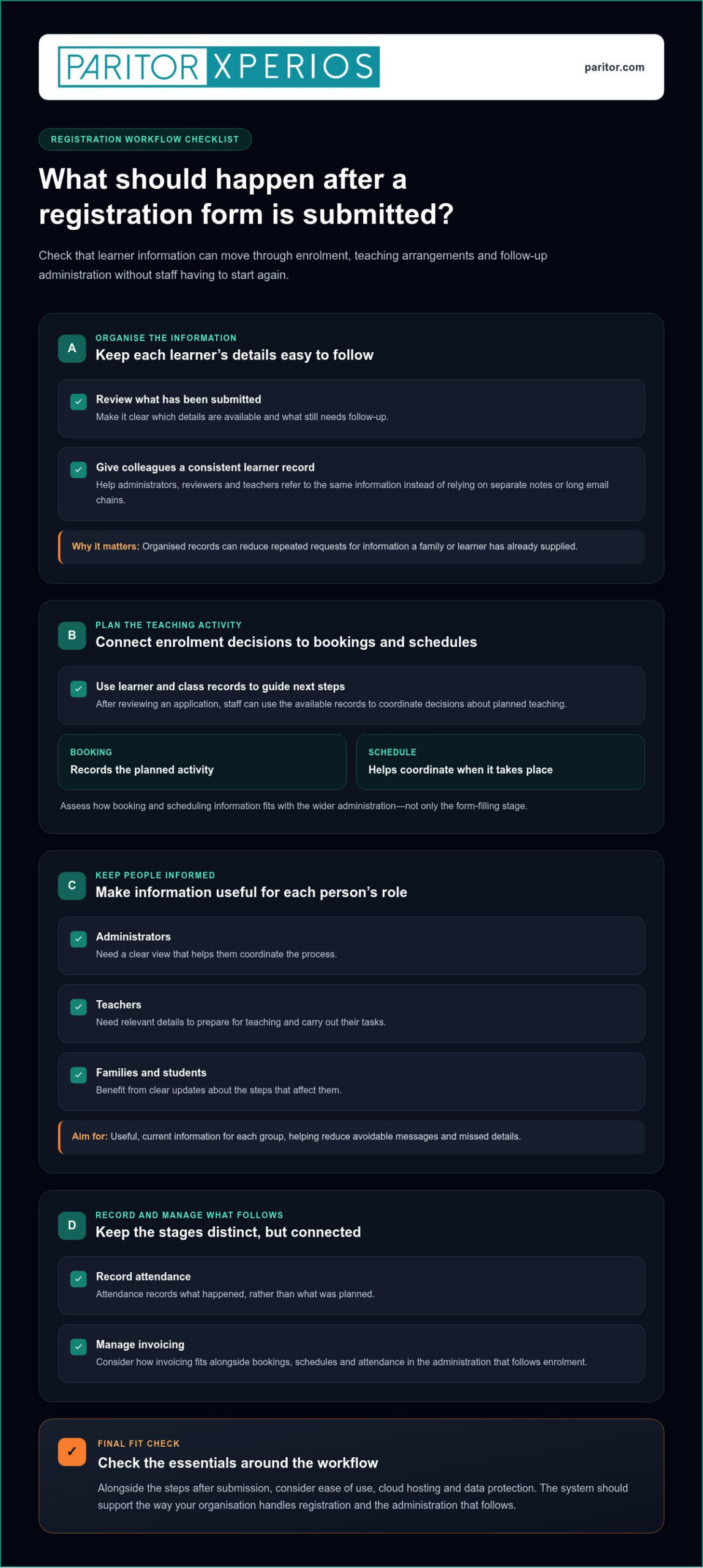
A submitted form should mark the start of the next administrative steps, not the end of the process. Registration data needs a clear administrative handover so each person can act on accurate information without starting again. That means connecting the details gathered during enrolment with the work of making decisions, arranging teaching activity and keeping relevant people informed.
Useful performing arts registration software supports this onward flow. Staff can refer to organised learner and class records as they plan bookings and schedules, then use connected administration to track attendance and manage invoicing. These stages are related, but serve different purposes: a booking records the planned activity, a schedule helps coordinate when it takes place, and attendance records what happened.
From registration details to bookings and schedules
Once details have been submitted, administrators can review them against the organisation’s enrolment process and decide what needs to happen next. A clear record helps staff see which information is available and what needs follow-up. Accurate learner and class records also make it easier to coordinate decisions about planned teaching, especially when several colleagues are involved.
As learners are placed into teaching activity, booking and scheduling information helps translate an enrolment decision into an organised plan. Consider how those records fit alongside wider administration when assessing a performing arts school administration system. Focus on the whole workflow, not just its form-filling features.
Keeping families, teachers and students informed
Not everyone needs the same information. Administrators need a view that helps them coordinate the process; teachers need relevant details for their teaching tasks; families and students benefit from clear updates about the steps that affect them. Giving each group access to useful, current information can reduce avoidable messages and help prevent important details from being missed.
A teacher portal is a mobile-responsive interface for teachers to log attendance, progress and instrument updates. It gives teachers a practical way to record relevant information as part of their work, rather than leaving all updates to administrative staff. For families, a parent portal strategy can help you consider how digital communication fits into wider enrolment and teaching administration.
After teaching begins, attendance tracking helps maintain a record of participation, whilst invoicing supports the financial administration connected with lessons or other teaching activity. When these tasks sit within a connected administrative workflow, staff can spend less time transferring details between records and more time supporting learners. The practical test is simple: can the information collected at registration help the right person take the next step?
How to compare performing arts registration software by workflow fit
The right fit is the system that supports the work your organisation needs to do without adding unnecessary steps. Compare how each option handles your current registration process, then consider which capabilities could help if your classes, activities or administration change. A task-based evaluation can address a common concern: software may feel more complex if it adds features without making everyday jobs clearer.
Start with real tasks, such as reviewing a submitted form, deciding the next enrolment step, arranging a booking or checking attendance. Consider whether staff can find and update relevant information as the learner moves through these tasks. This gives you a practical basis for comparing performing arts registration software, rather than judging it by a long list of features.
| Area | What to assess | Priority question |
|---|---|---|
| Workflow coverage | How registration connects with bookings, scheduling, attendance and invoicing. | Does it support the steps you already manage? |
| Role access | How administrators, teachers, parents and students access relevant information. | Can each group find what it needs for its role? |
| Reporting | Whether information can be reviewed in ways that help staff manage the process. | Can you see the details needed for routine decisions? |
| Security | How information is handled and access is managed. | Does the approach support your data protection responsibilities? |
| Usability | How easily staff can complete common tasks and find records. | Can users follow the workflow without avoidable steps? |
Assess the whole registration workflow
Assess the journey from submitted details to teaching administration. For example, a decision to enrol a learner may lead to a booking, a place in a schedule and later attendance records. Invoicing may also form part of the administration that follows. These tasks do not need to be treated as one feature, but their connections should make sense for your process. Check how staff locate and update a record at each handover.
Separate essential requirements from optional ones. An essential feature addresses a task your staff already perform or a recurring gap in the process. An optional capability may be useful later, but should not distract from whether the core workflow is straightforward. To assess flexibility, ask whether the workflow can still support your needs if your activities or teaching arrangements change.
Review access, security and everyday usability
Decide what administrators, teachers, parents and students need to access, and consider how the system handles personal information. Your review should take account of applicable data protection regulations, including the UK GDPR. A cloud-based platform is software hosted on remote servers and accessed remotely, rather than installed solely on a local computer. Assess whether that approach suits your working practices and whether staff can complete routine tasks clearly and confidently.
Keep the evaluation grounded in daily work. Ask staff to follow a typical registration task and note where information is easy to find, where it must be entered again and where a handover could be clearer. That practical test helps you identify software that reduces administration rather than simply moving it onto a screen.
How to prepare a performing arts registration process for new software
Good preparation starts with your current process, not a blank form in a new system. Before setting up performing arts registration software, trace what your team collects, who uses each detail and what happens when information is missing or changes. This helps you retain necessary steps, remove avoidable repetition and give staff a clear route through the new workflow.
Map current forms, decisions and handovers
Review paper forms, online forms, spreadsheets and the email exchanges that support enrolment. Follow a typical application from first submission to the start of teaching, noting which details are needed at each stage and where staff pass responsibility to someone else.
Use that review to create a practical record of the process:
- List the information collected. Note what you ask learners or families to provide, and where each detail is used after submission.
- Record decisions and exceptions. Describe how staff handle incomplete details, changes to an application and enrolment decisions, including who follows up and how the outcome is recorded.
- Separate information by stage. Keep details needed to assess or process a registration distinct from information gathered later for teaching administration. This can help prevent forms from becoming longer than necessary.
- Mark repeated tasks and handovers. Identify information copied between records, requests made more than once and points where responsibility is unclear.
For example, if staff routinely copy a learner’s details from a form into a separate class list, record that task and who completes it. That gives you a specific workflow to review when setting up the new process, rather than relying on general impressions about what feels inefficient.
Support adoption with clear roles and records
Before the process changes, agree who maintains each registration record and who is responsible for the next action. Map which information administrators, teachers, parents and students need for their roles. This makes access expectations clearer and helps you consider information handling alongside your organisation’s data protection responsibilities.
Plan guidance around real tasks, not software menus. Administrators may need instructions for reviewing submissions and recording decisions; teachers may need to know where relevant teaching information is available. Give staff a clear way to raise questions and share feedback as they begin using the process. Their experience can show whether a handover or record needs adjustment.
Document the current process, assign responsibilities, configure the workflow, guide staff, then review and refine. This sequence gives your team a practical basis for preparing. Once the process is in use, review where details are incomplete, tasks are repeated or responsibilities remain unclear. Use those findings to make focused changes, rather than adding features without a defined need.
For a related view of performing arts administration, read more about Xperios for Performing Arts, including how it supports bookings, scheduling, attendance tracking and invoicing around registration.
How Xperios supports performing arts administration around registration
Xperios for Performing Arts supports the administration that surrounds learner enrolment. It brings together the teaching administration that follows an enrolment decision, including bookings, scheduling, attendance tracking and invoicing. This helps you consider how the work after registration can fit into the wider process your team uses to bring learners into teaching activity.
Connect enrolment administration with teaching activity
As you plan a process, consider where enrolment handovers meet day-to-day administration. Xperios supports bookings and scheduling, with attendance tracking and invoicing available as part of the platform. These functions help you manage the work that follows a decision to enrol, while keeping your own enrolment decisions and procedures clear.
Xperios also has separate teacher, parent and student portals. These role-specific access points help you consider the needs of your staff, families and learners as part of your administrative approach. The key question is how each portal fits the way your organisation shares information and manages teaching activity.
Build confidence in a cloud-based platform
Xperios is hosted on Microsoft Azure. Its cloud-based setup means the software is hosted on remote servers, rather than being limited to a locally installed system. As you assess this approach, consider how it aligns with your organisation’s working practices and how you manage access to information.
Paritor supports high data security and GDPR compliance. This can inform your review of how the platform fits with your data protection responsibilities, alongside your own processes for handling information. A software platform does not replace clear internal procedures: staff still need to understand their roles and follow agreed practices.
To see how Xperios for Performing Arts can support the administration around learner registration, explore the platform.
Take the next step towards a clearer process
Before changing your enrolment process, choose one point where staff currently lose time or information becomes difficult to follow. Agree what a clearer handover would look like and whose day-to-day work it should support. This gives you a practical starting point for assessing performing arts registration software, without trying to redesign every administrative task at once.
Bring the people involved in that step into the conversation. Ask what information they need, what currently slows them down and how they’ll know the revised process is working for them. Their insight can help you shape a change around real teaching administration, not assumptions about how the work happens.
Set a review point with your team once the new process is in use. Discuss what has become easier and where steps still cause confusion, then agree on one practical adjustment. Small, informed changes can help your staff spend less time on administration and more time supporting creative learning.
Frequently Asked Questions
Is performing arts registration software suitable for a small school?
Yes, it can suit a small school if the change is manageable for the people who will use it. Before adopting a system, consider who will oversee its day-to-day use and how much time staff can set aside to learn the new process. Trying a typical task with a sample learner record can help reveal whether the setup feels proportionate to your school’s needs.
Can registration software help manage applications for different classes or courses?
It can support the organisation of applications across different activities, depending on how the system handles records and categories. Agree consistent names for courses and terms before setting these up, so staff do not create different labels for the same class. You could also test whether a record can be found by the activity a family selected, especially if learners may apply for more than one course.
What information should a performing arts registration form collect?
Include only information that has a clear use in considering or supporting the learner’s participation. Depending on the activity, this might include preferred days, relevant access or support requirements, or a preferred name for communication. Use clear wording and explain any questions that may not be obvious to families. Review the form with someone unfamiliar with it to spot confusing terms or questions that invite inconsistent answers.
How should staff manage incomplete registration submissions?
First decide which omissions prevent a decision and which can be resolved later. A missing course choice may need attention before staff can review an application, whilst a detail needed only after a place is offered may not. Set a consistent status for each case, such as awaiting essential information, so staff can distinguish a submission that needs review from one that is ready for a decision.
Can registration records be connected with timetables and attendance?
Where a system supports these records, consistent learner identifiers can help staff match a timetable entry and attendance record to the correct person. Agree how to handle changes such as a class transfer or withdrawal, and avoid overwriting past attendance when updating a learner’s current activity. Periodic checks for duplicate learner records can also help keep administrative information aligned.
Is cloud-based registration software accessible to teachers and families?
Access depends on the platform’s arrangements and the devices people use. Before introducing it, test the sign-in process on the devices teachers and families are likely to use, and check that instructions are clear for first-time users. Review how accounts are created, updated and closed when someone’s role changes. These practical checks can help identify access difficulties before they disrupt routine administration.