

What if parents judge your music or performing arts service as much by the updates they receive as by the quality of the teaching? Knowing how to look professional to parents means making every interaction feel clear, dependable and thoughtful, from the first booking to the latest lesson update.
Parents want their child to learn in a supportive environment, but they also need reliable information about lessons, schedules and progress. Unclear or inconsistent details can undermine confidence. Meanwhile, answering routine questions and correcting administrative mistakes takes staff time away from teaching.
This article explains how to build parent confidence with clear communication, dependable processes and a consistent experience. You’ll find practical ways to keep information current, make routine administration easier and handle student details responsibly. We’ll also explore how secure online portals and a cloud-based platform such as Xperios can support parent-facing service, while keeping personal communication at the heart of your relationships with families.
Key Takeaways
- Parents experience professionalism across every interaction, from their first enquiry to lesson updates, so consistency matters as much as a warm teaching approach.
- Learn how to look professional to parents by setting clear communication standards, including who responds and what useful next steps to provide.
- Review how scheduling, bookings and attendance records are managed to identify gaps that could lead to confusion or administrative corrections.
- Use a staged checklist to map parent touchpoints, spot friction and refine your service over time.
- See how Xperios tools and secure online portals can help parents, teachers and students access relevant information while reducing routine administration.
Why looking professional to parents starts with the whole experience
A polished website or welcoming first meeting can make a strong opening impression, but parents form their view of your service over time. They notice whether an enquiry receives a clear response, whether a lesson schedule is accurate and whether promised information arrives when expected. A warm introduction matters; dependable follow-through supports confidence day to day.
Professionalism doesn’t require formal language, expensive presentation or a distant manner. It comes from the consistency between what your service says and what families experience. The broad idea is explored in What is Professionalism?; for a music or performing arts service, a useful parent-facing definition is: professional communication gives families clear, respectful information and follows through on agreed next steps. That clarity helps parents know what to expect and gives staff a shared standard to work from.
This is the practical heart of how to look professional to parents: make everyday interactions as considered as the first one. A useful initial reply can be undermined if later messages give conflicting lesson times or leave families unsure who to contact. A simple process followed reliably can be more reassuring than a polished message that isn’t backed by accurate records.
What parents notice beyond your website
Parents encounter your service through its people and processes, not just its public-facing materials. They notice clear replies, accurate schedules, respectful wording and reliable follow-up. If a change is made, a timely explanation and a clear next step can prevent confusion. Small errors, such as sending an outdated time or overlooking a promised response, may leave parents wondering whether other details are equally dependable.
Shared ways of working help reduce mixed messages. Make sure staff know where current information is recorded and who owns each follow-up. Families are then less likely to receive conflicting answers. The aim isn’t to make every interaction sound identical. It’s to give each parent the same dependable standard, whoever responds.
Professional does not have to mean distant
A professional message can still feel personal. Greet the parent courteously, use plain language and explain what happens next. Avoid vague replies such as “We’ll sort it soon”. Instead, say what action you’ll take and when you expect to update them, where you can give a clear timeframe. Set boundaries too, such as explaining which channel to use for a scheduling query.
Warmth and organisation work together. A friendly tone can preserve the welcoming atmosphere of lessons, while consistent information helps families feel informed rather than left to guess. You don’t need to sound like a formal letter. You need to be considerate, clear and reliable.
Build parent confidence with clear, consistent communication
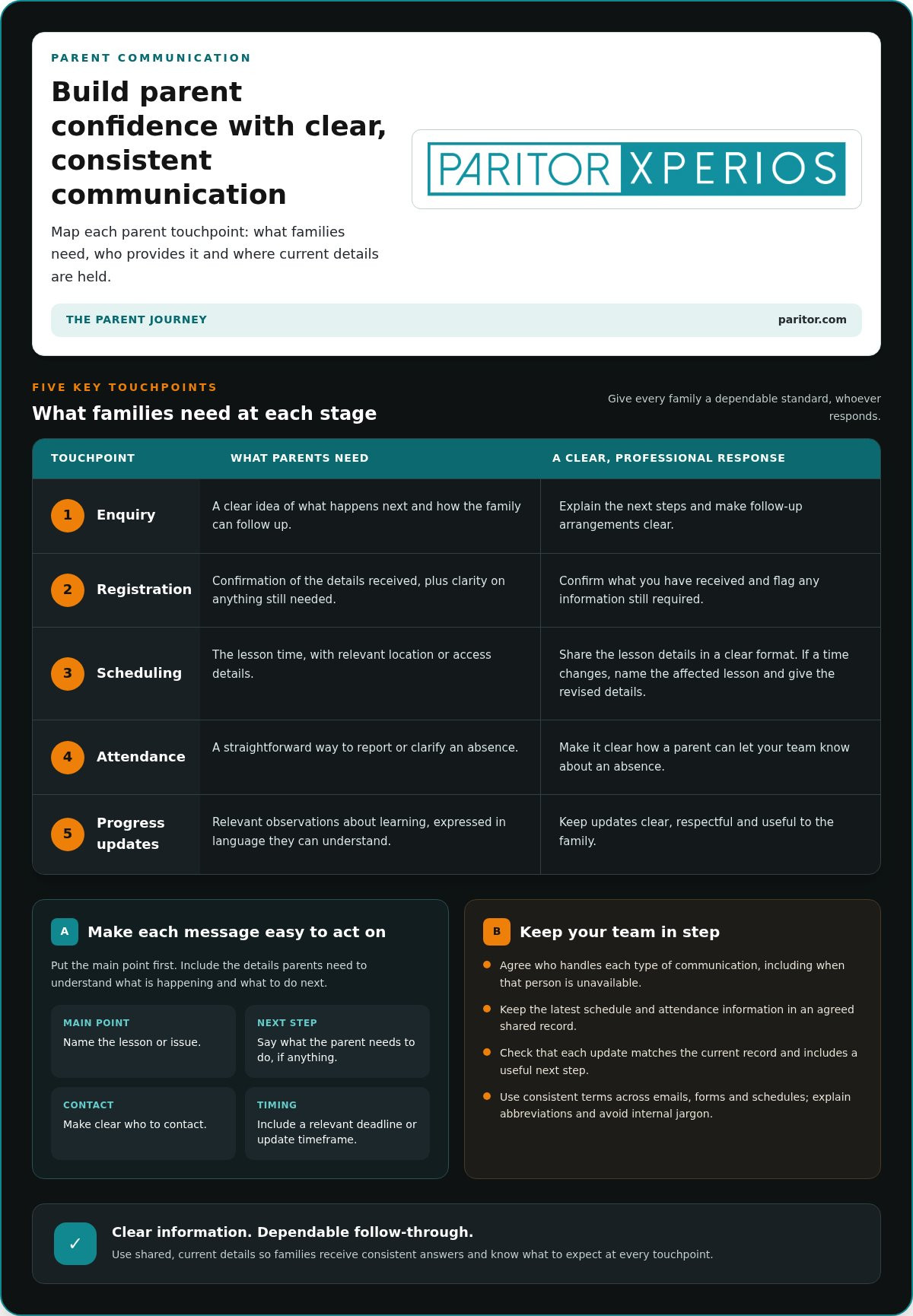
Parents need different information at different stages of tuition. Map the main touchpoints so your team can see what families need, who provides it and where the current details are held:
- Enquiry: explain the next steps and how the family can follow up.
- Registration: confirm the details received and flag any information still needed.
- Scheduling: share the lesson time and any relevant location or access details in a clear format.
- Attendance: make it straightforward to report or clarify an absence.
- Progress updates: share relevant observations in language parents can understand.
This map helps you spot gaps, such as a parent receiving a schedule change without knowing whether they need to reply. PowerSchool’s guide to Effective Teacher-Parent Communication also explores practical ways to support clear exchanges between families and educators.
Make messages easy to understand and act on
Put the main point first. Then state what the parent needs to do, who to contact and any relevant deadline. For example, a message about a lesson change should name the affected lesson, give the revised details and explain whether the family needs to take action. This structure makes important information easier to find, especially when parents are reading on a phone.
Use the same terms across emails, forms and schedules. If your service calls a session a “lesson”, avoid switching between “class”, “booking” and “appointment” without explanation. Expand abbreviations, leave out internal jargon and make ownership clear. “The administration team will update the schedule” tells a parent more than “This will be sorted”.
Create reliable routines for parent updates
Agree who handles each type of communication and what happens if that person is unavailable. Keep the latest schedule and attendance information in an agreed shared record, so staff can respond from the same source instead of relying on separate notes or remembered conversations. Before sending an update, check that it matches the current record and includes a useful next step.
Use automated notifications for routine alerts where they’re relevant, while keeping personal conversations in the hands of your team. For example, automated notifications can flag overdue instrument returns or scheduled maintenance to the appropriate staff member. They can prompt follow-up, but they don’t replace a thoughtful explanation when a parent needs context or help.
For portal-specific planning, the companion guide The Ultimate Parent Portal for Music Schools: A 2026 Strategy Guide can help you consider how families access service information. If you’re reviewing how administration supports communication, explore Xperios for Music Services, which brings scheduling, bookings and attendance tools together.
Show professionalism through dependable teaching administration
Parents may only see the final schedule or invoice, but its reliability depends on the records and routines behind it. When details are spread across spreadsheets, emails and paper notes, it can be harder to identify which version is current. Shared, well-maintained records give staff a consistent reference and make it easier to answer parent queries accurately.
For a practical review, follow one student’s administration from booking through to attendance and invoicing. Are lesson details consistent across records? Can the person handling a query find the current information? Is there a clear way to correct a mistake? These checks make how to look professional to parents more than a matter of presentation. They connect dependable administration to the service families actually receive.
Keep schedules and attendance dependable
Accurate timetable information helps parents plan around lessons and gives teachers and administrators a shared reference. If a lesson changes, record the update in the agreed place and follow your established process to communicate it. This reduces the risk of one person working from an old email while another has amended a separate calendar.
Record attendance consistently and promptly, following the same approach across the team. If a parent queries a missed lesson or an attendance entry, check the current record, establish whether it needs correcting and tell them what will happen next. A simple, agreed route for reporting changes and resolving discrepancies helps prevent duplicate updates and unclear follow-up.
Make records and responsibilities easier to manage
Decide who maintains each type of information, including student details, bookings and instrument records. Make responsibilities clear when more than one staff member contributes, so everyone knows who updates a record and who handles a query. Regular checks can identify missing or outdated entries before they affect a schedule, a parent update or an invoice.
For assets and financial information, an audit trail is a chronological record of changes made to that data. It can help authorised staff understand what changed and support accountability when a detail needs checking. Real-time data access, meaning immediate availability of up-to-date information across devices, can also help relevant users refer to the current record rather than rely on saved copies. For instruments, keeping a clear maintenance history helps staff follow the instrument lifecycle, from loan and maintenance through to retirement or disposal.
Invoices should be accurate and straightforward to understand. Set a consistent process for checking the details, issuing invoices and handling parent queries. Make clear what the invoice relates to and where families can raise a question. This helps prevent avoidable confusion without making the exchange feel impersonal.
For a wider view of how processes fit together, The Complete Guide to Music Service Management Software in 2026 considers the operational role of connected administration. The principle is simple: choose routines your team can maintain, keep records current and make each responsibility clear.
Create a practical parent-facing professionalism checklist
A useful review doesn’t need to start with a major systems change. Begin by tracing the experience a parent receives, then fix the points that cause the most uncertainty. This gives your team a practical way to improve how to look professional to parents without adding unnecessary steps or another communication channel.
Review the experience from a parent’s perspective
Follow a typical family journey from first enquiry through registration and regular lessons. Read the messages, inspect the schedule and note what happens when information changes. Look for missing details, repeated requests for the same information and unanswered questions about who will follow up. Prioritise removing confusion from existing touchpoints before adding new ones.
A sample audit can reveal small issues that are easy to miss during a busy teaching week. Review a selection of enquiry replies, schedules, attendance updates and routine notices. Ask whether each item is accurate, easy to understand and clear about any action the parent needs to take. Check that staff can identify the current version and know who owns the next step.
Turn standards into repeatable team habits
Once you’ve identified friction, agree simple standards for message templates, response responsibilities and schedule updates. Keep guidance brief and easy for staff to find. Revisit it when a process changes, so old wording or instructions don’t continue circulating. A shared approach supports consistency while leaving room for teachers to communicate warmly and respond to each family’s situation.
Bring staff and parent perspectives into the review. Staff can flag repeated queries or steps that are difficult to follow; parents can describe where instructions or updates felt unclear. Invite specific feedback, look for recurring themes and decide which changes are practical to test. Then check whether the change has made the process easier to understand.
A practical improvement cycle:
- Map the parent touchpoints, from initial enquiry to ongoing lesson communication.
- Identify friction, including missing details, duplicated requests and unclear responsibility.
- Agree shared standards for message wording, schedule changes and follow-up.
- Review a sample of real communications and gather staff and parent feedback.
- Refine the process, keep useful changes and set a regular point to check that they still work.
This sequence turns a broad aim into manageable actions. Start with one touchpoint where families or staff experience avoidable uncertainty, make a clear improvement and review how it works before extending the approach. That keeps the process grounded in day-to-day needs, rather than creating guidance that looks tidy but is difficult to maintain.
If you’re reviewing how administration can support a consistent parent experience, explore Xperios administration tools for music and performing arts services.
Support a professional parent experience with Xperios
Clear processes are easier to maintain when the information behind them is organised. Xperios brings scheduling, bookings and attendance tools together, helping music and performing arts services work from consistent records. This supports clearer updates for families and reduces the need for staff to reconcile details held in separate places.
Give parents clearer access to service information
The Xperios Parent Portal gives parents a secure route to relevant, current information. Families can refer to service details, while staff use shared records to check information and respond consistently. A portal doesn’t replace a personal conversation: a parent may still need an individual explanation, particularly when a change or concern needs context.
For further practical ideas, you can also explore Simple Ways to Improve Parent Communication. Make the portal part of a clear communication approach, with useful information that parents can find and understand.
Xperios also includes a teacher portal and student portal. These provide secure online access for teachers and students, supporting a more connected flow of information across the service. With relevant records easier for the right users to access, staff can spend less time tracking down details and more time supporting teaching.
Free staff to focus more time on teaching
Routine administration takes time through repeated data entry, checking bookings and answering questions that arise when information is hard to find. Xperios supports scheduling, bookings, attendance tracking and automated invoicing, helping bring these tasks into a managed process. Automation can reduce repetitive manual work, while staff continue to provide the judgement and personal communication families need.
As a cloud-based platform, Xperios is hosted on remote servers, supporting access to the system from different locations and accommodating changing administrative needs. Paritor hosts its services on Microsoft Azure and states its commitment to GDPR compliance. This is useful context when considering where a platform is hosted and how student information is handled, alongside your own data protection processes.
Professionalism grows from the experience your service provides, not from software alone. Clear records and accessible information can help your team give parents more consistent answers and keep routine tasks organised. Explore Xperios for music services to see how its administration tools can support your work.
Build confidence through the experience you create
Parent confidence is built over time, through the care your team brings to teaching and to the way families are supported. As your service develops, make space to notice what is working for parents and where staff need clearer processes. A thoughtful improvement doesn’t have to be large to make a difference to the experience families receive.
Paritor has worked in the music and performing arts sector since 1993, supporting organisations with the administration behind their work. To look professional to parents as your service grows, focus on solutions that fit the way your team operates and help it give families a consistent experience.
Explore Xperios for music services to see how it can support your organisation. With clear processes and organised information, you can keep building parent confidence while giving your team more room to focus on teaching.
Frequently Asked Questions
How can a music school look more professional to parents?
Make the practical details around your service feel considered. Use a consistent email signature with the school’s name and contact details, check that documents are easy to read on a phone, and write dates in an unambiguous format. These small choices help families recognise who is contacting them and find key information without effort. Review how your messages and documents appear on different screens, not only on a staff computer.
What makes parents trust a music or performing arts service?
Parents gain confidence when the service can explain what happens in a lesson and how a child’s learning is supported. Share useful context about teaching approaches, rehearsal expectations or how students prepare for performances, where relevant. If a concern arises, listen carefully and respond to the specific issue rather than relying on a stock reassurance. Handle personal matters discreetly, so families can discuss their child’s experience without feeling exposed.
Can a small music service appear professional without a large admin team?
Yes. A small service can work professionally by protecting time for essential administration and keeping its processes proportionate. For example, reserve a regular slot to check upcoming events, review unresolved queries and prepare information staff will need for the next teaching period. A short, shared record of outstanding tasks can help prevent things being overlooked without creating a complex management system. Choose routines your team can maintain consistently.
How quickly should a school respond to parents?
Set a response expectation your team can meet, rather than promising an arbitrary deadline. Let families know the usual working-day window for a reply and explain what to do if a matter is urgent. You can also distinguish a simple enquiry from an issue that needs investigation: acknowledge receipt where helpful, then give a realistic estimate for a fuller answer. Review whether the expectation remains manageable during busy periods.
What should a professional parent update include?
For an update about an operational change, include what is changing, when it takes effect and whether the parent needs to do anything. If a venue or event arrangement changes, make the revised details easy to distinguish from the previous ones. Avoid adding unrelated information that could obscure the main point. Before sending, check the update against the agreed decision, so families receive a clear and accurate account.
How can a school communicate more consistently with parents?
Consider whether families can access information in formats that work for them. A short note, a phone conversation or a written document may suit different circumstances, so invite parents to explain any communication preference that would help them engage. Keep the core information consistent across formats, and avoid relying on colour alone to signal an important change. This makes updates easier to follow without assuming everyone reads messages in the same way.
Does a parent portal make a school look more professional?
A portal can contribute to a professional experience when it is straightforward to use and genuinely useful to families. Consider whether parents can find the information they need without searching through unrelated content, and make the purpose of each section clear. A portal is less helpful if information is difficult to locate or out of date. Review it from a parent’s point of view and keep its content focused on practical needs.