

What if your CRM tracks people but not the work needed to support them? If attendance, lesson schedules, instrument loans and invoicing sit across disconnected tools, moving from a generic CRM to specialist software could bring more of your day-to-day administration together. A contact record alone may not reflect how a music or performing arts service operates.
Your current CRM may have served you well, so a change can raise understandable concerns about data migration, security and staff adoption. Switching systems for its own sake is rarely helpful. First identify where your current setup creates extra work, then decide what your team needs to manage its service effectively.
This guide explains how to assess those gaps, compare platforms against music and performing arts workflows, and plan a controlled transition. You’ll also see how a cloud-based platform such as Xperios connects administration beyond contact records, with tools for scheduling, attendance, instrument management and secure portals. The aim is to make service information easier to manage and reduce repetitive tasks, leaving staff with more time to focus on teaching.
Key Takeaways
- Spot signs that your current setup is creating extra work, then map the processes behind them.
- Compare platforms by checking which service workflows they support directly and where workarounds remain.
- Plan moving from a generic CRM to specialist software in clear stages, from workflow mapping to staff onboarding.
- Before transferring records, identify data owners, duplicates and retention needs to prepare for a controlled move.
- See how Xperios for Music Services brings sector-specific administration together on a cloud-based platform.
When does a generic CRM stop fitting music service administration?
Repeated data entry, spreadsheets for lesson schedules and updates scattered across different tools are practical signs that your system may no longer fit the work. A generic CRM can keep contact details and communication history together, but staff may still need separate processes for tuition, bookings, attendance and service delivery. The problem is not the value of relationship records. It is the extra effort required to connect them to daily operations.
Customer relationship management focuses on organising information about relationships with people and organisations. As the Customer Relationship Management (CRM) overview explains, CRM has grown beyond a simple contact record. Even so, a system designed for general relationship management may not reflect the steps involved in arranging lessons, coordinating staff or managing instruments.
Which everyday tasks expose the limits of a generic CRM?
Look at what happens when a lesson changes. Does someone update the schedule, notify the relevant people and amend attendance information in one place, or repeat the change in a calendar, spreadsheet and contact record? When information is copied manually, records can fall out of step. Staff then have to work out which version is current before they can act.
Instrument loans reveal another pressure point. If asset details, loan information and maintenance history are kept apart from tuition records, staff may need to search several tools to understand an instrument’s status and follow up. This makes it harder to see how related administrative tasks fit together.
What should a music or performing arts service expect from its system?
Contact records explain who a student, parent, teacher or organisation is. Operational workflows show what needs to happen next: arranging tuition, managing bookings, recording attendance and keeping the right people informed. A suitable system should support both, so relationships remain useful without staff having to maintain duplicate records or repeat updates.
Needs vary by organisation. A music service may coordinate tuition across schools and manage instrument loans. A conservatoire may need a clear view of teaching and student administration, while a performing arts organisation may focus on bookings and participation. Teachers, parents and students also need suitable access to service information. A teacher portal, parent portal or student portal can give each group access to information relevant to them.
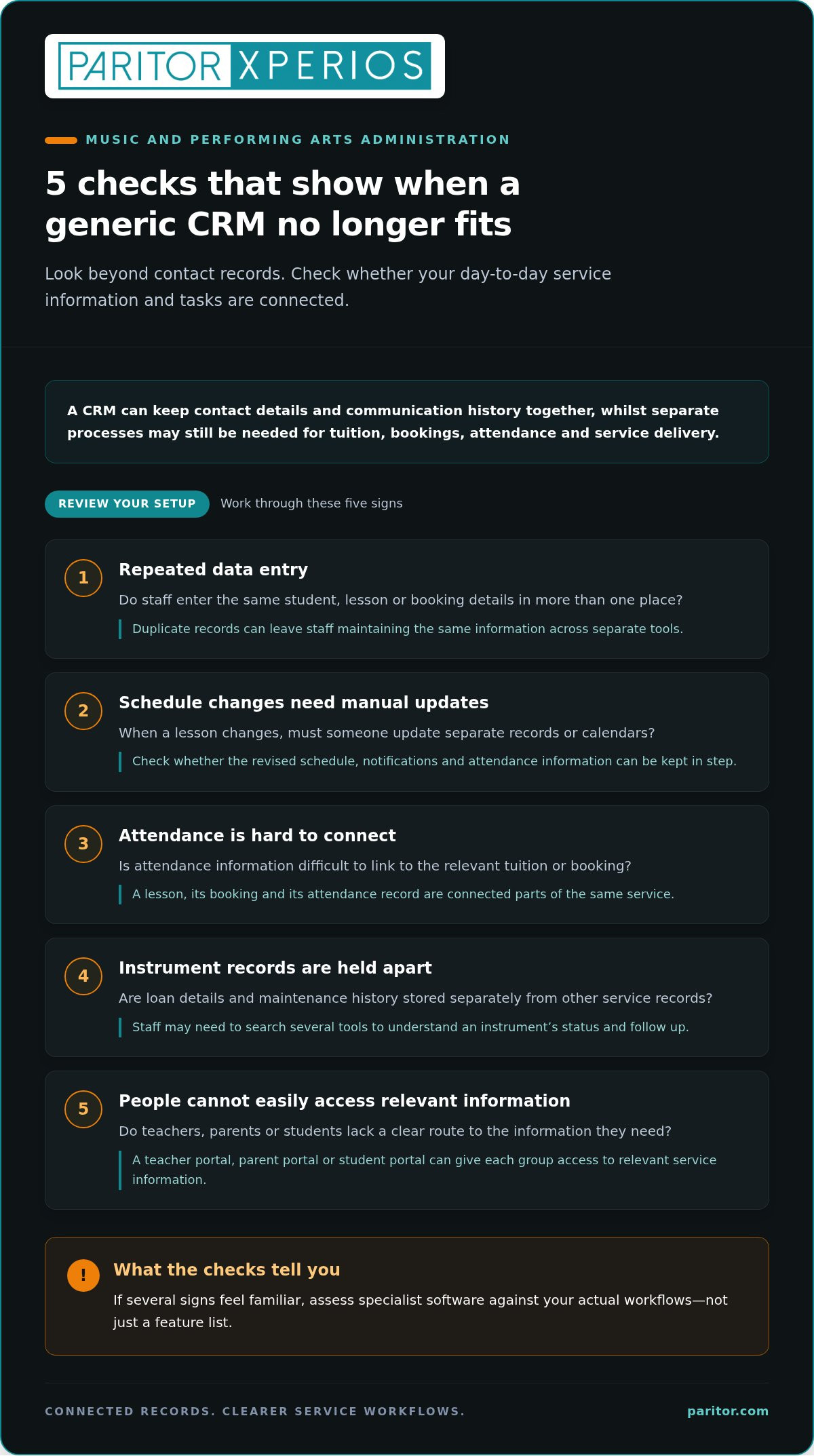
Use this short checklist to decide whether a review is warranted:
- Staff enter the same student, lesson or booking details in more than one place.
- Schedule changes require manual updates across separate records or calendars.
- Attendance information is difficult to connect to the relevant tuition or booking.
- Instrument loan details and maintenance history are held apart from other service records.
- Teachers, parents or students lack a clear route to the information they need.
If several signs feel familiar, assess moving from a generic CRM to specialist software against your actual workflows, not just a feature list. For a closer look at the processes involved, explore this music service management software guide.
What specialist software adds beyond a generic CRM
Specialist software is designed around the operational workflows of a particular sector. In music and performing arts administration, that means supporting the work that follows creating a contact record: arranging tuition, handling bookings, recording attendance and organising service information. A CRM record describes a person or organisation; a service-management workflow connects that record to the tasks involved in delivering an activity.
These functions are most useful when they work together. Contact details still matter, but they are easier to act on when staff can relate them to lessons, bookings, attendance and relevant assets. Moving from a generic CRM to specialist software does not make relationships less important. It can reduce the administrative steps between knowing who someone is and coordinating the service they receive. General CRM comparisons, such as Forbes Advisor’s Best CRM Software, can help you understand the wider category. Your assessment should also reflect the particular demands of tuition and arts administration.
How connected tuition workflows change daily administration
A lesson schedule, its booking and its attendance record are connected parts of the same service. If a booking changes, staff need to work from the revised information and record attendance against the right tuition activity. Keeping these processes in a specialist system can reduce reliance on repeated manual updates. With real-time data access, relevant information is available across devices, helping staff work from a clearer, more current view.
Automated invoicing can sit alongside tuition administration, linking financial tasks to the service rather than leaving them as a separate routine. Staff oversight still matters. The benefit is a process that is easier to follow, with less time spent maintaining duplicate records and more time available to support teaching.
Why instrument and stakeholder records need sector context
Instrument records need to make sense alongside loans and maintenance history. Organising these details together helps staff understand an instrument’s status and follow its instrument lifecycle, from allocation through servicing and return. For more detail, the instrument inventory management software guide explains how inventory management relates to music service administration.
Access matters too. A teacher portal is a mobile-responsive interface for teachers to log attendance, progress and instrument updates. Parents and students may also need relevant service information through their own portals. Giving each group an appropriate route to information supports clear communication without treating every user as an administrator.
Sector-specific workflows can make routine administration easier to manage while keeping people and their needs at the centre. If you’re considering a platform shaped around music service operations, explore Paritor’s music service management software as a way to bring tuition and related administration together.
Generic CRM vs specialist software: compare the workflows, not just the features
A feature list can make two systems look similar, even when one still leaves staff to join up the work manually. Compare what happens from the first booking through to attendance, invoicing and reporting. For each workflow, ask whether your current system supports the process directly or whether staff need spreadsheets, repeated data entry or separate tools to finish it.
Feature fit depends on your organisation’s recurring workflows. Use the comparison below to test your actual processes, rather than assuming every generic CRM has the same limitations.
| Workflow | Questions to ask about your current CRM | What to assess in specialist software |
|---|---|---|
| Scheduling | Can you organise lessons and manage schedule changes in the same workflow, or do staff update calendars separately? | Can scheduling reflect how your service arranges teaching and bookings? |
| Attendance | Can attendance be recorded against the relevant lesson or activity without re-entering details? | Can staff access and update the attendance information they need? |
| Invoicing | Does invoicing connect to tuition administration, or is information transferred between systems? | Can financial tasks sit alongside the service activity they relate to? |
| Assets | Can staff see asset details alongside loans and maintenance history? | Can instrument records support visibility across loans and maintenance? |
| Portals | Do teachers, parents and students have suitable access to relevant information? | Are access routes appropriate to each group’s role? |
| Reporting | Can you produce the information needed to review operations without combining separate records? | Does reporting reflect the service information your team uses? |
Which capabilities matter most to your organisation?
Rank each workflow by how often it occurs, how much administrative effort it takes and how much it affects service delivery. A music service may put lesson coordination and instrument records high on its list. A performing arts school may prioritise bookings and participation, while a conservatoire may focus on teaching administration and student information. Set priorities around your own work rather than another organisation’s feature checklist. The performing arts administration system guide offers related sector context.
How should you assess security, access and growth?
Check whether administrators, teachers, parents and students can access the information suited to their roles. Consider usability too: can staff complete common tasks without unnecessary steps, and what support will they need to adopt a new process? Data protection regulations are legal requirements governing how personal information is handled. Review how the platform supports your organisation’s data protection practices, then consider whether it can accommodate changes to workflows and user needs over time.
Moving from a generic CRM to specialist software is easier to assess when you test recurring tasks with the people who perform them. Record where workarounds remain, which processes matter most and what staff will need to learn. This gives you a practical basis for comparing platforms and planning the change.
How to move from a generic CRM to specialist software
A controlled transition starts with your processes, not a bulk transfer of records. Set out what staff need to keep doing during the change, who owns each dataset and how you’ll check information before and after it moves. The scope depends on your organisation’s requirements, so avoid assuming there is one standard timeline for every service.
Use this sequence to plan the work:
- Map workflows. Record how your team handles student and teacher records, bookings, attendance, finance, instruments and related tasks. Note who completes each step and where information is currently recorded.
- Review data. Assign data owners, identify duplicate records and fields that need review, and document retention needs before transfer. Separate information that supports current operations from records that need different handling under your organisation’s retention arrangements.
- Configure the new platform. Map agreed processes to the relevant workflows, then decide how roles and access should work. Focus configuration on identified needs instead of carrying over every old field by default.
- Migrate records. Decide which information will move and how you’ll check it in the new system. Agree how staff will handle changes and service activity during the transition, so essential records remain available to the people who need them.
- Onboard users. Prepare role-based guidance for administrators, teachers and other portal users. Explain what will change in their day-to-day tasks and give them a clear way to raise questions or report issues.
- Evaluate the change. Review whether the new process has reduced repeated entry, made records easier to access and helped staff complete routine tasks. Use feedback to identify anything that needs further attention.
Prepare workflows and data before the move
Make an inventory of the records your service relies on: student and teacher details, bookings, attendance, finance and instrument information. For each type of record, note its source, owner and purpose. Flag missing or inconsistent fields, duplicates and records that need review. Then map each current process to the relevant specialist workflow before configuration begins. This gives your team a shared reference and helps prevent old workarounds from becoming part of the new setup.
Support staff through implementation and onboarding
Training should reflect what each group needs to do. Administrators may need guidance on records and routine service processes; teachers may need support with the teacher portal and tasks relevant to their role. Give staff a clear route for questions and issue reporting, and review feedback during the transition. Keep service continuity in view by agreeing how staff will manage essential work as processes change.
Set practical measures before the move, such as how often staff re-enter the same information, how easily they can find a relevant record and whether key workflows are being completed in the new system. Moving from a generic CRM to specialist software is a managed change, not just a data transfer. If you’re planning the next step, explore Paritor’s music service management software in the context of the workflows your team needs to support.
Make the move with Xperios for Music Services
Xperios for Music Services is Paritor’s cloud-based management platform for music services. It brings operational tasks such as scheduling, bookings, attendance, automated invoicing and instrument management into a sector-specific system. Rather than keeping contact details in one place while staff coordinate the service elsewhere, you can assess how these connected processes fit your daily administration.
The practical question is whether the platform’s workflows match the work your team needs to do. Consider a change to a lesson booking: staff may need to update the schedule, record attendance and keep relevant service information clear for everyone involved. Instrument administration brings another set of connected needs, from asset records to loan information and maintenance history. A system that reflects these processes can reduce repeated administration and leave staff with more time for teaching.
Where Xperios fits into a specialist-software decision
A specialist platform differs from a contact database alone because it supports operational activity as well as relationships. Xperios includes teacher, parent and student portals, giving each group a relevant access point for service information. These portals support access to up-to-date details while keeping administration connected to the service itself.
Instrument records also need to make sense in context. Connecting asset information with loans and maintenance history helps staff follow an instrument lifecycle, from allocation through upkeep and return. As you compare platforms, map these capabilities to your own processes. Note which staff need each record, what information they rely on and where disconnected steps create extra work.
Security is part of that assessment. Xperios is hosted on Microsoft Azure, supporting high standards of data security and GDPR compliance. Consider this alongside your organisation’s data protection requirements, access needs and implementation priorities, rather than treating security as separate from operational fit.
What to do next when your current CRM no longer fits
Start by listing the workflows that take the most staff effort. You might prioritise bookings, attendance, invoicing or instrument records, then trace each process from the first action to the final update. Include the people who carry out those tasks. Their experience can help you distinguish essential requirements from features that would make little difference to daily work.
Use that information to frame a focused discussion about your processes, users and transition priorities. Consider how the platform supports the tasks you’ve mapped and what your team will need to prepare for implementation. Moving from a generic CRM to specialist software is a considered operational change, and a clear view of your needs helps you assess fit while keeping continuity in view for staff and service users.
When you’re ready to compare your requirements with a music-service platform, explore Xperios for Music Services and consider how its workflows could support your administration.
Give your team a clearer path forward
Changing systems is an opportunity to choose an approach that fits your organisation’s needs. Use your priorities to guide the decision, involve the people who will use the platform and agree how you’ll judge whether it suits your processes. Shared criteria give your team a sound basis for weighing options and making a considered choice.
If you’re considering moving from a generic CRM to specialist software, compare your requirements with a platform designed for music services. Explore Xperios for Music Services and discuss how its workflows could support your organisation’s administration.
Frequently Asked Questions
How do I know when a generic CRM is no longer suitable for a music service?
Test it against a few representative situations your team handles, including a routine case and an exception. Trace each from the first request to completion, noting where someone has to intervene, search elsewhere or make a judgement the system does not support. If those extra steps recur in ordinary work, the issue is more than an occasional inconvenience. This gives you concrete evidence to discuss with staff before deciding whether a change is justified.
Can specialist software replace a CRM completely?
It may, if it covers the relationship-management work your organisation needs as well as its operational processes. Consider how staff use communication history, contact notes and follow-up records, not just where those details are stored. Assess a complete replacement and a split-system approach against the same set of tasks. This helps show whether keeping a separate CRM serves a distinct purpose or simply gives staff another place to maintain information.
What data should we review before moving from a generic CRM?
Check that essential fields use consistent formats and meanings. For example, staff may have entered a student’s status using different labels, making records difficult to sort or interpret. Agree which values should be used in future and test a sample of records against that standard before transfer. Also note any information whose context is not obvious from the field alone, so the receiving team can understand it rather than inherit unexplained entries.
Will moving to specialist software disrupt lessons or administration?
Reduce the risk of disruption by deciding how the team will manage an unexpected issue during the change. Set out who can make operational decisions, where staff should log a problem and how urgent work will be handled if a new process is not working as intended. Share this plan before the transition, then review reported issues regularly so staff know their concerns are being heard and addressed.
Can a generic CRM and specialist software work together?
They can have separate roles, but any exchange of information needs clear rules. Decide which system is authoritative for each item, what information needs to pass between them and how staff will spot a mismatch. For example, if contact details change in one system, establish how the team will keep the other record accurate. These decisions help define the practical requirements for connecting platforms.
Is specialist software only useful for large music organisations?
No. Organisation size alone does not show how complicated its administration is. A smaller team may still manage distinct processes, hand-offs or exceptions that make a sector-specific system useful; a larger organisation may have simpler requirements in some areas. Consider how much coordination depends on individual knowledge and whether a new team member could follow the same process consistently. That can be a more useful measure of fit than headcount.
How should we measure whether the change has helped?
Use a consistent review method rather than relying on a general impression. Ask staff to describe a recent task before and after the change, including any extra steps or uncertainty. Compare like with like, and record unexpected work as well as improvements. A review with administrators and teaching staff can help distinguish early adjustment from a lasting problem and identify where guidance or process changes may still be needed.