

A small music school runs more smoothly when clear workflows do the remembering. If you’re managing a music school with a small team, bookings, attendance and invoicing can quickly crowd out the work that matters most: supporting teachers and students. When essential knowledge sits with one colleague, even a planned absence can leave others unsure what to do next.
You don’t need to solve every pressure by working faster. Map recurring tasks, assign clear responsibilities and agree simple processes so administration is easier to share and cover. This guide shows you how to identify bottlenecks, organise handovers and decide which tasks could be automated, giving your team more time for teaching.
You’ll also see how a cloud‑based platform such as Xperios can support bookings, scheduling, attendance tracking and invoicing, with role-specific access through teacher, parent and student portals. The aim is practical: build routines that fit your school, reduce avoidable delays and make technology useful in day-to-day administration.
Key Takeaways
- Identify where interruptions, duplicate records and unclear ownership slow down day-to-day administration.
- Make managing a music school with a small team easier by assigning task owners, tracking progress and agreeing how handovers work.
- Compare spreadsheets, separate applications and connected platforms against the tasks your team needs to manage.
- Use a brief weekly review to plan upcoming work and distinguish urgent timetable issues from routine tasks.
- See how Xperios can support scheduling, bookings, attendance, invoicing and instrument maintenance history.
Managing a Music School with a Small Team Starts with Finding the Bottlenecks
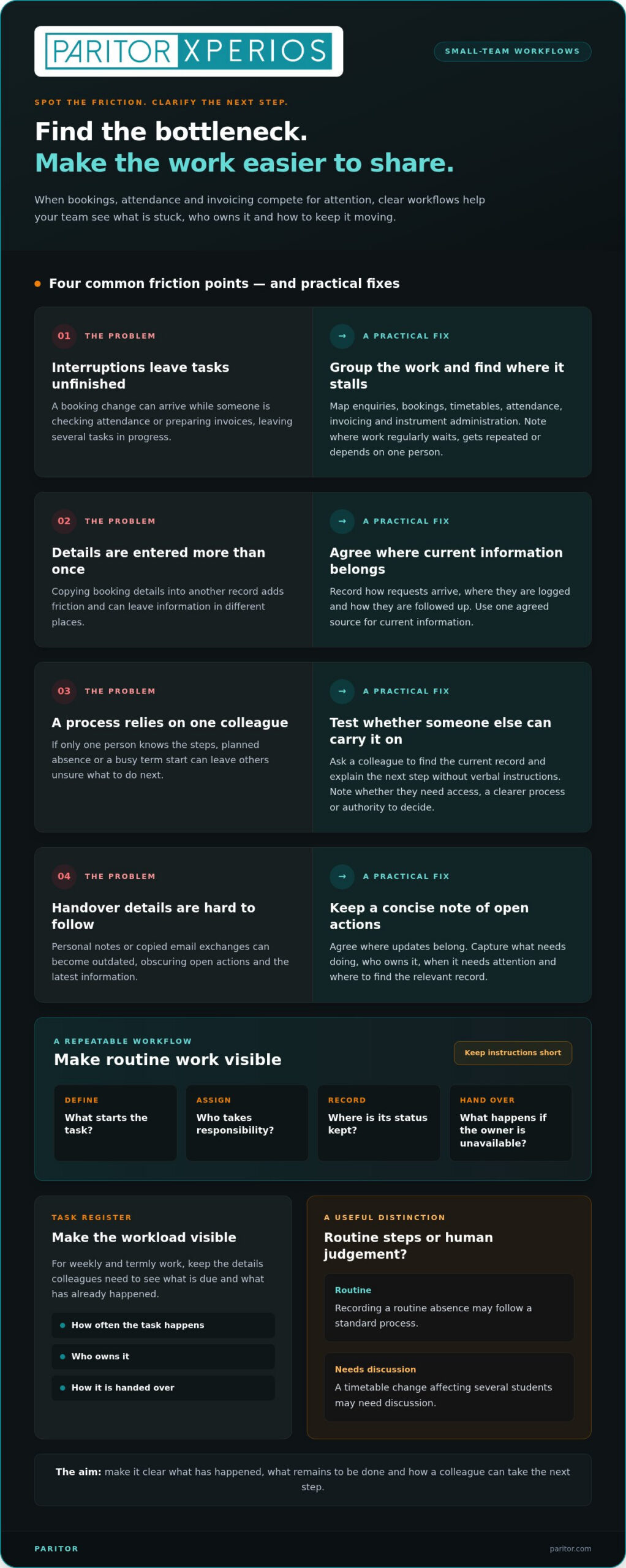
A small music-school team may be supporting students and teachers, coordinating lessons and rooms, answering enquiries and keeping administration moving at the same time. The work is varied because a music school brings teaching together with the practical arrangements that make lessons happen. If a booking change comes in while someone is checking attendance or preparing invoices, the interruption can leave several tasks unfinished.
Managing a music school with a small team starts with finding where work slows down, rather than assuming everyone needs to work faster. Duplicate records, unclear ownership and information kept in personal notes all add friction. An administrative bottleneck is any point in a school’s process where work regularly stalls, gets repeated or depends on one person before it can move forward.
Which music-school tasks create the most pressure?
Group work into enquiries, bookings, timetables, attendance, invoicing and instrument administration. For each group, separate predictable tasks from exceptions that need individual judgement. Recording a routine absence may follow a standard process; resolving a timetable change that affects several students may need discussion.
- Enquiries and bookings: record how requests arrive, where they’re logged and how they’re followed up.
- Timetables and attendance: clarify who updates lesson arrangements and records attendance.
- Invoicing and instruments: map recurring administration, including where instrument details and maintenance history are recorded.
Look for repeated data entry, such as copying booking details into another record, and delays where a task is waiting for information or approval. These clues help you pinpoint whether the problem is too many steps, an unclear handover or information stored in the wrong place.
How can a small team spot single-person dependencies?
List processes that only one colleague understands or usually completes. Ask another team member to find the current record and explain the next step without relying on verbal instructions. If they can’t, note what’s missing: access to information, a clear process or authority to make a decision. This is a practical test, not a judgement of the colleague.
Make the workload visible in a simple task register. Include weekly and termly work, how often each task happens, who owns it and how it’s handed over. For example, record who prepares for term start, when timetable changes are reviewed and where open actions are listed. Give colleagues enough detail to see what’s due and what has already happened.
Use staff absence and busy term-start periods to test whether processes are clear. Can someone else find the latest information, identify open actions and continue routine work? If not, document the steps and agree where updates belong. This gives your team a practical view of the bottlenecks to address and helps separate process problems from exceptions that need human judgement.
Create Repeatable Music-School Workflows Before Adding More Tools
Once you’ve identified where work slows down, make the process easier to follow before adding another tool. A workable workflow doesn’t need lengthy instructions. It should show what starts the task, who takes responsibility, where current information is recorded and what happens if that person is unavailable.
Use the same sequence for recurring work: define the task, assign an owner, record its status and agree the handover. For a new booking, decide what information to collect, who records the request, how its progress is marked and how the next person knows it’s ready for action. Clear steps make routine work more consistent while leaving room for cases that need individual judgement.
Documented workflows help small teams share cover because colleagues can see what has happened, what remains to be done and how to take the next step.
How should a small team document recurring administration?
Keep instructions short and close to the work. A checklist for new bookings might cover what information to collect, where to record it, who updates the timetable and how to mark the request as complete. For attendance updates, note who records the change and what follow-up is needed. The aim is a useful prompt, not a manual staff won’t consult.
For each process, record the next action, the responsible role and the information needed to complete it. Use roles such as “administrator” or “timetable coordinator” where that makes cover clearer, rather than relying on one person’s name. Review the checklist when an unusual case exposes a missing step or colleagues keep asking the same question. This keeps the guidance practical and current.
How can handovers work without adding unnecessary meetings?
A handover can be a concise, up-to-date note in the place your team has agreed to use. Focus on open actions: what needs doing, who owns it, when it needs attention and where to find the relevant record. Avoid copying whole email exchanges or keeping a second set of details in personal notes, which can quickly become outdated.
Agree what needs immediate attention, such as a change affecting an upcoming lesson, and what can wait for the routine team review. Where your system supports them, automated notifications can flag scheduled actions without relying on a colleague to remember every follow-up. Set alerts for genuine tasks so they support the process rather than add noise.
Choose one agreed source for current information and make sure everyone knows where updates belong. This might be a shared record or a management system. The key is to avoid making staff compare scattered notes to work out which detail is current. If you’re assessing how a connected system could support your routines, the music service management software guide can help you consider the fit. With shared steps and clear handovers, managing a music school with a small team depends less on informal reminders and individual memory.
Compare Music-School Administration Options Against Your Team’s Actual Needs
Choosing between spreadsheets, separate applications and a connected management platform is easier when you compare each option with the work your team actually does. Start with the tasks and handovers you’ve mapped. Then consider which approach keeps information current, helps colleagues pick up work and fits the routines you want to keep.
The comparison below is a starting point, not a scorecard. Spreadsheets can suit straightforward records; separate applications may each support a particular task; a connected platform can bring related administration together. The details depend on how each tool is set up, so assess the actual process rather than assuming every option works in the same way.
What should a small music school assess in administration software?
Test a typical task from start to finish. Can the staff member who needs the information find it, update it and pass it on without entering details again elsewhere? Consider how a booking change flows through to scheduling, attendance and financial records. For instruments, check whether records include maintenance history and an audit trail, a chronological record of changes. Confirm that access suits each person’s role and that information is protected appropriately.
When might separate tools become difficult to manage?
Look for the same student, lesson or instrument details being entered more than once, or updates appearing in one place but not another. These are signs that disconnected records may be adding work and making handovers less reliable. Compare the effort of maintaining each tool with the process for handling related tasks in one system. For instrument and asset records, include maintenance history in your assessment so you can see whether the record supports ongoing administration.
There’s little value in selecting functions your team won’t use. Prioritise the tasks that take regular effort, the access colleagues need and the handovers that must work smoothly. For a small team, managing a music school effectively means choosing tools to match documented needs and real working routines, not adding technology for its own sake.
Build a Manageable Weekly Routine for Your Music-School Team
A short, regular weekly review can help you spot pressure before it becomes a last-minute scramble. Choose an agreed point in the week to review upcoming teaching activity, open actions and workload pinch points. The aim isn’t to plan every detail again. It’s to give the team a shared view of what needs attention and who will take it forward.
Keep the review focused on decisions and actions. Check what has changed since the previous review, what could soon affect students or teachers, and what work can be scheduled for quieter periods. This makes managing a music school with a small team more deliberate: urgent matters get attention, while routine tasks don’t have to compete with every new request.
How can weekly planning reduce last-minute administration?
Review forthcoming bookings, timetable changes and attendance tasks at the same point each week. For each issue, record the next action, the responsible role and when it needs attention. A booking change affecting an upcoming lesson may need prompt follow-up; a routine record update may fit into planned administration time. Keep the review proportionate. A concise check of changes and decisions is more useful than another lengthy meeting.
- Teaching activity: identify upcoming changes that could affect students, teachers or rooms.
- Outstanding actions: confirm who owns each item and when it should be revisited.
- Workload pinch points: move suitable routine tasks into available work periods instead of leaving them until they become urgent.
Clear role ownership matters as much as the schedule. If one person checks timetable changes and another follows up attendance records, colleagues know where to direct questions and which work they can cover. Include time for student and teacher support in the plan. Otherwise, routine administration can expand into the time intended for teaching needs.
How can teams handle peak periods and staff cover?
Term starts and other predictable busy periods bring several tasks together. Before the pressure builds, agree who will review bookings, prepare timetable updates and track open follow-ups. For peripatetic teacher timetables across schools, include relevant teaching locations and changes in the review so colleagues can see the practical scheduling picture.
Keep essential process notes accessible to colleagues who may provide cover. Include current actions, where to find the relevant records and any upcoming decisions, then refresh the notes as work progresses. This gives a covering colleague enough context to continue without a long briefing or a search through personal messages. Clear ownership also helps the team see when tasks need to be reassigned.
A shared weekly routine can show what your system needs to support, from scheduling and attendance to clear handovers. Explore Xperios for music-service administration and consider how connected processes could fit your team’s working week and leave more room for teaching support.
How Xperios Can Support a Music School with a Small Team
Once you’ve mapped your routines and decided what your team needs from its systems, you can assess whether a music-service platform fits. Xperios brings key administration together, including scheduling, bookings, attendance tracking and automated invoicing. For a small team, these functions can support connected tasks rather than leaving each one as an isolated record.
Which Xperios functions relate to small-team administration?
Scheduling and bookings support lesson arrangements, while attendance tracking helps keep lesson records up to date. Automated invoicing supports recurring administration, so your team doesn’t have to handle every invoice as a separate manual task. The financial management module supports invoicing and financial reporting, bringing related financial processes into the wider administrative picture.
Instrument and asset management brings instrument information into your administrative records, including maintenance history. Staff can refer to recorded upkeep instead of piecing together separate notes. Keeping asset details alongside routine school administration also gives colleagues a clearer reference when responsibilities are shared.
Access points can be organised around the people who use them. The teacher portal, parent portal and student portal provide role-specific routes to relevant information. A parent portal for music schools gives families a dedicated point of access, while the teacher and student portals serve different user groups. This helps your team direct people to the appropriate channel for their role.
How can a cloud-based platform support shared administration?
A cloud‑based platform supports real‑time data access, making up-to-date information available across devices. During a handover, a colleague can refer to the current record instead of relying on an old note or waiting for someone to pass on a change. Your agreed processes still matter: decide who updates information and how staff should act on it.
Xperios is hosted on Microsoft Azure and supports data security and GDPR compliance. When using a system, consider how it fits your organisation’s approach to data protection regulations, including which people need access to particular records. Clear role-based processes help staff use information appropriately. A shared system doesn’t remove the need for agreed procedures.
Managing a music school with a small team still depends on choosing the right processes and responsibilities. Xperios can support the administrative routines you’ve identified, while your team decides how those functions fit its work. Explore Xperios for music services and see how its tools can support the way your school manages administration.
Make Space for the Work That Matters
Better administration isn’t about asking a small team to do more. It’s about making deliberate choices so your time and attention stay focused on students, teachers and the quality of their experience. As your school changes, revisit those choices. A process that works now may need to change as responsibilities or teaching activity shift.
Take one practical next step: identify where a connected system could fit your team’s work and which recurring task you’d most like to make easier to manage. Paritor provides Xperios for music services, supporting the administrative work that helps you spend more time on teaching and student support.
Grow with Xperios for Music Services and take the next step towards a more manageable routine, with more room for teaching and student support.
Frequently Asked Questions
How many staff does a small music school need?
There’s no fixed staff number that suits every small music school. The right team size depends on teaching activity, administrative tasks and how responsibilities are shared. Map the work that needs covering, including student support, scheduling and finance, then check whether each task has an owner and suitable cover. This helps you identify capacity gaps without assuming one person must manage every part of the operation.
What should a music school administrator prioritise first?
Prioritise tasks that could disrupt students’ learning or leave teachers without essential information. For example, resolve a lesson change affecting an imminent class before a routine record update. Then review which recurring tasks are being delayed and why. When you’re managing a music school with a small team, a clear order of priority helps staff make consistent decisions when several demands arrive together.
Can a small music school manage bookings and attendance without specialist software?
Yes. A school can use spreadsheets or other existing tools if staff can keep records accurate, find current details and hand work over reliably. For example, agree who updates a booking change and how teachers are told about it, then check that attendance records reflect the same arrangement. If information is often re-entered or conflicting versions appear, review whether your current approach still suits the workload.
How can a small music school keep administrative work organised during staff absence?
Make routine processes clear to someone who doesn’t usually own them. Keep a shared record of open actions, the next step and where relevant information is held. Before planned leave, identify tasks that need a temporary owner and flag deadlines or decisions. During an unexpected absence, colleagues should be able to find essential records without relying on private notes or a verbal briefing from the absent person.
What does a cloud-based platform mean for a music school?
A cloud‑based platform is hosted on remote servers rather than running only from a computer at the school. Staff access it online, so the service isn’t tied to a single local machine. Before adopting one, identify which devices and internet connections staff rely on, and consider how the school will manage access if those arrangements change. This helps you plan how online systems fit into everyday operations.
How can a music school keep pupil and family information organised?
Use consistent names for records and agree which details your team needs to maintain, such as contact information and relevant lesson arrangements. Set a regular time to check for duplicate entries, outdated details or incomplete records, and assign someone to follow up discrepancies. A simple convention for recording names and dates makes information easier to search and interpret, especially when a colleague needs to pick up an administrative task.
Can music-school administration software help manage instrument maintenance history?
It can support useful maintenance records when staff enter updates consistently. For each instrument, your team can note the date of an issue, the action taken and who recorded the update. This gives colleagues context when an instrument needs attention again and helps them distinguish a new concern from one recorded earlier. Agreeing a standard way to describe repairs also makes entries easier to understand later.