

What if the best portal experience began before anyone reached the login page? Music school website portal integration works best when your website gives each family member and staff member a clear route to the information they need. When website enquiries, administrative records and portal access feel disconnected, people can be unsure where to go and staff may have to repeat updates.
It’s worth looking beyond adding a login button. A connected journey helps parents find relevant information, teachers access what they need for their work, and students reach their own resources. It can also reduce duplicated administration. The aim is a smoother experience for everyone and more staff time available for teaching.
This practical guide explains how to plan those journeys, what to consider before selecting or configuring a platform, and how connected administration can support current information. Xperios is a cloud-based platform hosted on Microsoft Azure, with parent, teacher and student portals that provide access to real-time information alongside music service administration. We’ll look at how to make the route from your website to each portal clearer, while keeping user needs, data protection and day-to-day processes in view.
Key Takeaways
- Plan music school website portal integration around the tasks parents, teachers and students need to complete, not just the route to a login page.
- Map routine workflows to the right portal so users can find relevant information and staff can reduce repeated updates and enquiries.
- Compare linked access, a connected management platform and separately managed tools by considering user experience, information ownership, administration and data protection.
- Before configuring a platform, identify who owns each piece of information, who needs access and how you’ll test the journey for each user group.
- See how Xperios brings parent, teacher and student portals together with music service administration and access to real-time information.
What does music school website portal integration actually connect?
Music school website portal integration connects the public information on your website with clear routes to the signed-in tasks and information each user needs. It’s more than placing a login link on a page. The journey should help parents, teachers and students find the right access point, while administrators understand how portal information relates to day-to-day processes.
A Web portal can bring relevant information together in a single interface. For a music organisation, the practical questions are where your website directs each person, what they need once signed in, and how the information for those tasks is managed. A clear route helps users find what they need and can reduce avoidable enquiries and repeated updates.
How does a music school website connect users with a portal?
Your website is the public starting point. It can explain your service, lessons, events or ways to get in touch, then direct visitors to the relevant portal. After signing in, users can access information and tasks intended for their role.
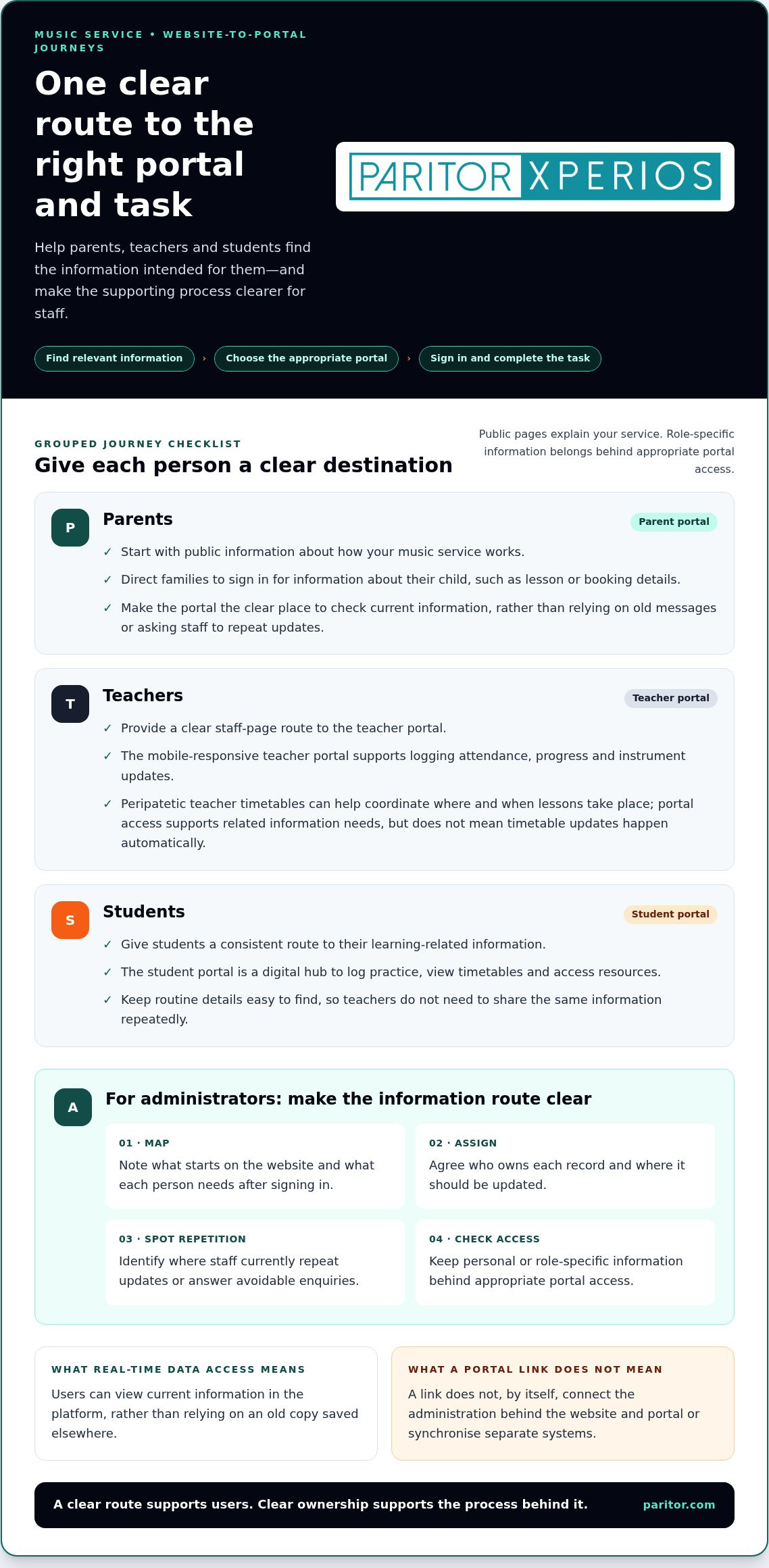
For example, a parent might read about the music service, follow the parent portal route, sign in and check information about their child. A teacher might start from a staff page, enter the teacher portal and record attendance. A student could use the student portal to reach information or resources made available to them. Administrators need a clear view of the processes that support these journeys.
Make the route easy to follow: find relevant information, choose the appropriate portal, sign in, then complete the task. A link can provide a useful entry point, but it doesn’t by itself connect the administration behind the website and portal. That distinction matters when you want to reduce duplicate records or manual updates.
Website access, portal access and the information between them
Keep public content separate from information intended for signed-in users. Public pages can explain how your service works; personal or role-specific information belongs behind appropriate portal access. This makes the purpose of each area clearer and brings data protection into the design from the start.
Real-time data access means users can view current information in the platform, rather than relying on an old copy saved elsewhere. It doesn’t automatically mean every website page and administrative record updates together. Don’t assume that adding a link synchronises separate systems.
Before choosing an approach, map the information and its route. Note what starts on the website, what users need after signing in, who owns each record and where staff currently repeat updates. This gives you a practical basis for planning music school website portal integration without assuming a particular technical method.
Which music school workflows benefit from connected parent, teacher and student portals?
Each group needs a different view of the music service. A parent may need information about a child’s lessons or bookings; a teacher may need to record attendance or progress; and a student may need to check a timetable or find practice resources. Clear routes from your website help each person reach the appropriate portal instead of directing every question to your administrative team.
That separation can also make routine processes clearer for staff. When information is available through the relevant portal, families and teachers may be able to find it themselves rather than requesting it by email or phone. Where administrative records support the same process, agree who maintains each detail and where it should be updated. This helps limit duplicate entry without assuming that separate systems share information automatically.
Parent portal journeys for bookings, information and updates
Give parents a clear route from public information to the parent portal. For example, a page explaining how your music service works can direct families to sign in for information about their child. Xperios includes a parent portal with access to real-time information. A clear route helps families find current details in the appropriate place instead of relying on old messages or asking staff to repeat them.
For more on shaping communication around family needs, read our parent portal strategy guide. Clear access can support smoother communication and leave staff more time for work that needs their attention.
Teacher and student portal journeys across the teaching week
The teacher portal is a mobile-responsive interface for teachers to log attendance, progress and instrument updates. A teacher working across schools can use a clear portal route to reach relevant tasks during the teaching week. Peripatetic teacher timetables can help coordinate where and when lessons take place; portal access supports related information needs, but shouldn’t be mistaken for automatic timetable updates.
The student portal is a digital hub for students to log practice, view timetables and access resources. Directing students to this hub gives them a consistent place to find learning-related information, while teachers can focus on lessons rather than repeatedly sharing routine details.
Thoughtful music school website portal integration matches access to real workflows, rather than giving every user the same route. Technology in music education also has a wider professional context, reflected by Technology in Music Education (TI:ME). To see how Xperios supports role-specific portal access alongside music service administration, explore Xperios for music services.
Which website-to-portal integration approach suits your music organisation?
The right approach depends on how your music organisation manages information and how much administration happens across separate tools. A clear website route may be enough to help users reach a portal. If staff repeat updates across systems, consider how portal access fits alongside your wider music service administration. These are planning patterns, not claims about a particular technical connection method.
Linked access or a connected cloud-based platform?
Linked access gives your website a straightforward way to direct parents, teachers and students to a portal. It can improve the user journey, but a link alone doesn’t connect records or prevent staff from entering the same update in different places. For organisations requiring custom web applications or tailored digital journeys, software development specialists such as Larasoft can build bespoke portals that seamlessly align frontend user experiences with complex backend workflows.
A cloud-based platform can bring portal access and relevant administration, such as scheduling, bookings, attendance and invoicing, into one platform. Separately managed tools may still meet particular needs, but staff should know where information sits and who updates it. Xperios is a cloud-based platform with parent, teacher and student portals, hosted on Microsoft Azure. This describes its platform and portal offering, not a specific website integration method.
| Approach | User experience | Information ownership and administration | Data protection considerations |
|---|---|---|---|
| Linked portal access | A direct route from your website to a separate portal. | Clarify which system holds each record and who maintains it. A link alone may leave staff updating information in more than one place. | Keep public pages distinct from signed-in information and consider how users reach the right access point. |
| Connected management platform | Portal journeys sit alongside relevant music service administration within a platform. | Map which processes and records the platform supports, and agree responsibility for updates. | Review how the platform handles personal information in line with your organisation’s data protection requirements. |
| Separately managed tools | Users may move between different tools to complete related tasks. | Identify duplicated entry, hand-offs and the people responsible for keeping details current. | Understand where information is held and how access is managed across the tools. |
Questions to compare before choosing an approach
Assess each option against the work people actually need to do. Can a parent find the right information without unnecessary steps? Can a teacher reach a routine task easily? Who owns timetable or attendance updates, and where will users see the current version? Real-time data access means information is available in its current form within a platform. Don’t assume separate tools update together unless that arrangement has been established.
Also consider the staff effort involved in maintaining information and managing access. Compare usability and administration alongside data protection regulations and how personal information is handled. Use these questions to assess each option against your music school website portal integration plans and the needs of your service.
How to plan music school website portal integration step by step
A good plan starts with the work people need to do, not with a technical feature. Map user needs, current systems and information ownership first. Then configure, test and review the journeys so music school website portal integration supports families and staff without adding unnecessary administration.
Map users, information and existing administration
Start with the audiences who use your website and the tasks they need to complete after signing in. Include parents, teachers, students and administrators. Record where information currently sits, who updates it and where staff enter the same details more than once. This map shows what a new portal journey should improve.
- 1. List users and tasks. Note what parents need to access, what teachers record and what students need for their learning. Include the administrative work that supports each journey.
- 2. Map current systems. Record where you manage scheduling, attendance, bookings and updates today. Note how users move between the website and the tools they rely on.
- 3. Assign information owners. For each record, identify who maintains it and where the current version should be found. Mark duplicate entry points and unclear handovers that could lead to inconsistent details.
Plan configuration, onboarding and ongoing review
Use the map to set practical goals before configuring a platform. For example, you may want parents to find relevant information with fewer steps, teachers to complete routine records more easily, or administrators to spend less time repeating updates. Include data protection in your planning by considering what information each user should access and how it is handled. Your UK music school GDPR guide can provide focused context for this review.
- 4. Agree success measures. Choose outcomes you can review, such as fewer repeated enquiries, clearer portal routes or less duplicate data entry. Keep the focus on better administration and time available for teaching.
- 5. Prepare staff and test journeys. Explain the purpose of each portal route and help staff understand their role in keeping information current. Test common tasks from the perspective of a parent, teacher and student before wider use. Check that each person can reach the right place, access the relevant information and understand what to do next.
- 6. Review and refine. Gather feedback from users and staff after the journeys are in use. Look for confusing steps, repeated requests and information that needs clearer ownership. Refine the process as your organisation’s needs develop.
A staged, user-centred plan helps you make considered decisions and avoid adding complexity for its own sake. Explore Xperios for Music Services to see how portal access sits alongside music service administration.
How Xperios supports connected portal experiences for music services
For a music service, a useful portal journey needs to sit alongside the work that keeps lessons and programmes running. Xperios is Paritor’s cloud-based platform for music services and performing arts organisations. It brings parent, teacher and student portals together with administration for scheduling, bookings, attendance and invoicing, helping you manage related activity in one platform and reduce repeated updates.
A platform shaped around music service administration
Each portal gives users access to information relevant to their role. Parents, teachers and students can reach the appropriate portal, while administrators manage the processes behind the service. For example, attendance recorded as part of teaching administration relates to lesson schedules, while bookings and invoicing form part of the organisation’s ongoing work.
Xperios supports scheduling, bookings, attendance and automated invoicing alongside these role-specific portal journeys. Bringing these activities together in a music service management platform can help reduce repeated administrative work across disconnected processes. That means less time maintaining separate details and more staff time available for teaching and supporting learners.
Paritor’s development approach is informed by user needs, with the aim of supporting the practical work of music services and performing arts organisations. The focus is on making the platform useful in day-to-day administration, not adding technology for its own sake. Consider how your own workflows, responsibilities and portal journeys should be arranged.
Cloud hosting, data protection and moving forwards
Xperios is hosted on Microsoft Azure and supports data protection requirements. Its portals provide access to real-time information, helping users reach current details within the platform. As with any system handling personal information, your organisation should consider access needs and information management as part of its wider data protection planning. A platform does not remove the need for clear internal processes.
For your music school website portal integration plans, compare your mapped user journeys with the administration your team needs to manage. Consider where parent, teacher and student access fits alongside scheduling, bookings, attendance and invoicing. This helps you assess the platform against your working processes, rather than focusing on a login page alone.
Explore Xperios for music services to see how its portal experiences and music service administration support your organisation’s workflows.
Make your portal journeys work for everyone
Effective music school website portal integration starts with clear user journeys, not simply a login link. Map what parents, teachers and students need to access, decide who keeps information current, and review how your website and administration processes fit together. A thoughtful approach can reduce repeated updates and routine enquiries, giving staff more time to focus on teaching.
Xperios brings parent, teacher and student portals together with music service administration. It’s hosted on Microsoft Azure, and Paritor has provided software since 1993. These are useful foundations as you consider how portal access can support your organisation’s workflows and data protection needs.
Start with the journeys that matter most to your families and staff, then see how a platform can support them. Explore Xperios for music services and take a considered next step towards a smoother experience for your music community.
Frequently Asked Questions
What is music school website portal integration?
Music school website portal integration is the planned journey between your public website and the online portals parents, teachers or students use. Your website helps people find information and the right next step; a portal gives them access to relevant information and tasks. Good planning starts by mapping user needs and information flows. A sign-in link can guide people to a portal, but it doesn’t by itself connect administrative processes or records.
Can a music school website connect to a parent portal?
Yes. Your website can provide a clear route for parents to reach a portal, where they can access information relevant to them. The technical connection depends on the systems and configuration your organisation uses. Start by identifying what parents need, how they’ll reach it and who maintains the information. Keep public website content separate from information intended for signed-in users, and make the route easy to understand.
How do teacher and student portals help a music school?
A teacher portal can give teachers a mobile-responsive place to log attendance, progress and instrument updates. A student portal can bring practice information, timetables and resources together. These role-specific views help each person find information suited to their needs. Their value depends on clear workflows, accurate records and straightforward routes from your website. When routine information is easy to access, staff may spend less time responding to repeated requests.
Is a portal the same as a school website?
No. A website usually presents public information, such as details about your music service and how to get in touch. A portal is a digital area where users access information and tasks relevant to their role. Your website can guide parents, teachers and students to the appropriate portal, but you should plan public content, signed-in access and the administrative processes behind them as distinct parts of the experience.
How can a music school reduce duplicate administration when connecting a website and portal?
List where staff currently record bookings, attendance, schedules and updates. Identify which details are entered more than once and who is responsible for keeping each record current. Then plan website and portal journeys around those responsibilities. A cloud-based platform with relevant administrative and portal functions, such as Xperios, can bring supported processes together. Clear ownership and workflows help reduce repeated work without assuming that separate systems share information automatically.
How should a music school protect information across website and portal access?
Separate public information from information intended for signed-in users, and define which groups should access each type. Review how information is stored, updated and managed in the platform you use. Data protection regulations govern the handling of personal and sensitive information, so consider them as part of your planning. Use guidance suited to your organisation’s circumstances, and don’t treat a sign-in page alone as a complete approach to protecting information.