

Simplifying music school invoicing process starts before you create an invoice. When tuition details have to be copied from lesson schedules into billing records, even a straightforward billing cycle can bring repeated admin, avoidable errors and parent payment queries. The issue often isn’t the invoice template. It’s whether the information behind it is joined up.
If you spend time checking lesson details, correcting invoices or aligning staff and financial records, a clearer routine can help. A consistent workflow makes invoicing easier to manage and gives your team more time to support teachers and students.
This practical guide explains how to organise tuition and billing information, reduce repetitive steps and keep records clear. You’ll learn what to consider when choosing an administrative process, including how a financial management module can connect invoicing with music-service administration. The aim is a reliable approach that supports your team without adding another layer of paperwork.
Key Takeaways
- See why simplifying music school invoicing starts with accurate, up-to-date tuition and payer records.
- Follow a repeatable workflow, from checking billable activity to reviewing invoices and following up on payments.
- Compare spreadsheets, separate billing tools and connected management software for continuity, oversight and reporting.
- Plan a smoother change by documenting current tasks, assigning ownership and checking records and billing rules first.
- Explore how Xperios Financial Management supports invoicing, direct debits and tiered instrument hire pricing within music-service administration.
Why simplifying the music school invoicing process starts with better-connected records
A pupil changes lesson day, a teacher updates a session record, or a parent changes who is responsible for payment. If these details sit in separate schedules, spreadsheets and billing files, someone has to pass each update from one place to another. That hand-off can be missed, leaving an invoice based on information that is no longer current.
Simplifying music school invoicing starts with the records behind the bill. Before generating an invoice, you need a reliable view of who received tuition, what activity is billable and which payer details apply. A clear source for this information reduces duplicate entry and helps staff see what needs checking.
Where manual music tuition invoicing creates extra work
In a manual process, staff may copy lesson dates from a timetable, pupil details from one record and billing information from another. Every transfer creates another opportunity for a mismatch. A late change, such as a moved lesson or updated payer details, can mean correcting an invoice or answering a parent’s query about an arrangement that has changed.
Resolving queries often means tracing information across records and checking who made or received an update. That reconciliation takes time away from work that supports teachers and students. The wider steps involved in invoice processing show why clear information and review matter, not just the invoice document itself.
A streamlined invoicing process uses current tuition and payer records to prepare, check and issue bills through consistent steps, while giving staff a clear way to review exceptions.
What a simpler invoicing process needs to do
Start with consistent records for pupils, tuition arrangements and the person responsible for payment. Agree where staff should record changes so an update to a lesson or payer detail does not have to be entered in several places. Before billing, check that the relevant information reflects the current arrangement.
Then give staff a repeatable sequence for preparing, reviewing and issuing invoices. The reviewer should be able to check that billable activity and payer details match the records, and know how to flag anything unclear before an invoice reaches a parent. This creates oversight without relying on everyone to remember an informal process.
Automation can support routine steps, such as preparing invoices from maintained records, while staff remain responsible for checking changes and resolving exceptions. The aim is not to remove judgement. It is to cut avoidable copying, keep records dependable and give your team more time for teaching support.
Simplify music school invoicing from tuition to payment
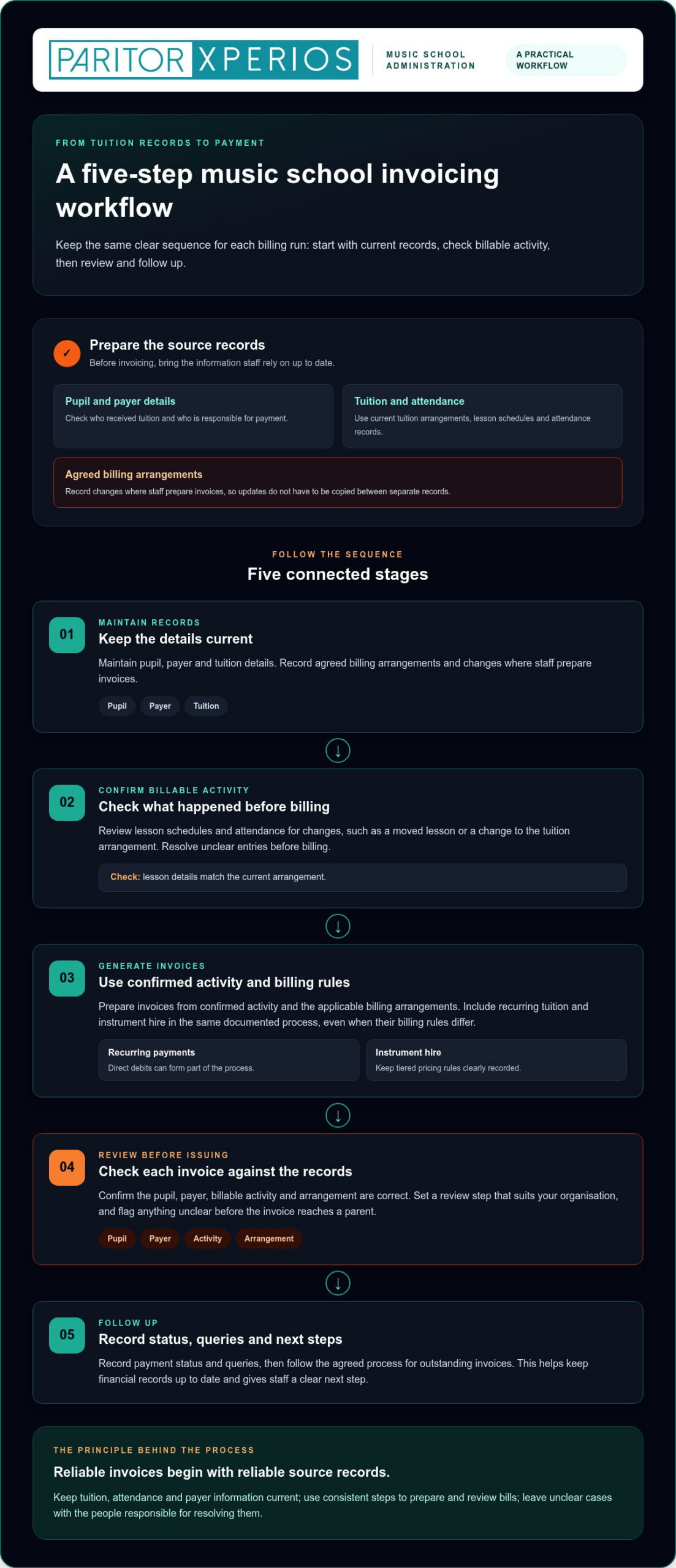
A clear billing routine gives your team a practical route from current tuition information to payment follow-up. To simplify the music school invoicing process, make each step visible and follow the same sequence each time. Check the details that matter before invoices are issued, rather than correcting avoidable errors afterwards.
- Maintain records. Keep pupil, payer and tuition details current. Record agreed billing arrangements and changes where staff prepare invoices.
- Confirm billable activity. Check lesson schedules and attendance records for relevant changes, such as a moved lesson or a change to the tuition arrangement. Resolve unclear entries before billing.
- Generate invoices. Use confirmed activity and the applicable billing arrangements to prepare invoices. Include recurring tuition and instrument hire in the same documented process, even if their billing rules differ.
- Review before issuing. Check that each invoice reflects the correct pupil, payer, activity and arrangement. Set a review step that suits your organisation, rather than assuming every school needs the same approval policy.
- Follow up. Record payment status and queries, then follow your agreed process for outstanding invoices. This gives staff a clear next step and helps keep financial records up to date.
Prepare and review the information before invoicing
Before each billing run, check for changes in the records staff rely on: tuition details, attendance, payer information and the agreed billing arrangement. For example, record a change to who pays before generating the invoice, rather than leaving it for the recipient to query. A consistent review helps staff spot missing or conflicting details, while leaving decisions about exceptions with the people responsible for them.
Accurate invoices begin with reliable source records. Keep tuition, attendance and payer information current, and every later billing step has a clearer foundation.
Bring recurring billing and instrument hire into the workflow
Direct debits can be part of a financial management process for recurring payments, while tiered instrument hire pricing needs its own clearly recorded rules. Document how these arrangements apply, then include them in the steps staff use to prepare and review billing. The Invoice Processing Platform (IPP) describes a government invoicing process from purchase order to payment. Its context is federal agencies, but the sequence illustrates why defined steps matter.
Build your workflow around your organisation’s documented arrangements, rather than assuming every pupil or hire agreement follows the same pattern. A financial management module for music services brings invoicing, direct debits and tiered instrument hire pricing into music-service administration, helping reduce repetitive billing tasks while staff retain oversight.
How to compare music school invoicing approaches without losing control
The right invoicing approach depends on how your music service works, how much administration your team manages and how complex its billing arrangements are. Compare the whole process, not just how quickly a tool produces an invoice. Simplifying music school invoicing should reduce repeated work without making it harder for staff to review changes or understand the records behind each bill.
| Approach | Record continuity | Routine automation | Oversight and reporting | Potential fit |
|---|---|---|---|---|
| Manual spreadsheets | Records can be adapted to your process, but staff may need to update separate files. | Often relies on manual entry and checks. | Staff can review entries, though changes and reporting may need extra tracking. | May suit a smaller or simpler operation with clear ownership of records. |
| Separate billing tools | Billing may sit apart from tuition and attendance information, creating hand-offs. | Can support billing tasks, depending on the tool and setup. | Staff may need to reconcile information across systems. | May fit an organisation whose billing needs are distinct from its tuition administration. |
| Connected management software | Can bring relevant administration into a more connected workflow. | May reduce repeated steps for routine invoicing. | Assess how staff review changes and access financial reporting. | May suit services with linked tuition, payment and instrument hire processes. |
Compare the process, not just the invoice screen
Map how a tuition change moves from the person recording it to the person preparing a bill. Can tuition administration and financial management work together, or do staff have to copy details between systems? Check how users review updates and whether the platform provides an audit trail for financial data. Consider whether staff who need the information can access current records across relevant devices.
Security matters alongside convenience. When assessing a cloud‑based platform, consider its hosting and approach to data protection. Xperios is hosted on Microsoft Azure and is designed to support data protection requirements. For more context on how connected tools can support music-service administration, read this music service management software guide.
Check fit for tuition, instrument hire and reporting
List the billing arrangements your team actually manages. These may include recurring tuition, direct debits and different instrument hire tiers. Then assess whether the process supports those arrangements and gives staff a clear way to check what has been billed. Useful financial reporting should help your organisation review income and expenditure in line with its regular oversight needs.
Instrument hire also depends on accurate asset information, such as which instrument is associated with a loan. Consider how those records connect with billing and explore this instrument inventory management guide for more context. Maintenance history can also help staff keep relevant instrument records together. No single approach suits every music service, so choose according to your workflows, record-keeping needs and the level of staff oversight you want to retain.
How to introduce a simpler invoicing process with less disruption
Changing how your team handles invoices works best when you understand the existing process first. Map each step from tuition updates to payment follow-up, then decide what should change and who will own it. This gives you a practical starting point for simplifying music school invoicing without losing sight of current invoices or staff responsibilities.
Map the current process and prepare your records
Write down how tuition information becomes invoice data. Note where staff record lesson changes, attendance and payer details, and where they copy information into another record or tool. Ask the people involved which steps lead to corrections, parent queries or delays. These repeated hand-offs can show you where to start.
Before moving to a new system, review the records and billing rules the process depends on. Check pupil and payer details, current tuition arrangements, relevant attendance information and any instrument hire tiers. Resolve duplicates or unclear entries, and document how recurring billing arrangements should be handled. Clean, consistent records give staff a more reliable basis for setting up the new workflow.
A staged preparation can help you keep control:
- Document: Record the current steps, tools and people involved in preparing and following up invoices.
- Prioritise: Identify repeated data entry and common causes of corrections or queries.
- Prepare: Check the records and billing rules that will be used in the new process.
- Agree ownership: Decide who maintains tuition and payer details, who reviews invoices and who handles queries.
Support staff adoption and ongoing oversight
Give staff practical guidance based on the tasks they perform. A colleague updating tuition records may need different instructions from someone reviewing invoices or recording payment queries. Make the agreed steps easy to follow, including where changes should be entered and how to flag information that needs attention.
Set a regular review routine that fits your organisation’s billing cycle. Check whether invoices reflect current records, whether queries are reaching the right person and whether staff still repeat manual steps. Gather feedback from the people using the process, then refine instructions or responsibilities where confusion remains. Ongoing oversight lets automation support routine work without removing staff judgement.
A smoother transition is not just a system change. It is a shared process that connects accurate records, clear ownership and staff guidance, leaving your team better placed to focus on teaching support. Explore Xperios for Music Services as one way to bring invoicing into music-service administration.
How Xperios can support a simpler music school invoicing process
A simpler invoicing process should fit the way your music service manages tuition and related administration. Xperios for Music Services brings that context together with a financial management module that supports invoicing, direct debits and tiered pricing for instrument hire. This can reduce repetitive billing tasks while keeping staff involved in reviewing information and managing exceptions.
Connect financial administration with music service needs
A connected approach means less repeated handling of billing information. Your team can organise its process around the details that matter to the service, from tuition administration to recurring payments and instrument hire. The financial management module automates invoicing and direct debits, and supports tiered instrument hire pricing. These capabilities give you a starting point for building a workflow around your organisation’s documented arrangements, rather than treating every invoice as an isolated task.
Automation supports routine administration, but staff still need clear responsibilities for maintaining records and checking invoices. A review step helps your team catch changes or exceptions before they affect billing. The practical aim is to reduce avoidable copying, keep the process manageable and give staff more time to support teachers and students.
Consider security, access and user-centred development
Xperios is a cloud‑based platform hosted on Microsoft Azure. Cloud hosting is one consideration when assessing how a platform supports access to administration, alongside how it handles personal information. Music services should also consider relevant data protection regulations, including UK GDPR, when managing pupil, parent and financial records. Paritor has developed Xperios with input from users in the sector, helping keep the system grounded in the needs of music and performing arts organisations.
Shared school information involves different users and administrative needs. Clear processes for access and record updates help staff work from consistent information. For more on how parent access fits into school administration, read this parent portal strategy guide.
Choosing a platform is only part of improving invoicing. The records, responsibilities and review routine around it still matter. Xperios supports a more connected approach to music-service administration, helping reduce repetitive billing work so your team can focus more of its time on teaching support.
Evolve your music service administration with Xperios.
Build a clearer path from tuition to payment
Simplifying music school invoicing starts with reliable records and a repeatable workflow. Keep tuition, attendance and payer details current, check billable activity before issuing invoices, and make responsibilities clear so changes and queries have a defined route.
Choose an approach that fits your music service’s needs. Whether you use spreadsheets, separate billing tools or connected management software, look for a balance between routine automation and staff oversight. Before changing systems, map current steps, prepare your records and give staff guidance suited to their roles.
Xperios’ financial management module supports invoicing, direct debits and tiered pricing for instrument hire, bringing relevant billing tasks into music-service administration. The cloud‑based platform is hosted on Microsoft Azure and was developed with input from sector users.
A consistent process can mean less time re-entering details and more time supporting teachers and students. Evolve your music service administration with Xperios and take a practical next step towards giving your team more time for teaching.
Frequently Asked Questions
How can a music school simplify its invoicing process?
Start by keeping tuition, payer and billing records accurate, then follow the same steps for preparing, reviewing and issuing invoices. A clear process should also specify who updates records and who handles payment queries. Automation can reduce repeated admin, but staff should still check changes and resolve exceptions. Make sure your workflow reflects your school’s tuition and instrument hire arrangements.
What should music school invoicing software automate?
Look for software that supports repetitive tasks in your existing billing process, such as preparing invoices and managing direct debits. For music services, consider whether it can also support your instrument hire arrangements and financial reporting needs. Automation should reduce duplicated work without removing useful staff checks. Assess the full process, from maintaining tuition information to following up payments, rather than judging a system by its invoice screen alone.
Can invoicing software manage tuition and instrument hire together?
Some platforms support both, but assess whether their features match your organisation’s arrangements. Check how tuition billing and tiered instrument hire pricing are handled, and how staff maintain the records behind each charge. Include a review of changes before invoices are issued. Xperios’ financial management module supports invoicing, direct debits and tiered pricing for instrument hire.
How do I reduce invoice errors at a music school?
Keep pupil, payer, tuition and billing information current, and review these details before issuing invoices. Record changes consistently so staff are not relying on separate notes or entering the same information repeatedly. If an error occurs, a clear process helps your team trace where it began and identify who can correct it. Software can support routine administration while staff review updates and deal with exceptions.
Is a cloud‑based platform suitable for music school invoicing?
A cloud‑based platform may help staff access current administrative information across devices. When assessing one, consider how it is hosted, how personal data is protected and how access to records is managed. Your organisation should also consider its responsibilities under data protection regulations, including UK GDPR. Paritor’s Xperios platform is hosted on Microsoft Azure. Cloud hosting is one part of your assessment, alongside the platform’s fit with your invoicing workflow.
How can I move from spreadsheets to a music school invoicing system?
Document how your current records become invoices, then identify repeated entry, common corrections and the information that needs review. Check your records and billing arrangements before moving them into a new system. Agree who maintains details, reviews invoices and handles queries, and give staff guidance suited to their tasks. During the transition, review records and invoice outputs so your team can spot issues early and maintain oversight as the new workflow takes shape.