
Can timetable software coordinate shared rooms without creating clashes or adding more administration? For a music service, room availability needs to line up with lessons, teachers and changing schedules. When updates are managed manually, staff can spend valuable time answering timetable queries, while teachers may rely on out-of-date information. Choosing timetable software that handles room sharing means looking beyond a calendar view to how your service organises bookings and communicates changes.
You need a dependable process for keeping room, lesson and teacher information organised as plans change. This guide explains how to assess software against your day-to-day scheduling needs, what to consider when sharing rooms, and how to reduce repetitive administration. It also explains why you should check what a system actually does rather than assume it will resolve every room conflict automatically.
You’ll also see how Xperios brings scheduling and bookings together for music services, with a cloud-based platform and portals that give teachers access to real-time information. Use these considerations to find a system that supports your workflows and gives staff more time to focus on teaching.
Key Takeaways
- Assess timetable software that handles room sharing against your lesson, room booking and teacher scheduling workflows.
- Map room availability, lesson schedules and teacher needs before comparing systems, so you can identify where scheduling problems arise.
- Look for clear ways to organise booking and timetable information and keep relevant users informed when plans change.
- Use a software demonstration to explore user access, update processes and how well the workflow fits your music service.
- Xperios for Music Services supports scheduling, bookings, attendance tracking and automated invoicing through a cloud-based platform.
Why timetable software that handles room sharing matters to music services
Timetable software that handles room sharing coordinates room use with teaching schedules and bookings, helping a music service organise lessons, teachers and available spaces in one administrative workflow. The aim is not simply to show who is teaching and when. Staff also need to know which room is booked, whether it is available for a lesson and what needs updating when arrangements change.
Shared spaces make this coordination more demanding. A music room might be needed by several teachers for individual lessons, group sessions or other activities. If lesson times shift or a teacher’s availability changes, the room plan may need to change too. A timetable that shows teaching commitments but not clear booking information can leave staff checking separate records to understand what is available.
Where shared-room scheduling becomes difficult
Competing needs can arise when teachers rely on the same rooms at similar times. A lesson may need to move because a space is already booked, or a room change may affect the teacher’s schedule and the students attending. Schools and conservatoires may also coordinate teaching across different spaces, making it harder to keep everyone’s information current.
Manual communication adds more work. After a change, staff may need to update a timetable, notify teachers and respond to questions about the revised arrangement. If someone is working from an older version, the team can spend time resolving confusion rather than supporting lessons. Clear, accessible information helps everyone work from the same schedule.
What a music service needs from a shared timetable
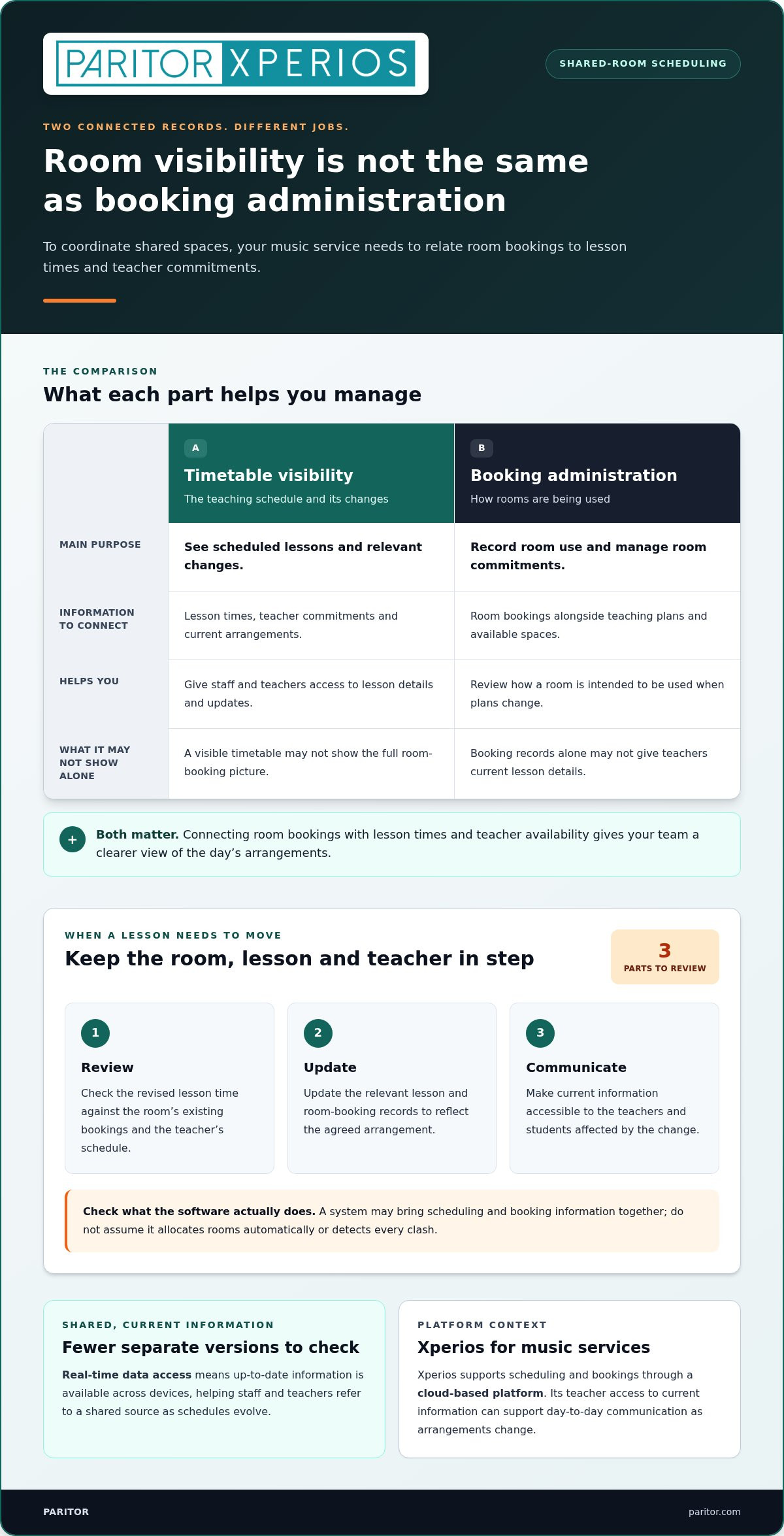
Room visibility and booking administration are related, but serve different purposes. Timetable visibility lets staff and teachers see scheduled lessons and relevant changes. Booking administration records how spaces are being used, helping staff manage room commitments alongside teaching plans. Both matter: a visible timetable may not show the full booking picture, while booking records alone may not give teachers the current lesson details they need.
For a music service, useful scheduling information connects room bookings with lesson times, teacher availability and attendance records. This gives staff a clearer view of the day’s arrangements and a practical basis for managing updates. Flexible lesson blocks may also be relevant: flexible modular scheduling describes a model that divides the day into smaller units, an idea to consider when planning lessons of varied lengths.
The right fit reflects how your organisation works, whether you coordinate lessons in a school, across several teaching spaces or within a conservatoire. A shared timetable can reduce repeated queries and manual updates, leaving staff with more time to support teaching.
How timetable software coordinates rooms, lessons and teachers
A shared scheduling workflow starts with accurate information: which rooms are available, when lessons are planned and which teachers are involved. Administrators record bookings alongside lesson details to see how teaching plans relate to room use. Software can support this process by bringing scheduling and booking information together. Check the system’s functions rather than assuming it allocates rooms automatically or detects every clash.
When plans change, shared timetable information helps staff update room bookings and lesson details from a clearer, more consistent record. That matters in a music service, where a change to one lesson can affect the space, teacher and students involved.
How room bookings relate to lesson timetables
Keep the room booking record connected to the teaching schedule in your administrative process. A booking record helps staff see how a room is intended to be used, while the timetable shows lesson and teacher commitments. Together, these records make it easier to review a change and understand what else may need attention.
For example, if a teacher needs to move a lesson to a different time, staff can review the revised lesson alongside the room’s existing bookings. They can then update the relevant records and communicate the agreed arrangement. This step-by-step review helps your team account for the room, lesson and teacher affected by a change, instead of relying on separate records that may not reflect the latest plan.
How teachers stay informed when schedules change
Once an update is made, relevant teachers need access to current information. Real-time data access means up-to-date information is available across devices, helping staff and teachers refer to a shared source rather than relying on separate copies or repeated messages. This can reduce avoidable questions about lesson times and arrangements.
A teacher portal is a mobile-responsive interface for teachers to log attendance, progress, and instrument updates. In a music-service platform, teacher access to current information can support day-to-day communication as schedules evolve. When assessing timetable software that handles room sharing, look at how booking and timetable updates fit together, who can access relevant information, and how changes are shared. These details show whether the workflow suits your staff, teachers and teaching programme.
Paritor’s Xperios platform supports scheduling and bookings for music services, alongside teacher, parent and student portals that provide access to real-time information. Explore music-service scheduling with Xperios as you consider how a connected administrative workflow could reduce timetable queries and free staff to focus on teaching.
How to compare room-sharing timetable software for your organisation
Compare systems against the work your staff actually do, not just the features shown on a screen. In a demonstration, follow a typical sequence: record a room booking, schedule a lesson, update the details and show the information to relevant users. This helps you see whether the workflow suits your music service and where staff might still need to enter or check information separately.
| Criterion | Why it matters | Evidence to look for in a demonstration |
|---|---|---|
| Rooms and bookings | Staff need a clear record of how teaching spaces are being used. | See how a room and its booking are recorded, viewed and updated alongside teaching activity. |
| Lesson and teacher scheduling | Room arrangements need to make sense alongside lesson times and teacher availability. | Trace a lesson through the schedule and see how a change is represented for staff. |
| Updates and user access | Relevant users need current information without relying on repeated manual messages. | Review what staff, teachers, parents and students can access, and how timetable information is shared. |
| Attendance and administration | Connected information can help avoid unnecessary repeat entry. | Follow how scheduling, booking and attendance tasks fit into the service’s day-to-day process. |
| Hosting, data protection and usability | The platform should be straightforward for your team and support responsible handling of personal information. | Review the cloud-based platform, the provider’s data protection information and how easily users can complete common tasks. |
Pay close attention to the difference between a record of room use and automatic room allocation or clash detection. Treat the latter as specific functions, not assumptions. Assess whether the demonstrated workflow matches your organisation’s teaching structure, including how staff manage changes and keep lesson, booking and attendance information in step.
Data protection regulations set requirements for handling personal information. Consider what information your service stores, who needs access and what the provider explains about protecting that data. Cloud hosting can provide remote access to a platform, but it is still worth understanding the provider’s stated hosting and data protection arrangements. Ease of use matters too: a clear workflow can help staff keep information current.
Paritor’s Xperios for Music Services is a cloud-based platform hosted on Microsoft Azure, with scheduling, bookings, attendance tracking and automated invoicing. Explore Xperios for Music Services as you assess how music-service administration can fit alongside your room and timetable workflows.
How to prepare your room-sharing timetable workflow for a software decision
A clear picture of your current process makes it easier to judge whether software will support your daily work. Before a demonstration, map how rooms, lesson schedules, teacher availability and bookings fit together. Then note where staff re-enter details, update separate records or rely on manual messages. These pressure points give you practical criteria for assessing timetable software that handles room sharing.
- Map your rooms and their uses. List each teaching space, the activities it supports and any regular room bookings. Include the lesson schedules that use those spaces, so you can see how room use and teaching plans relate.
- Record scheduling constraints. Note teacher availability, lesson timings and any room requirements that affect the timetable. Include how your service handles changes to a shared-room booking, such as a lesson moving to another time or space.
- Document the people and process. Identify who enters room bookings, schedules lessons, updates records and communicates changes. Record where the same information is copied between systems or spreadsheets, as this can reveal avoidable administration.
- Review access and communication. Set out who needs timetable information, what they need to see and how they receive updates. Consider staff, teachers, parents and students, and note whether portals could support access to relevant information.
Use the map to follow a typical change from start to finish. For example, trace what happens when a teacher’s availability changes: who reviews the lesson schedule, checks the room booking, updates the records and informs the people affected? This shows where delays or repeated queries arise, and gives you a realistic workflow to assess in a software demonstration.
Look closely at the hand-offs. If staff maintain a room list in one place, lesson details in another and attendance records elsewhere, they may need to repeat updates or reconcile information manually. Note which tasks must remain connected and which users need access to current details. This helps you distinguish essential requirements from features that would add little to your team’s daily work.
Finally, agree what a successful process should look like. Your team might prioritise clear booking records, straightforward timetable updates or easier access for teachers. A shared set of requirements helps staff assess software consistently and focus on the workflows that matter, rather than assuming that room allocation or conflict handling happens automatically.
With your workflow mapped, see how Xperios supports music-service administration, including scheduling, bookings and attendance tracking.
How Xperios supports scheduling and booking for music services
Xperios for Music Services is Paritor’s cloud-based platform for music-service administration. It supports scheduling, bookings, attendance tracking and automated invoicing. Bringing these tasks into a platform designed for music services can help your team organise information alongside wider teaching administration, rather than treating timetable activity as an isolated task.
Connect scheduling with wider music-service administration
Room sharing depends on clear records and a workable process. Xperios supports scheduling and bookings, while attendance tracking helps staff manage another part of lesson administration. These functions can help your team keep relevant service information organised and reduce repeated entry across day-to-day tasks.
For example, staff can use scheduling and booking information to manage teaching arrangements, then record attendance as lessons take place. The platform supports these workflows, but this does not mean it automatically allocates rooms or detects every potential clash. Your team can assess how its own room-sharing process fits with the platform’s scheduling and booking functions.
Music-service administration often extends beyond individual lessons. If your work includes ensemble coordination, see the ensemble management guide for related considerations. The music service management guide can also help you explore how scheduling fits into wider service operations.
Support staff with secure, current information
Teachers, parents and students can access real-time information through the platform’s secure portals. The teacher portal is a mobile-responsive interface for teachers to log attendance, progress, and instrument updates. Current information can help teachers refer to relevant details and reduce repeat timetable queries for your administrative team.
Xperios is hosted on Microsoft Azure. Paritor states that its services support GDPR compliance. When assessing a platform, consider how its stated data protection approach relates to the personal information your service manages, and which users need access to which information.
By connecting scheduling, bookings, attendance tracking and automated invoicing in a platform for music services, Xperios can support more organised administration. Less repetitive work can mean more time for your staff to focus on teaching and supporting learners.
Explore Xperios for Music Services to see how it can support your music-service administration.
Build a clearer timetable workflow
Choosing timetable software that handles room sharing starts with understanding how your rooms, bookings, lessons and teacher schedules work together. Map your current process first, then compare systems against the tasks your staff need to manage and the information teachers need when plans change.
Look for a workflow that brings scheduling and bookings together with attendance tracking, while making relevant information accessible to staff, teachers, parents and students. Xperios for Music Services supports these functions through a cloud-based platform hosted on Microsoft Azure, with portals providing access to real-time information.
A well-organised process can help reduce repeated timetable queries and manual updates, giving your team more time to support teaching. Explore how Xperios could fit your music-service administration: Explore Xperios for Music Services.
With clear requirements and current information within reach, you can make room-sharing decisions with greater confidence and help your staff focus on inspiring learners.
Frequently Asked Questions
Can timetable software manage rooms shared by several teachers?
Yes, timetable software can help staff coordinate room bookings with lessons and teacher schedules. A system’s value depends on how clearly it records room use and supports your service’s process for updating arrangements. For timetable software that handles room sharing, check how a change to a lesson or booking is recorded and communicated. Don’t assume the software automatically allocates rooms or detects every conflict unless that function is specified.
How does room-sharing timetable software help prevent scheduling clashes?
It can make room bookings and lesson schedules easier to review together, helping staff spot possible overlaps during planning and updates. For example, if a lesson changes time, administrators can review the room’s booking information before confirming the new arrangement. Software supports the workflow, but its capabilities vary. Check what the system shows and how staff are expected to review conflicts, rather than assuming every clash will be detected automatically.
What should music services look for in room-booking software?
Look for a clear way to manage room bookings alongside lesson schedules, teacher availability and attendance records. Consider how staff update information, who can access it and whether the process fits your service’s teaching structure. In a demonstration, follow a typical booking change from entry to communication. Notice whether staff need to repeat the same details in separate records, as reducing duplicate administration can help keep information organised.
Can timetable software handle peripatetic teacher timetables across multiple schools?
Some systems can support peripatetic teacher timetables by helping staff coordinate teaching schedules, room availability and teacher commitments across locations. Your requirements may include travel between schools, fixed availability, lesson times and the rooms available at each site. Map these needs before comparing software, then assess how the workflow represents them. Don’t assume a system manages travel or rotation automatically unless its stated functions include this.
How can teachers access up-to-date room and lesson schedules?
Teachers can access current timetable information through a platform’s relevant online portal. Xperios provides a teacher portal and access to real-time information, helping teachers refer to current service information rather than relying only on messages or saved copies. The teacher portal is a mobile-responsive interface for teachers to log attendance, progress, and instrument updates. Consider whether the information shared suits your teaching and communication processes.
Is cloud-based timetable software suitable for music services?
A cloud-based platform can suit a music service that needs staff and teachers to access information online. Suitability also depends on how well the software supports your scheduling and booking workflows, and how straightforward it is for users to work with. Consider the provider’s hosting arrangements and stated approach to data protection regulations. Xperios is hosted on Microsoft Azure, and Paritor states that its services support GDPR compliance.
How does Xperios support scheduling and bookings for music services?
Xperios for Music Services supports scheduling, bookings, attendance tracking and automated invoicing. Its teacher, parent and student portals provide access to real-time information, helping relevant users stay informed. The platform is cloud-based and hosted on Microsoft Azure. These functions support music-service administration, but do not imply automatic room allocation or clash detection. Assess how Xperios’s scheduling and booking workflows fit your organisation’s shared-room process.