

What if your summer school administration followed each learner from registration through to attendance, rather than scattering details across forms, spreadsheets and messages? Choosing music summer school management software means looking beyond sign-up. Even a short programme needs clear schedules, reliable attendance records and timely communication, without adding repetitive work for your team.
You need accurate, up-to-date information that administrators, teachers and families can access in ways that suit their roles. A connected system can link bookings, scheduling and attendance, reducing manual updates and giving staff more time to focus on teaching and the student experience.
This 2026 UK buying guide compares the capabilities to consider across the registration-to-attendance workflow, including administration, communication, data protection and instrument allocation. It also explains how Xperios supports music services with a cloud‑based platform hosted on Microsoft Azure, alongside teacher, parent and student portals. Developed with user feedback, Xperios brings relevant administration into one workflow, helping your team spend less time on routine tasks and more time supporting a successful summer programme.
Key Takeaways
- Trace each learner’s journey from booking to attendance to see where information needs to move between people and processes.
- Assess music summer school management software against your registration data, scheduling, attendance and communication needs, not just its feature list.
- Map who needs access to which records so administrators, teachers and families can work from current information.
- Include data access, cloud hosting and staff adoption in your assessment to support secure, practical day-to-day use.
- See how Xperios connects bookings, scheduling and attendance with role-specific portals and instrument management where needed.
What music summer school management software needs to organise
Music summer school management software should help you coordinate the information and administration around each learner’s place on a programme. Registration is only the starting point. After a booking, staff need to connect learner details with class schedules, attendance records and communication with families.
This workflow has similarities to a student information system, which supports activities such as registration, scheduling and student data management. For a music programme, the practical test is whether the system carries information from one task to the next, rather than leaving staff to update separate forms, spreadsheets and messages.
A short programme still needs consistent records. When booking details, class allocations and attendance are held in different places, staff may have to enter or check the same information repeatedly. A connected workflow can reduce duplication and help administrators and teachers work from shared, current records. That leaves more time for programme delivery and the student experience.
Which summer school tasks should the system bring together?
Start with the core tasks: bookings, learner details, class schedules and attendance. Consider how a change to one record affects the next step. For example, booking information should inform programme planning, while schedules should show teachers which learners to expect and allow them to record attendance.
Central records make these handovers clearer and limit repeated data entry. Then consider additional needs. Instrument allocation or loans call for instrument and asset records; performances or other programme activities may need event information. Include these capabilities where they support your programme, but first make sure the main learner journey is organised well.
Who needs access to summer programme information?
Administrators coordinate bookings, learner details and schedules. Teachers need access to information relevant to their classes, including attendance records. A teacher portal gives them a role-specific way to access and record information instead of relying on updates passed through multiple messages.
Families and learners also need suitable ways to receive programme information. Parent and student portals give them online access to relevant details, separate from staff administration. Map who needs each record and when. Clear access for administrators, teachers, families and learners helps information reach the right people without adding manual work.
How to assess registration, scheduling and attendance workflows
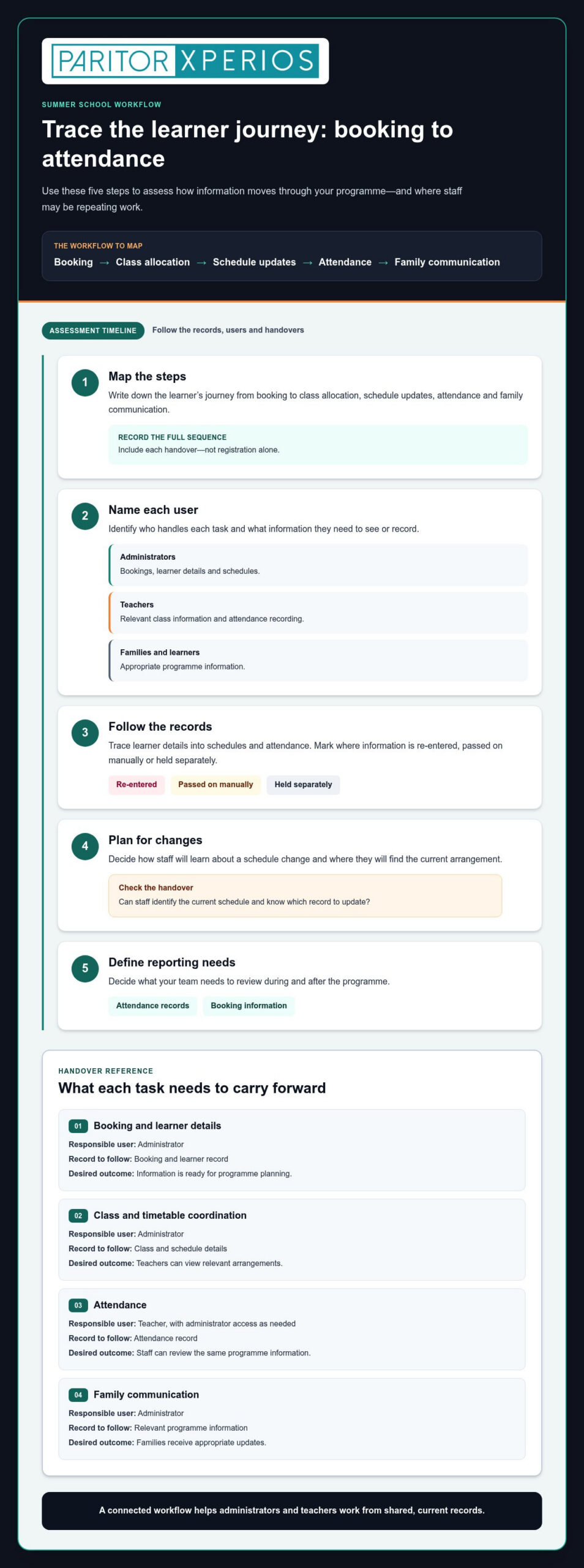
Assess the process from the point a learner’s details are captured to the moment attendance is recorded. Registration data is the starting record, not the whole workflow: it should inform the administrative steps that follow. Use this assessment to identify where information moves, who needs it and where staff may be repeating work.
- Map the steps. Write down the journey from booking to class allocation, schedule updates, attendance and family communication.
- Name each user. Identify which tasks administrators handle, what teachers need to see or record, and what information families and learners should access.
- Follow the records. Trace learner details into schedules and attendance. Note where information is re-entered, passed on manually or held separately.
- Plan for changes. Decide how staff will learn about a schedule change and where they will find the current arrangement.
- Define reporting needs. Decide what your team needs to review during and after the programme, such as attendance records or booking information.
A clear workflow supports the wider value of music education described in the government’s National Plan for Music Education. Use the table to compare how a system could support each handover in your programme.
| Task | Responsible user | Record to follow | Desired outcome |
|---|---|---|---|
| Booking and learner details | Administrator | Booking and learner record | Information is ready for programme planning |
| Class and timetable coordination | Administrator | Class and schedule details | Teachers can view relevant arrangements |
| Attendance | Teacher, with administrator access as needed | Attendance record | Staff can review the same programme information |
| Family communication | Administrator | Relevant programme information | Families receive appropriate updates |
Can registration information connect to programme schedules?
Check whether learner, class and timetable information can be coordinated without separate records and repeated updates. When a schedule changes, staff need to know where to find the current arrangement and which record to update. Focus on the handover between booking information and programme planning, rather than treating registration as the whole process.
How should attendance and family communication fit the workflow?
Teachers need a straightforward way to record attendance, while administrators need access to relevant programme records. Assess whether each role can access the information it needs. Parent and student portals provide families and learners with online access to appropriate information. For further context, read this parent portal guide for music schools.
Xperios brings bookings, scheduling and attendance tracking together with online portals for teachers, parents and students. Explore Xperios music-service administration to see how a connected workflow can reduce repeated administration for your team.
Compare summer school software by music-specific capabilities
Compare capabilities against the way your programme runs, not the length of a feature list. A useful system connects the tasks your staff carry out, from coordinating teachers and recording attendance to sharing appropriate information and managing equipment. This helps you judge whether music summer school management software supports the real workflow or simply stores details.
| Capability | What to assess in your programme | Potential benefit |
|---|---|---|
| Scheduling | Can staff coordinate classes and teacher schedules, and find current arrangements? | Clearer planning and fewer manual updates |
| Attendance | Can teachers record attendance and can administrators access the relevant records? | Consistent information across teaching and administration |
| Communication | Can administrators, teachers, parents and students access information suited to their roles? | More direct access to programme updates |
| Financial administration | Can the system support invoicing connected to your programme administration? | Less repetitive handling of routine administration |
| Asset records | Can staff record equipment allocation, loans or maintenance where needed? | Clearer oversight of instruments and other assets |
A cloud‑based platform can give authorised users access to current information across devices, helping staff work from shared records instead of separate copies. Assess what each user can view and update, and how the system supports appropriate access to children’s information. The ICO’s UK’s Children’s code for online services is a reference for organisations considering children’s data in online services.
Which music education features matter beyond registration?
Teacher scheduling, attendance tracking and communication work best when they support connected tasks. If your programme lends or allocates instruments, include asset records in your assessment. The instrument inventory management guide explains the role of asset tracking, while the music service management software guide covers wider system considerations.
How can portals support staff, parents and learners?
Consider each audience separately. Administrators coordinate programme records; teachers need relevant attendance, progress and instrument information. A teacher portal is a mobile‑responsive interface for teachers to log attendance, progress and instrument updates. Parent and student portals provide online access for families and learners. Match access to each role, as each portal serves a different audience.
Xperios brings scheduling, attendance, invoicing and instrument and asset management into a cloud‑based platform hosted on Microsoft Azure. Its teacher, parent and student portals support role-specific online access to relevant information.
Check security, data handling and implementation before choosing
Before choosing music summer school management software, consider how it will fit your team’s handling of learner information and daily processes. Review access, cloud hosting and the practical steps staff will take to adopt the system. Cloud access can make current information available across devices, while role-based access helps users work with the records relevant to their responsibilities.
What should you assess about data protection and access?
Start by listing the personal information your programme handles, such as learner and family details, schedules and attendance records. Then map which roles need access to each type of information. This gives you a practical basis for reviewing the data protection regulations that apply to your organisation, including UK GDPR. Software selection should sit alongside your own data-handling processes.
Use this checklist to guide your review:
- Access: Can you identify what administrators, teachers, parents and students need to view or update?
- Hosting: Is the system cloud-based, and is the hosting arrangement clearly explained?
- Data handling: Can you understand how learner information is managed and protected?
- Staff practice: Do your processes make clear who is responsible for keeping records accurate and current?
Xperios is hosted on Microsoft Azure, and Paritor states that the platform supports GDPR compliance. Include these details in your assessment alongside your organisation’s own requirements. Hosting location and data sovereignty are separate questions, so establish where data is stored rather than inferring it from the hosting provider’s name.
How can onboarding support a smooth change?
Plan for the transition as three distinct tasks: configuring the system around your administrative workflow, preparing existing records, and helping staff learn the processes they’ll use. Treat these as separate steps, with clear responsibilities for each. Agreed ways of working help administrators and teachers adopt consistent routines instead of recreating fragmented records in a new system.
- Configuration: Map your programme tasks and the staff roles involved.
- Data transition: Plan how existing information will be reviewed and prepared for use.
- Staff learning: Identify who needs guidance on schedules, attendance, communication and other relevant tasks.
Paritor develops Xperios with user feedback, bringing music-service administration into a cloud‑based workflow. Explore how Xperios supports music service administration.
Where Xperios fits into a music summer school workflow
Xperios brings together music-service administration capabilities that support the workflow you mapped: bookings, scheduling, attendance, invoicing and, where needed, instrument and asset records. To assess the fit for your programme, connect each capability to a task your team carries out and identify which staff need access to the information.
How do Xperios capabilities relate to summer programme administration?
Bookings support the administration of learner places, while scheduling helps coordinate programme arrangements. Attendance tracking gives staff a way to record participation, and automated invoicing supports related financial administration. If your programme lends or allocates instruments, instrument and asset management keeps equipment records alongside other music-service administration, including maintenance history.
Use your workflow to assess the fit:
- Bookings: Consider how booking information informs the records your team uses to plan the programme.
- Scheduling: Identify who coordinates arrangements and who needs to view them.
- Attendance: Map how teachers record attendance and how administrators access those records.
- Invoicing: Review how automated invoicing can support your programme’s financial administration.
- Instruments: Include asset records if equipment loans, allocation or maintenance form part of your activity.
This approach keeps your assessment grounded in what staff actually do. It also highlights repetitive updates a connected workflow may reduce, leaving more time for teaching and the learner experience.
What are the next steps for evaluating Xperios?
Start by writing down your current process and noting where details are copied, checked or passed between staff. Then list the people involved, the records each role needs and the tasks that take repeated administrative effort. Compare those requirements with Xperios capabilities, including its teacher, parent and student portals, to see how online access can support the people involved.
Xperios is hosted on Microsoft Azure. Include this in your review alongside your organisation’s data-handling requirements and the access each role needs. Paritor develops Xperios with user feedback, bringing a user-centred perspective to music-service administration. Keep the assessment focused on your workflow: the system should support the processes your team needs to carry out and make handovers clearer.
If you’re comparing music summer school management software, use your workflow map to guide your evaluation. Explore Xperios for music services and consider how its capabilities could support your programme administration.
Choose a workflow that gives your team room to teach
The right music summer school management software connects the work around each learner, from bookings and schedules to attendance and family communication. Assess the whole workflow, the records staff need, and how cloud access and data handling fit your organisation. This helps you choose for practical value, not just a list of features.
Xperios brings together scheduling, bookings, attendance tracking and online portals for teachers, parents and students. Hosted on Microsoft Azure, it supports music-service administration, while Paritor’s experience providing software since 1993 offers a long-standing foundation for its work with the sector.
Start with the repeated tasks you’d most like to simplify, then compare them with the people and records involved in your programme. Explore Xperios for music services to see how it could help your team spend less time on administration and more time creating a positive learning experience.
Frequently Asked Questions
What is music summer school management software?
Music summer school management software helps you coordinate the administration around a music programme. It can bring bookings, scheduling and attendance tracking into a connected workflow, so staff can use relevant records as learners move through the programme. Online portals can also give teachers, parents and students access to information suited to their roles.
Can music service software manage summer school registration?
Music service software supports administration linked to bookings and learner records. Separate the information captured when someone applies or books from the work that follows, such as coordinating classes, schedules and attendance. Assess how those tasks connect. Xperios includes bookings and scheduling for music-service administration, which support the planning and organisation of a summer programme.
What features should summer school registration software include?
Look for capabilities that support the full administration process, not only the initial collection of details. Consider bookings, scheduling, attendance tracking, communication, financial administration and, where relevant, instrument records. Check how information moves between administrators, teachers and families, and whether staff can access the records they need. A role-specific teacher portal supports logging attendance, progress and instrument updates.
How can software help manage attendance at a music summer school?
Attendance tracking gives teachers a way to record participation and administrators a way to review programme records. Consider how the process fits with class schedules and how staff access current learner information. A shared workflow reduces the need to reconcile separate records manually. Xperios includes attendance tracking, with a teacher portal for logging attendance, progress and instrument updates.
Is cloud-based software suitable for a short summer programme?
Cloud-based software can suit a short programme when its capabilities match your administrative needs and staff can access relevant information online. Assess how bookings, schedules and attendance records support your workflow, as well as how access is organised for different roles. Xperios is hosted on Microsoft Azure and includes online portals for teachers, parents and students to access relevant information.
How should a music school assess data protection when choosing software?
Start by identifying the personal information your programme handles and which roles need to access it. Review the system’s hosting and data-handling information alongside your own processes and applicable data protection regulations, including UK GDPR. Consider how access is organised and information protected. Paritor states that Xperios supports GDPR compliance; include this in your assessment alongside your organisation’s own requirements.
Can summer school software also help track musical instruments?
Yes. A music-service platform with instrument and asset management can support equipment records when a programme allocates or lends instruments. Identify what your team needs to record, such as which items are assigned and whether maintenance history is useful. Assess this alongside core bookings and attendance, and consider how instrument records fit with the programme’s other administrative workflows.