
What if every instrument had a clear, up-to-date record, from its current borrower to its latest repair? Learning how to manage a large instrument inventory can be difficult when spreadsheets contain errors, hire agreements are incomplete and staff cannot see what is available. Those gaps create extra administration when your priority is supporting music education.
You need more than a list. A centralised system can help you track assets, check availability and find each instrument’s maintenance history. Connecting hire records with student information and invoicing can also make routine administration easier.
This guide covers practical ways to organise a large collection, improve tracking and maintain a reliable audit trail. You’ll see how a cloud-based platform such as Xperios Instrument Management can support instrument records and loan administration. The aim is clearer information, better oversight and more time for teaching.
Key Takeaways
- Learn how to manage a large instrument inventory with a digital register that makes each asset easier to identify and track.
- Use a consistent identification approach so staff can check an instrument’s record and availability.
- Connect instrument assignments with student records to simplify loan administration and agreement follow-up.
- Keep repair logs and maintenance information together to support decisions across each instrument’s lifecycle.
- Explore how Xperios Instrument Management can support instrument records and loan administration in a cloud-based platform.
What is Instrument Inventory Management for Music Services?
For a music service, inventory management means following each instrument through its lifecycle, from acquisition and allocation to repair, return and eventual disposal. It is not simply a count of what is in a store cupboard. You need to know where each item is, who has it, whether it is available and what maintenance it has received.
That differs from retail inventory, where the main concern is stock held for sale or rental. Educational services manage instruments on loan over time, often across school sites and student homes. Records need to connect each asset with its borrower and relevant hire or repair information. A useful starting point is the general principles of Inventory Management, adapted to the ongoing responsibilities of an educational loan scheme.
The Complexity of Large-Scale Musical Assets
A music service may look after orchestral strings, woodwind, brass, percussion and digital keyboards, each with different handling and maintenance needs. Instruments can move between storage, schools, teachers and students, so a record that only lists an item’s usual location can quickly become out of date. Give each instrument a distinct record so staff can identify it and check its history.
Centralised visibility helps you see the whole collection rather than relying on separate lists held by different staff or sites. Without it, an instrument may appear available in one record while already assigned in another. These gaps can lead to avoidable replacement or repair decisions, make insurance records harder to substantiate and add pressure to busy administrative teams. Check your policy terms and record-keeping requirements rather than assuming that a particular inventory process guarantees cover.
Moving Beyond the Spreadsheet
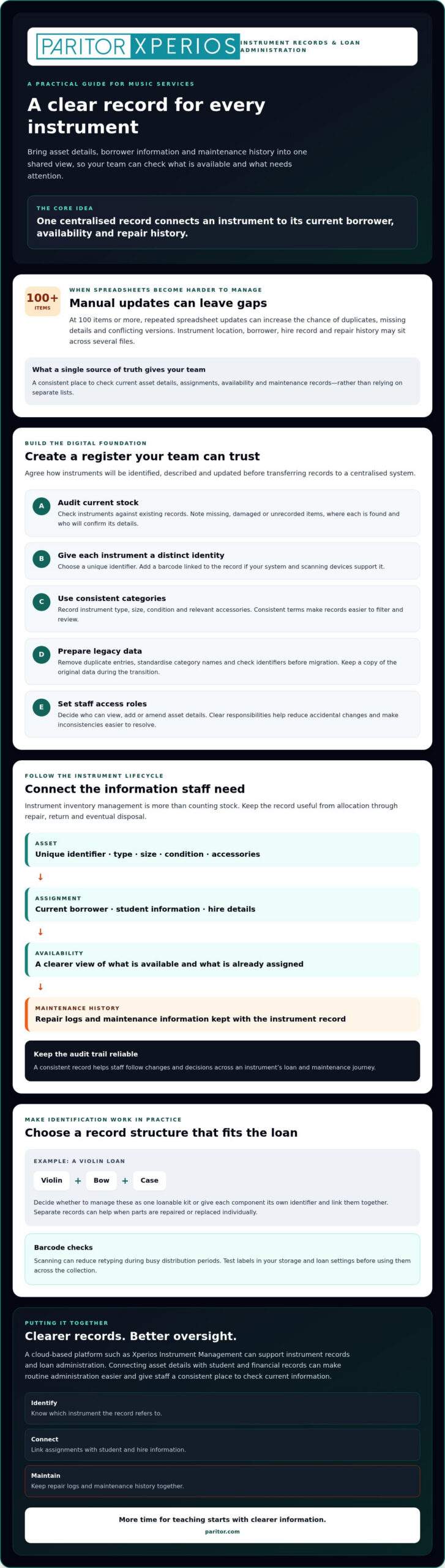
Spreadsheets can work for a small register, but once you are managing 100 items or more, repeated manual updates can increase the chance of duplicates, missing details and conflicting versions. A spreadsheet also will not automatically connect an instrument’s location to its borrower, hire record or repair history. Staff may have to check several files to answer a straightforward question.
A single source of truth means keeping current asset details in one shared system, with appropriate access for the people who need them. It gives your team a consistent place to check availability, assignments and maintenance records, helping prevent decisions based on outdated information.
Instrument inventory management connects asset tracking with student and financial records.
That connection is central to how to manage a large instrument inventory: use each instrument’s record to support decisions throughout its loan and maintenance journey. With clearer information in one place, staff can spend less time reconciling lists and more time supporting teaching.
How to Manage a Large Instrument Inventory: Establishing a Digital Foundation
A reliable inventory starts with accurate records. Before moving from spreadsheets to a digital system, agree how your team will identify, describe and update each instrument. A clear process makes records easier to trust, whether staff are preparing allocations or checking an item’s status across several sites.
Build a Consistent Asset Register
Work through these steps to create a practical foundation:
- Audit current stock. Check instruments against existing records and note missing, damaged or unrecorded items. Record where each item is found and who is responsible for confirming its details.
- Choose an identification approach. Give each instrument a unique identifier. Add a barcode linked to that record if your chosen system and scanning devices support it.
- Set useful categories. Record instrument type, size, condition and relevant accessories. Consistent terms make it easier to filter the register, for example, to find available instruments of a particular type or items needing attention.
- Prepare legacy data for migration. Remove duplicate entries, standardise category names and check identifiers before transferring records to a centralised platform. Keep a copy of the original data during the transition.
- Set staff access roles. Decide who can view, add or amend asset details. Clear responsibilities help reduce accidental changes and make inconsistencies easier to resolve.
Make Identification Work in Practice
Barcodes can reduce retyping during busy distribution periods. Staff scan an item’s label and retrieve its record instead of manually entering an identifier. Test labels in your storage and loan settings before using them across the collection. For a violin, bow and case, decide whether to manage the set as one loanable kit or give each component its own identifier and link them together. Separate records can help if parts are repaired or replaced individually.
Mobile scanning may also help staff check items at school sites, provided the selected devices and system support it. Agree what staff should do if a label is damaged or a scan does not match the instrument. For example, set out who can confirm an item’s identity and how they should correct the record.
Keep Records Accessible and Controlled
A cloud-based platform can give authorised administrators and teachers access to current records, rather than leaving them to rely on separate files. Before migration, ask how the provider protects and backs up data, how access is controlled and what happens if information needs restoring. Xperios is hosted on the Microsoft Azure cloud platform. For broader context, see the complete guide to music service management software.
If you are considering a dedicated system, explore Xperios Instrument Management for instrument inventory management.
Optimising the Instrument Hire and Loan Lifecycle
A clear loan process links each instrument to the student, parent or carer responsible for it, the agreed hire terms and relevant administrative records. This gives your team a reliable way to check who has an instrument, what needs attention and whether it has been returned. It also replaces repeated manual checks with a consistent workflow.
Make Hire Agreements Easier to Track
Set up a process that records whether an agreement has been issued, completed and associated with the correct instrument and student record. No system can guarantee every form is completed, but a clear status view helps you spot outstanding approvals before an instrument is issued.
Link the relevant terms and conditions to each loan record so staff can find the agreed information later. Set out how staff should follow up with families about overdue returns, and give them a clear route to do so. Check that your agreement process records the required parent or carer acknowledgement for each loan.
Connect Assignments, Returns and Administration
When a student record is linked to an instrument assignment, staff can look up the borrower and asset together rather than searching separate files. At return, update the instrument’s status promptly and record its condition. Unreturned items then remain visible for follow-up instead of disappearing from the active loan list.
For termly invoicing, connect the hire record with the relevant invoice schedule, then check that changes such as a loan starting, ending or being extended are reflected in the administrative records. Automated invoicing can reduce repetitive data entry, but clear ownership of record updates still matters. Agree who confirms loans and returns, and when those changes are passed to the person responsible for invoicing.
Record Support Arrangements Consistently
Music services may have different arrangements for families, including support linked to Pupil Premium or a bursary. Record the applicable arrangement using your organisation’s approved criteria, and limit access to sensitive details to staff who need them. Keep the instrument assignment and relevant administrative records connected, so authorised staff can review hire activity alongside financial reporting without relying on disconnected spreadsheets.
For more guidance on choosing a system to support these workflows, read the ultimate guide to instrument inventory management software. Xperios Instrument Management supports instrument inventory management. If you are reviewing how to manage a large instrument inventory, explore Xperios Instrument Management as one option for bringing instrument records and administration together.
Proactive Maintenance and Regulatory Compliance
Maintenance records help you make informed decisions throughout an instrument’s lifecycle. A digital repair log can bring together the reported fault, damage type, repair work, date and associated expenditure record. Over time, these details can help you identify instruments that need repeated attention and review their maintenance history before deciding what to do next.
Track Repairs and Keep Availability Accurate
Agree a consistent way for staff to report damage, then update the instrument’s condition and availability as soon as it has been assessed. Mark broken or unsafe items as out of service until they have been checked and cleared for use. This prevents an instrument being assigned while unavailable. For high-value brass or woodwind, set a maintenance schedule that reflects your service’s requirements, and decide how staff will record completed checks. Equipping delicate instruments with high-grade protective cases—as highlighted by instrument specialists at soundshop.si—can also help prevent recurring transit damage before it occurs.
Electrical equipment, such as keyboards and amplifiers, also needs suitable maintenance. Portable appliance testing (PAT) is not a specific, universal legal requirement in the UK. However, electrical equipment must be maintained to prevent danger, and PAT testing is a recognised way to demonstrate that it has been checked. Set out who arranges checks, how results are recorded and when the next review is due. Follow your organisation’s procedures and seek appropriate advice where needed.
Protect Personal Data and Prepare for Review
Linking an instrument to a student or parent record can make administration easier, but it also means handling personal information. Limit access to staff who need it, use individual accounts where available and review permissions when responsibilities change. Keep asset records focused on information needed to manage loans and maintenance. A cloud-based platform can support access across sites, but you should check the provider’s data protection and security arrangements, including how information is stored and protected.
Paritor states that Xperios is hosted on the Microsoft Azure cloud platform and provides GDPR-compliant hosting. Your organisation remains responsible for handling personal data appropriately under applicable data protection regulations. Confirm that your processes and system settings meet your own requirements.
For audits, keep records current and make it straightforward to retrieve an instrument’s assignment, condition and repair history. An audit trail is a chronological record of changes to asset and financial data. Where your system supports one, it can help you understand who updated a record and when. Check reports against the physical collection so discrepancies can be investigated rather than carried forward.
These steps make it easier to see how to manage a large instrument inventory without losing sight of maintenance or data protection. Explore Xperios Instrument Management to see how its instrument management tools can support your records.
Modernising Your Inventory with Xperios
Once your asset records, loan process and maintenance routines are clear, a digital platform can help keep that information together. Xperios Instrument Management is designed for instrument inventory management. It gives your team a consistent place to check key details throughout an instrument’s lifecycle, rather than piecing together information from separate spreadsheets and paper files.
Inventory is only one part of running a music service. Xperios also offers financial management and teacher administration, so you can consider how instrument records fit alongside wider workflows such as invoicing and scheduling. Check which modules and processes suit your organisation, and how information is shared between them, before planning a transition.
Designed Around Music Service Administration
Xperios is a cloud-based management platform for music and performing arts services, conservatoires and private teachers. It includes tools for administrative tasks such as scheduling, bookings, attendance tracking and invoicing, as well as modules for managing instrument inventory and assets.
The teacher portal gives teachers access to relevant information. Depending on your setup and staff permissions, portals for teachers, parents and students can help make current information accessible to the people who need it. Confirm how stock availability and update responsibilities will work in your team so records stay current across locations.
Automation can reduce repetitive administration, but the time saved depends on your existing processes and how your organisation configures and uses the system. Start by identifying tasks you want to simplify, such as updating hire records or finding repair history. Then check whether the system supports the workflow you have in mind.
Plan a Practical Transition
Before changing systems, involve the staff who manage instruments, loans and finance. Agree which records need to move, check their accuracy and decide who will maintain each type of information. A phased plan can help your team learn the new process while keeping essential records available during the change. Ask the provider what migration guidance and support are available for your organisation, rather than assuming a particular service is included.
If you are deciding how to manage a large instrument inventory, compare systems against your everyday requirements: asset identification, loan administration, repair history, staff access and data protection. A clear checklist will help you assess whether the platform fits your service and where further planning is needed.
Explore Xperios and consider how its instrument management tools could support your team’s day-to-day records.
Bring Your Instrument Records into Clearer Focus
Learning how to manage a large instrument inventory starts with reliable, centralised records. Track each instrument from assignment through return and repair, and give staff a clearer view of its availability and maintenance history. Connecting hire administration with invoicing can also reduce repetitive follow-up and leave more time for teaching.
Choose a process your team can maintain: keep asset information current, set clear responsibilities and protect student and parent data. Xperios Instrument Management is part of Paritor’s cloud-based platform for music and performing arts administration, hosted on Microsoft Azure. Its instrument inventory and asset management tools can support a more organised approach to instrument records.
To explore whether the platform fits your service, contact Paritor about Xperios Instrument Management. Consider how its tools could support your everyday inventory and administration needs.
Frequently Asked Questions
How do I start transitioning from a spreadsheet to inventory software?
Start by auditing your current records before transferring them. Check each instrument’s identifier, type, condition, location, borrower and repair history, then correct duplicates and missing details. Agree consistent categories and decide who will maintain each record. Ask the software provider what file formats and migration support are available. This preparation helps you move to a new system without carrying spreadsheet errors into it.
Can I track instrument repairs and maintenance schedules in Xperios?
Xperios Instrument Management supports instrument inventory management. Ask Paritor what repair and maintenance details can be recorded, and whether the system supports recurring maintenance schedules or reminders. Before adopting a process, confirm how your team will record checks and keep an instrument’s availability status current.
Is instrument inventory management software GDPR compliant?
Software alone does not make your organisation compliant with data protection regulations. Paritor states that Xperios is hosted on Microsoft Azure and provides GDPR-compliant hosting. You should also check how your organisation will manage access to student and parent information, keep records accurate and follow its own data-handling procedures. Ask the provider for details of its security arrangements, and assess these alongside your organisation’s requirements before storing personal data.
How does barcoding work for musical instruments in a school setting?
A barcode label can link an instrument to its digital record. Staff scan the label using a compatible device to identify the item and retrieve details such as its condition, location or loan status, rather than retyping an identifier. Give each instrument a unique record, and decide whether accessories such as a bow and case are tracked separately or as a kit. Confirm that your chosen software supports barcode scanning before adopting this process.
Can parents sign hire agreements digitally through a portal?
Paritor offers the Xperios Parent Portal, but the information available here does not confirm whether parents can sign hire agreements digitally through it. Before changing your process, ask Paritor whether electronic signatures are supported, how signed agreements are attached to the relevant student and instrument records, and how staff can check signature status. If digital signing is not available, establish a consistent way to record agreement completion and follow up outstanding forms.
What happens if an instrument is lost or stolen?
Follow your organisation’s reporting and insurance procedures first. Update the instrument record with its status and relevant details, such as its serial number, last recorded borrower and known location. Keep a note of actions taken and any communications, following your organisation’s data-handling rules. A clear asset record can help staff find information for follow-up, but it does not replace reporting the incident to the appropriate people or checking your insurance requirements.
Does Xperios integrate with my existing accounting software?
Compatibility depends on the accounting system and the integration required. Xperios has financial management features, but specific accounting software integrations are not confirmed here. Ask Paritor whether your system can connect, what information can be shared and whether any configuration is needed. Check how the proposed setup will handle hire invoices and financial records, and involve the staff responsible for your organisation’s finance processes.
How long does it take to set up a large instrument inventory system?
There is no confirmed standard setup timeframe. The work can depend on the number and quality of existing records, the information you need to migrate and how your team plans to configure its processes. Prepare an accurate asset list and identify who will check it before migration. Paritor provides structured onboarding programmes; ask what support is available for your organisation and request a timeline based on your data and requirements.