

Choosing between cloud vs on-premise school software affects more than where your system is hosted. It shapes how teachers and administrators access information, who manages maintenance and updates, and how you protect pupil, parent and financial records. The right model is one your team can run confidently while keeping lessons and administration on track.
For a music or performing arts organisation, weigh access across teaching locations against the capacity to manage local infrastructure. Consider what happens when internet access is interrupted, how data will be migrated and who will handle routine system tasks.
This guide compares the two deployment models and gives you practical criteria for assessing workflows, data responsibilities and technical capacity. Xperios is a cloud-based platform hosted in UK Microsoft Azure data centres. Teachers can use the app offline, with changes syncing when internet access is available. Understanding these trade-offs can help you select software that supports your team and gives staff more time to focus on teaching and learner support.
Key Takeaways
- Understand what cloud and on-premise deployment mean for your organisation’s software and infrastructure.
- Compare cloud vs on-premise school software by hosting, access, maintenance and data handling to identify the trade-offs that matter to your team.
- Use a practical readiness check to assess staff workflows, internet reliability, migration needs and your team’s technical capacity.
- See how a cloud-based platform such as Xperios supports the scheduling and administration demands of music and performing arts organisations.
Cloud vs on-premise school software: what do the two models mean?
For a music service, start with two questions: where will the administration software run, and who will look after the infrastructure it depends on? Cloud vs on-premise school software describes the hosting model. It doesn’t determine whether the system suits your teaching administration, what its features do or what each user can see. Assess those points separately.
At a glance
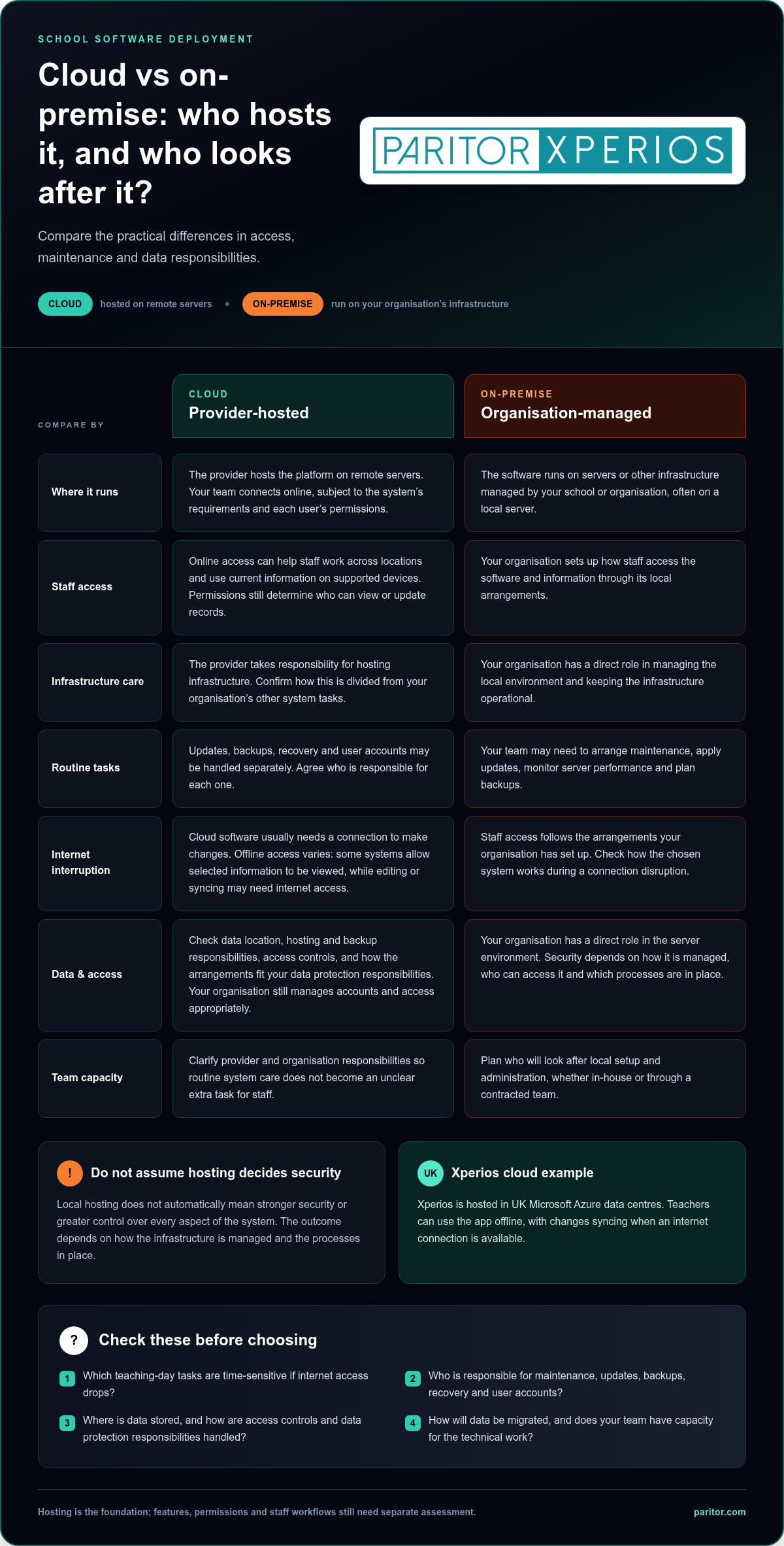
- Cloud: The provider hosts the platform on remote servers. Your team accesses it online, according to the system’s requirements and each user’s permissions.
- On-premise: The software runs on servers or other infrastructure managed by your organisation. Your team is responsible for the local setup and administration.
What does cloud-based school software mean?
A cloud-based platform is hosted on remote servers rather than on a server at your premises. Administrators and teachers connect online to use it, which can provide access to current information across supported devices and locations. The broad concept of Cloud computing covers many services. For school administration, the key point is that the provider hosts the software infrastructure.
Hosting doesn’t decide what the platform can do. Timetables, lesson records and financial information are software functions; permissions determine who can view or update particular records. For example, a teacher working across schools may need access to teaching information, while an administrator may have different responsibilities. Your organisation still needs to manage accounts and access appropriately.
What does on-premise school software mean?
With on-premise software, the application runs on infrastructure managed by your school or organisation, often on a local server. Staff access it through the arrangements your organisation has set up, and your team takes responsibility for system administration. This can include keeping the local environment operational and managing the technical tasks that support it.
Local hosting doesn’t automatically mean stronger security or greater control over every aspect of the system. Those outcomes depend on how the infrastructure is managed, who can access it and what processes are in place. Your organisation has a direct role in the server environment, and needs the people and capacity to look after it.
Think of deployment as the location and management of the software’s foundation, not a measure of its usefulness for music education. Either model can support administrative work, but the day-to-day experience depends on the software’s features, access arrangements and division of responsibilities. Hosting alone won’t resolve scheduling pressures or reduce repetitive administration. Compare who handles the practical work and how each model fits staff routines.
How hosting changes daily work, access and data responsibility
Hosting affects who takes care of the underlying technology and how staff reach the information they need during a busy teaching week. For a music service coordinating lessons across schools and venues, these responsibilities can influence how administrators manage timetable changes and how teachers find the details they need between sessions.
Who manages maintenance and system changes?
With local servers, your organisation generally needs to manage the infrastructure that keeps the software available. This can include arranging maintenance, applying updates, monitoring server performance and planning backups. The work may sit with in-house IT staff or a contracted team. Either way, assign responsibility for each task and decide how staff will report issues.
Cloud hosting shifts responsibility for the hosting infrastructure to the software provider, but the division of work can vary. Responsibilities for software updates, backups, recovery and user accounts may be handled separately. Set out who does what for your chosen system, so routine care doesn’t become an unclear extra task for teaching or administration staff.
How do access and continuity affect teaching teams?
Remote access can help administrators coordinate work across locations and give peripatetic teachers access to relevant information between lessons. It can also help staff maintain accurate peripatetic teacher timetables as teaching arrangements change. The benefit depends on the system’s access arrangements, supported devices and permissions for each user.
Cloud software usually needs an internet connection for users to make changes. If connectivity drops, a teacher may need to wait before updating a lesson record or changing a timetable. Identify which activities are time-sensitive and agree how to record urgent changes until the system is available. This reduces the risk of administrators and teachers working from different information.
Offline access differs between systems, so base your continuity plan on the tasks staff need to complete. Some platforms may allow selected information to be viewed without a connection, while editing or syncing records may require internet access. Consider the real teaching-day scenarios: a teacher checking a schedule, an administrator updating attendance or a team responding to a timetable change.
Data sovereignty means data is stored within a specific national jurisdiction. For UK organisations, data location is one part of data handling. You also need to understand hosting and backup responsibilities, access controls and how the arrangements fit your organisation’s data protection responsibilities.
To see how cloud hosting can support music administration across varied teaching schedules, explore Xperios for music services.
Cloud vs on-premise school software: compare the criteria that matter
There’s no single deployment model for every music service. The right choice depends on how your team works, who can manage the technology and what arrangements protect access to information. Use this comparison to identify practical trade-offs, rather than treating either model as the automatic winner.
| Criterion | Cloud | On-premise |
|---|---|---|
| Hosting responsibility | The provider hosts the platform and its infrastructure. The division of responsibilities should be clear. | Your organisation manages the local infrastructure, directly or through an appointed IT team. |
| Access | Staff can access the platform remotely when they have a suitable connection, device and permission. | Access depends on how the local system is set up, including whether staff can use it away from the organisation’s network. |
| Maintenance | The provider manages the hosting infrastructure, but arrangements for updates, backups and other tasks can vary. | Your organisation plans and manages maintenance, updates and backups, or assigns those tasks to an IT team. |
| Data handling | Data is held within the provider’s hosting arrangement. Consider its location, controls and commitments. | Data is held on infrastructure managed by your organisation. You oversee the related arrangements and safeguards. |
| Operational fit | May suit teams that need access across locations and want hosting infrastructure managed externally. | May suit teams with the capacity and processes to manage local infrastructure and access. |
Which model fits your organisation’s IT capacity?
Look beyond organisation size. A small music service with established IT support may be equipped to run local infrastructure, while a larger organisation may prefer to have a provider manage hosting. Identify who will monitor system health, coordinate updates, arrange backups and respond to issues. If these tasks depend on one person’s spare time, local hosting could add pressure to an already busy team.
Cloud hosting changes who manages the infrastructure, not the need for good governance. Your organisation still needs clear user access practices and an understanding of its responsibilities for the information it handles. Assign ownership for each task before comparing models.
How should you assess security and data protection?
Look at practical evidence rather than relying on labels. Consider where information is hosted, how access is managed, which security controls are described and what commitments apply to the service. For UK organisations, assess data sovereignty alongside security measures and your own data protection responsibilities. The location of stored information is one factor, not proof on its own that an arrangement meets your organisation’s requirements.
These checks sit alongside broader operational needs, from coordinating teaching to keeping administration organised. The music service management software guide can help you consider how deployment fits the system your team relies on. Use the comparison to identify which responsibilities your team can manage and what access staff need in practice.
How to decide: a practical deployment readiness check
Make the deployment choice after mapping how your music service works today. List the tasks staff handle, the access they need and the technical responsibilities your organisation can sustain. This creates a practical basis for comparing cloud and on-premise options and planning implementation around teaching.
What should you map before choosing a deployment model?
Start with daily work, not technology. Record how staff manage scheduling, attendance, communications, invoicing and reporting. Note where handovers or repeated data entry create extra administration. This picture shows what a new system must support and which routines may need to change.
- Map your workflows. Note who creates and updates lesson schedules, records attendance, handles parent communications, processes invoices and prepares reports.
- Identify users and access needs. List who needs the system, which devices they use and where they work, including teachers moving between schools or teaching locations.
- Set out infrastructure responsibilities. Identify who could manage local servers and related tasks, or which hosting duties you expect a cloud provider to handle.
- Review data protection requirements. Consider the pupil, parent, staff and financial information you handle, the access practices you need and your organisation’s data protection regulations.
- Assess internet reliability. Identify where staff need to view information or make changes, and how interruptions could affect those tasks.
- Check migration complexity and capacity. Review the condition and format of legacy records, available staff time and the technical support you can assign to the change.
How can you prepare for a move to cloud software?
Use your workflow map to decide what to move into the new system, what to archive and how to review migrated records. Data quality matters: inconsistent pupil details or outdated timetable records can complicate setup and early use. Allow staff time to plan, review information and learn the tasks relevant to their roles.
Plan training around the responsibilities of administrators, teachers and other platform users. Xperios implementations can take as little as three or four weeks, depending on the organisation’s size, migration complexity and team availability. This is a planning guide, not a fixed timetable. Readiness and staff capacity affect implementation.
Consider the wider operational needs of your organisation when assessing a system. The performing arts administration system guide offers further criteria alongside deployment. When you’re ready to explore a system for music-service workflows, discover Xperios for music services.
How Xperios cloud software supports music and performing arts administration
After weighing access, infrastructure responsibilities and readiness to move, consider how the system will support your daily work. Xperios is a cloud-based tuition and service management platform for music and performing arts organisations. It supports administrators coordinating tuition and schedules, alongside teachers working across locations, with related administrative tasks managed in one system.
What does Xperios offer music organisations?
Xperios modules include Tuition, Schedules, Finances and Resources. They support tasks such as organising teaching activity and managing service information. Bringing these tasks together can reduce repetitive administration and leave staff more time to support teachers and learners.
Instrument records are another part of music service operations. If your team needs to organise information about instruments and their upkeep, an instrument inventory management guide can help you consider asset management alongside tuition administration.
What should readers know about Xperios access and safeguards?
Xperios data is hosted in UK Microsoft Azure data centres. The data centres have ISO 27001 accreditation, and the platform has a 99.9% uptime SLA. Built-in GDPR compliance tools support data handling. Consider these details alongside your own access practices and the responsibilities set out in your organisation’s data protection procedures.
Parents and teachers can access the mobile apps through a web browser or iOS app. The system works on Windows 10. These options can help you plan which devices staff will use for their roles.
For a music or performing arts organisation, cloud vs on-premise school software comes down to fit: which model supports your workflows, staff needs and capacity to manage infrastructure? Xperios provides a cloud option with teaching administration features for music services. Map the tasks staff need the system to support, identify who needs access and plan how information and users will move into the new system. Explore Xperios to see how its approach could fit your organisation’s administration.
Make your next step work for your team
The right choice in cloud vs on-premise school software is the one your staff can support confidently while keeping teaching and learner needs at the centre. Turn your readiness notes into clear priorities: what must work smoothly, who needs access and which responsibilities your organisation can manage over time.
Xperios is built on 25 years of tuition-management experience, with over a million lessons managed. It supports the administrative demands of music and performing arts organisations, helping your team spend less time on repetitive tasks and more time supporting teaching.
Ready to assess the fit for your workflows? Explore Xperios for your organisation.
Frequently Asked Questions
Can cloud-based school software and on-premise systems work together?
Yes, some organisations use a mix of cloud and locally hosted systems, but the setup depends on how information moves between them. For example, a music school might keep an existing finance system while using a cloud platform for lesson administration. Map which system holds each record, who updates it and how staff can avoid entering the same information twice. Include integration requirements and responsibilities in your plan.
Is cloud-based school software suitable for a small music school?
It can be, if shared access and avoiding responsibility for local server infrastructure suit your school’s needs. Size alone doesn’t settle whether cloud vs on-premise school software is the better fit. Consider whether teachers need information away from the office, how reliable internet access is where they teach and who will manage user accounts. A small school with varied teaching locations may have different priorities from one with a single site and established IT support.
Can cloud school software be accessed on different devices?
That depends on the platform’s supported devices, browsers and apps. Match those options to the tasks each role needs to complete. In Xperios, parents and teachers can access the system through a web browser or iOS app, and the system works on Windows 10. An administrator might prepare schedules on a computer, while a teacher uses mobile access between lessons. Don’t assume other operating systems or apps are supported.
What happens to school software access during an internet outage?
Some cloud functions may be unavailable during an outage, so plan around what staff need to do. Xperios teachers can use the app offline, and their changes sync when internet access returns. Users need to be online to make changes to information, although reports can be viewed offline. Agree which tasks teachers can complete without a connection and how they’ll handle urgent timetable or attendance updates until service returns.
Does moving school software to the cloud remove the need for staff training?
No. Staff need to learn the system’s everyday workflows, permissions and processes, regardless of where it’s hosted. Plan role-specific training: administrators may need to practise managing records, while teachers focus on the tasks they handle during teaching. Xperios provides free training resources, interactive training modules and built-in help. Give users time to practise with realistic examples and show them where to find guidance as routines change.
How can a school assess whether its software provider is reliable?
Assess documented service commitments, data-handling information and support arrangements. An uptime SLA describes a service commitment, not a promise that interruptions cannot happen. Understand its scope and how reported issues are handled. Paritor states a 99.9% uptime SLA and hosts Xperios data in UK Microsoft Azure data centres. Consider these facts alongside the documented approach to access and service support.