

A music service can be full of music and still be held together by disconnected systems. When pupil details, lesson schedules, staff updates, instrument records and invoices live in different places, routine admin can take time away from teaching. The right tools for music service managers should support tuition workflows, not just artists, playlists or music libraries.
If you recognise the repeated work of checking schedules, recording attendance and chasing paperwork, you’re likely looking for a simpler way to coordinate your service. For teams managing peripatetic teacher timetables or instrument loans, connected records can make day-to-day decisions easier. This article explains which tool categories match your responsibilities and how to weigh separate apps against a connected management platform.
You’ll see how scheduling, finance, communications and instrument records can work together, and what to consider for secure administration and ease of use. We’ll also look at how a cloud-based platform such as Xperios for Music Services brings key workflows together, helping your team spend less time managing information and more time supporting music education.
Key Takeaways
- Start with the everyday work your team needs to coordinate, from lesson schedules and attendance to instruments and administration.
- Choose tools for music service managers by matching each category to a specific task, rather than selecting software based on music-related features alone.
- Compare standalone tools with a connected platform by considering duplicated records, staff access and how information moves between tasks.
- Plan a careful introduction by mapping workflows, reviewing data protection and reporting needs, and supporting staff as they adapt.
- See how Xperios for Music Services connects tuition, contacts, schedules, finances, reports and communications in a cloud-based platform.
Tools for music service managers: define the work before choosing software
Coordinating music teaching means keeping several moving parts aligned: pupils need lessons, teachers need clear schedules, instruments need to be available and service records need to stay up to date. If each task is handled in a different place, even a straightforward change, such as a lesson cancellation, can require updates across several records. Before comparing tools for music service managers, define the work your team is responsible for and where information needs to connect.
The remit varies with the size of the service and the way it delivers tuition. A small team may manage a compact set of schedules and pupil records, whilst a larger organisation may coordinate teachers across multiple locations, instrument loans, finance and reporting. The right toolkit reflects those workflows, not the number of features in a software package.
What does a music service manager need to coordinate?
Your operational picture usually includes people, teaching activity and the records that support delivery. Each responsibility points to a practical tool category:
- Pupils and contacts: organised records help staff find relevant details without searching through separate files.
- Teachers and lessons: scheduling tools help coordinate availability, locations and lesson changes.
- Attendance: a consistent way to record attendance keeps lesson activity visible to the team.
- Communications: tools for sharing updates help staff, pupils and families stay informed.
- Instruments and service records: asset records can show what is on loan and preserve useful information, such as maintenance history.
- Administration and reporting: financial and reporting tools help managers oversee routine processes and review service information.
These responsibilities are linked. A teacher’s timetable, a pupil’s lesson record and an instrument allocation may all relate to the same teaching activity. When information sits in disconnected systems, staff can end up entering the same details more than once or relying on manual checks to spot changes. Identify which records need to share information before comparing standalone tools with a connected platform.
Music service management is not artist management
The phrase “music manager” can refer to different roles. An artist manager supports an individual performer’s career and professional relationships, including areas such as bookings, promotion and business opportunities. The Music Manager Role and Responsibilities overview describes that career-focused role. Music service managers, by contrast, oversee the organisation of tuition delivery and its administration.
Music-service management tools organise pupils, teachers, lessons, instruments and administration; artist-management tools support performers’ careers and professional relationships.
This distinction matters when you assess software. A tool designed around playlists or an artist’s contacts may help with music-industry tasks, but it won’t necessarily match the day-to-day requirements of a tuition service. Look for tools that reflect education workflows, such as pupil and teacher records, lesson scheduling, attendance, communications and service reporting. Start with what your organisation needs to coordinate, then choose a toolkit that supports those responsibilities and gives your team a clearer view of its work.
Match music service management tools to the work your team does
Once you’ve mapped your responsibilities, match each tool to a part of the service’s daily workflow. A scheduling system should help staff coordinate teaching, not simply store calendar entries. Contact records, attendance, finance and instrument information each serve a different purpose, but updates are easier to manage when staff don’t have to re-enter the same details.
A music service manager’s core toolkit groups around four workflows: planning tuition, keeping people informed, managing finance and maintaining service records. Use that structure to assess what your team needs now and where handovers between tasks create extra admin.
Tools for tuition, timetables and communication
Scheduling tools need to reflect how your service delivers lessons. For individual tuition, that means coordinating pupils, teachers and lesson times. Group teaching may also require visibility of participants and available rooms. If teachers work across several schools, peripatetic teacher scheduling needs to account for location as well as availability. Look for a timetable staff can act on and a clear process for notifying people affected by a change.
Attendance tools help keep a record of lessons delivered, whilst teacher updates can flag changes to pupil or lesson information. A teacher portal is a mobile-responsive interface for teachers to log attendance, progress and instrument updates. It gives teachers a practical route to submit information from their teaching day and helps administration work from consistent records.
Communication tools should support the messages that accompany these workflows: lesson changes, service updates and information for families or staff. Consider whether messages can be associated with the relevant pupil, group or lesson. Keeping context with a communication makes follow-up clearer than relying on separate inboxes and spreadsheets.
Tools for finance, instruments and service records
Financial administration connects several routine tasks. Invoicing records what is due, payment processing records what has been received, and financial reporting helps you review income and expenditure. When these tasks relate to relevant pupil, lesson or hire information, staff spend less time reconciling separate records. Choose tools that fit your organisation’s processes and reporting needs, and check that staff can trace a transaction back to the information they need.
Instrument records serve a different but related purpose. They can help staff follow an instrument’s allocation or loan, note its condition and retain maintenance history. This information supports practical decisions about availability and follow-up. If instrument oversight is a major part of your role, look at how instrument inventory management software can organise asset records alongside tuition administration, rather than treating each instrument detail as an isolated entry.
Some music organisations also deal with licensing or royalty matters. The U.S. Copyright Office’s Music Modernization Act information explains a United States framework, so it should not be treated as guidance on UK requirements. For the daily work of a UK tuition service, prioritise tools that support your teaching, finance and record-keeping workflows.
With those categories in view, compare how separate tools or a connected system would support your team. Xperios supports music service administration with tools for bringing tuition workflows together.
Standalone music tools or one connected management platform?
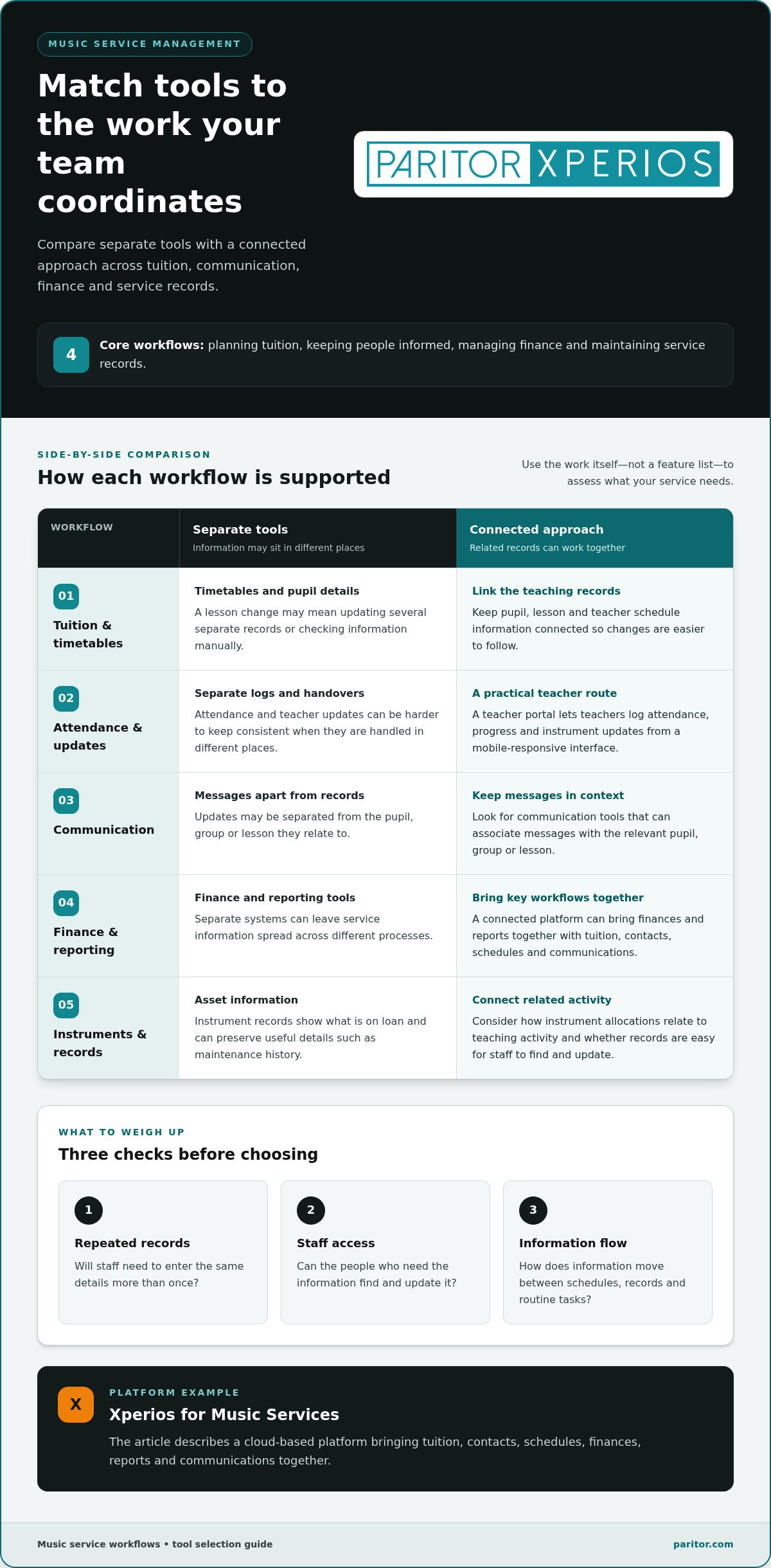
Separate apps can work well when a task is narrow and handovers are straightforward. But if a lesson change affects the timetable, attendance record, family communication and invoice, separate systems may mean updating the same information several times. A connected management platform can link these workflows and reduce repeated data entry. It won’t remove the need for clear processes, but it can make information easier to follow across the service.
Use the comparison below to assess each option against the work your team actually does. Focus on how records move between tasks, not simply how many features a tool offers.
| Task | Separate-tool approach | Connected-platform approach | Decision question |
|---|---|---|---|
| Tuition and schedules | Lesson details and timetables may sit in separate calendars or systems. | Tuition and schedule information can sit within linked workflows. | How often do staff copy or update lesson details? |
| Finance | Invoicing and payment records may need to be reconciled with pupil or lesson information. | Financial tasks can relate to relevant tuition records. | Where does your team spend time matching records? |
| Communications | Messages may be kept apart from the pupil, group or lesson they concern. | Communications can be managed alongside service information. | Can colleagues see the context for a follow-up? |
| Instruments | Loan and maintenance details may be stored separately from teaching records. | Instrument records can be considered as part of wider service administration. | Who needs instrument information, and when? |
When separate tools may fit a music service
A standalone tool may suit a clearly defined need, such as maintaining a simple shared calendar or recording one specific type of information. It can be a practical choice if the workflow is self-contained and staff know where its records belong. Before adding another system, check whether your current processes already connect the relevant information. If they do, another tool may add upkeep without solving a real gap.
When connected tools may better support service delivery
Connected workflows may be more useful when a change in one area needs to inform others. A pupil’s lesson, teacher schedule, payment record and instrument loan can all relate to service delivery. Linked modules can reduce the need to re-enter shared details and keep work visible in its operational context. The benefit depends on how well the system reflects your actual processes.
Portals can also give different groups a suitable route into service information. A teacher portal, parent portal and student portal support distinct interactions, rather than requiring everyone to use the same interface. Instrument records, including maintenance history, can sit alongside the wider service picture, helping staff connect an asset to its loan and upkeep records.
For tools for music service managers, the best fit depends on your responsibilities, handovers and existing records. Choose separate tools where a task is genuinely independent; consider a connected platform where information repeatedly crosses between tuition, finance, communications and instruments.
Choose and introduce music service tools without disrupting teaching
Choosing new software is only part of the work. A careful introduction helps your team move from existing processes to a clearer way of managing service information without losing sight of lessons and pupils. Start with daily tasks, then assess access, data, reporting and staff support.
Assess workflows, users and information needs
Map what happens repeatedly, from setting up a lesson to recording attendance, handling a payment or updating an instrument record. Mark where information is entered more than once, passed between colleagues or kept in separate files. These points show which workflows need to connect and which can remain independent.
Then identify who needs access and what they need to do. Administrators, teachers, parents and pupils may need different views or tasks. Review data protection tools against your organisation’s requirements, including how personal information is handled and where it is hosted. Data sovereignty means storing data within a specific national jurisdiction, which can be relevant to your assessment. Xperios data is hosted in UK Microsoft Azure data centres, which are ISO 27001 accredited.
Set out the reports your team relies on, who needs them and how often. This helps you assess whether a system can support existing oversight, rather than changing useful reporting processes without a clear reason.
Plan migration, training and adoption
Before selecting tools for music service managers, decide which existing records need to move and which can be archived or left in their current location. Assign responsibility for decisions about data, workflows and access. A named internal lead can gather questions from staff and help keep the introduction aligned with teaching activity.
Use this ordered process to guide the decision:
- Map workflows: record recurring tasks and note where information is duplicated or handed over.
- Define access: list user groups and the information each group needs to view or update.
- Set requirements: prioritise data protection, data sovereignty, reporting and fit with current processes.
- Plan records: identify migration priorities, decision-makers and the team members responsible for preparing information.
- Support staff: schedule introductions to the new processes, allow time to practise and identify where users can find built-in help and support.
Implementation timing varies with the organisation’s size, the complexity of migrating records and staff availability. Plan around teaching commitments, and introduce changes in a way that gives colleagues time to learn their part of the workflow. Training resources, built-in help and clear support arrangements make it easier for staff to raise questions and build confidence as they use the system.
With your requirements mapped, explore Xperios music service management as a way to bring tuition administration into a cloud-based platform with information hosted in the UK. A considered choice can help your team spend less time maintaining processes and more time supporting teaching.
How Xperios brings music service management tools together
Xperios is a cloud-based platform for music tuition and service management, designed around the practical work of running a service rather than managing an individual artist’s career. Its modules support day-to-day administration, from organising tuition and contacts to handling schedules, finances, reports and communications. This gives your team a shared operational picture and reduces the need to move between disconnected records.
Xperios modules bring tuition, people, schedules, finance, reporting and communications into a toolkit shaped around music-service administration. The aim is to support your existing responsibilities and help staff spend less time on repetitive administration.
Connect tuition workflows with service administration
Xperios for Music Services supports music tuition and service management. Relevant offerings include Xperios Financial Management and Xperios Instrument Management, alongside Xperios Teacher Portal, Xperios Parent Portal and Xperios Student Portal. These support different parts of the service, from administration and finance to access for teachers, parents and pupils.
Each portal serves a distinct user group, so access can be relevant to the role rather than assuming everyone needs the same view. Teachers can use the teacher portal to support their work, while parent and student portals provide their own routes into service information. The platform also includes Tuition, Contacts, Schedules, Reports and Communications modules, helping teams connect related tasks. When assessing a platform, consider which roles need each area and how the information supports your existing processes.
Reports can help your team review service information, while Communications supports the day-to-day flow of updates. Together with Contacts and Schedules, these modules provide a way to organise information around the work staff need to complete. Consider how each module fits your processes and which colleagues need access to it.
Support instrument records and informed adoption
Instrument management adds an important operational layer. Xperios Instrument Management supports instrument records, including maintenance history, so staff can refer to upkeep information when managing service resources. Connecting those records with tuition administration can help your team consider instrument needs in their teaching context, rather than treating asset information as an isolated task.
Teachers can use the app offline, and changes sync when internet access is available. Users need to be online to make changes to information. Mobile access is through a web browser or iOS app, and Windows 10 is required. These access details can help you plan how staff will use the system within their working arrangements.
Xperios has managed over a million lessons to date. Its modules support the interconnected tasks behind music tuition, while training resources and built-in help support staff as they adopt the system. Assess how each feature fits the day-to-day work of your service and what your team needs to learn first.
Explore Xperios for Music Services to see how its tuition, finance, communication and instrument-management capabilities could support your organisation’s administration and leave more time for teaching.
Make your next step a practical one
The best tools for music service managers should fit the way your team works and protect time for its core purpose: supporting music education. You don’t need to change every process at once. Choose one recurring administrative task that regularly interrupts the working day, then consider what would make it easier to manage and how you’ll know the new approach is helping.
Bring the people who handle that task into the decision. Their experience can reveal process details that a software checklist may miss, from how updates are passed on to what information colleagues need at hand. Treat their feedback as part of the introduction, not an afterthought. A system is more useful when its workflows make sense to the people responsible for using them.
From there, build towards a toolkit that supports your wider service without losing sight of teaching. Explore Xperios for music service management and consider how its approach could fit your team’s next step. With a clear priority and staff involved, you can make progress at a manageable pace and give teaching more room in the working day.
Frequently Asked Questions
What is the difference between a music service manager and an artist manager?
The difference becomes clear when you look at the decisions each role makes. If you’re arranging teaching across a service, assess tools for tasks such as allocating lessons and tracking attendance. If you’re supporting a performer, the relevant work may centre on career opportunities and professional relationships. Before choosing software, write down the decisions your role needs to support, then exclude features designed for a different kind of management.
Can music service management software work for a small organisation?
Yes, if the software’s functions fit the work your organisation needs to do. A small team might begin by listing its regular tasks, then identify which are currently handled in spreadsheets, email or calendars. Xperios offers a Community plan for up to 50 pupils. Focus your assessment on the tasks the team needs to manage, rather than selecting a system solely by organisation size.
Can teachers use Xperios without an internet connection?
Yes, teachers can use the app offline, and changes sync when internet access is available. Users need to be online to make changes to information, although reports can be viewed offline. For a teaching visit with unreliable connectivity, decide in advance which updates can be completed later and who will follow them up. This helps prevent an offline period from becoming a missed handover. Make sure your team understands the process for completing updates once internet access is available.
How can a music service keep instrument maintenance records organised?
Use a consistent record for each instrument and agree how staff will identify it when documenting work. A clear process might include recording the date, the action taken and any follow-up needed, then assigning responsibility for the next step. Keep the record linked to the instrument rather than relying on an individual colleague’s inbox or memory. This makes it easier for staff to continue the process when responsibilities change.
What should a music service consider before moving records into cloud-based software?
Start by identifying which records support current work and which need to be retained for reference. Assign a person to prepare each set of records and another to review it before migration. Consider how staff will access information during the transition, and schedule training around teaching commitments. The time needed varies with organisational size, migration complexity and team availability, so build a realistic plan around those factors.
How does Xperios support data protection for music services?
Xperios includes GDPR compliance tools, AI anonymisation and automatic data deletion based on user-defined settings. Decide who in your organisation will set and review those deletion rules, and how staff should handle requests to amend or remove information. Documenting these steps can help colleagues apply the platform consistently. The tools support your processes, but your organisation remains responsible for its own data protection procedures.
Can Xperios support online payments and invoicing?
Yes, Xperios supports online payment processing, automated invoicing and direct-debit support. Available payment integrations include Worldpay, Stripe, Sage Pay and Schooble Pay. To assess how these functions fit your service, map what happens when an invoice is raised, a payment arrives or a discrepancy needs follow-up. This will help you identify which routine steps the platform can support and where your team still needs a separate procedure.