

What if taking attendance during a music lesson could be quick and straightforward, rather than another task to finish later? Tracking student attendance online can replace paper registers and disconnected records with a consistent way to record who attended, while keeping the focus on teaching.
If you teach or manage classes, attendance information needs to work for both the people in the lesson and the team overseeing the service. Teachers need a clear way to mark attendance; administrators need reliable records they can review across students, classes and teachers. When those details sit in separate places, checking and updating them takes time.
This guide explains how to record, review and manage attendance online for music tuition. You’ll see how teacher access to current information supports consistent record-keeping, and why attendance works best as part of scheduling and bookings. Xperios brings these capabilities together in a cloud-based platform, helping you spend less time on repetitive administration and more time supporting teaching.
Key Takeaways
- Tracking student attendance online makes lesson records easier for teachers to enter and administrators to review.
- Keep attendance recording separate from progress tracking so each record has a clear purpose.
- Connect attendance with lesson schedules and organisational records to manage information across your service.
- Agree who records attendance and who reviews it, then keep the process simple and consistent.
- Xperios brings attendance tracking together with scheduling and bookings for music and performing arts services.
Why track student attendance online in a music service?
Tracking student attendance online means recording whether each student attended a scheduled music lesson in a digital record that the service can review. It gives teachers and administrators a consistent view of attendance without relying on paper registers or piecing together messages later. Attendance management covers how organisations record and review attendance. In music tuition, the process needs to account for individual lessons, groups and ensemble sessions.
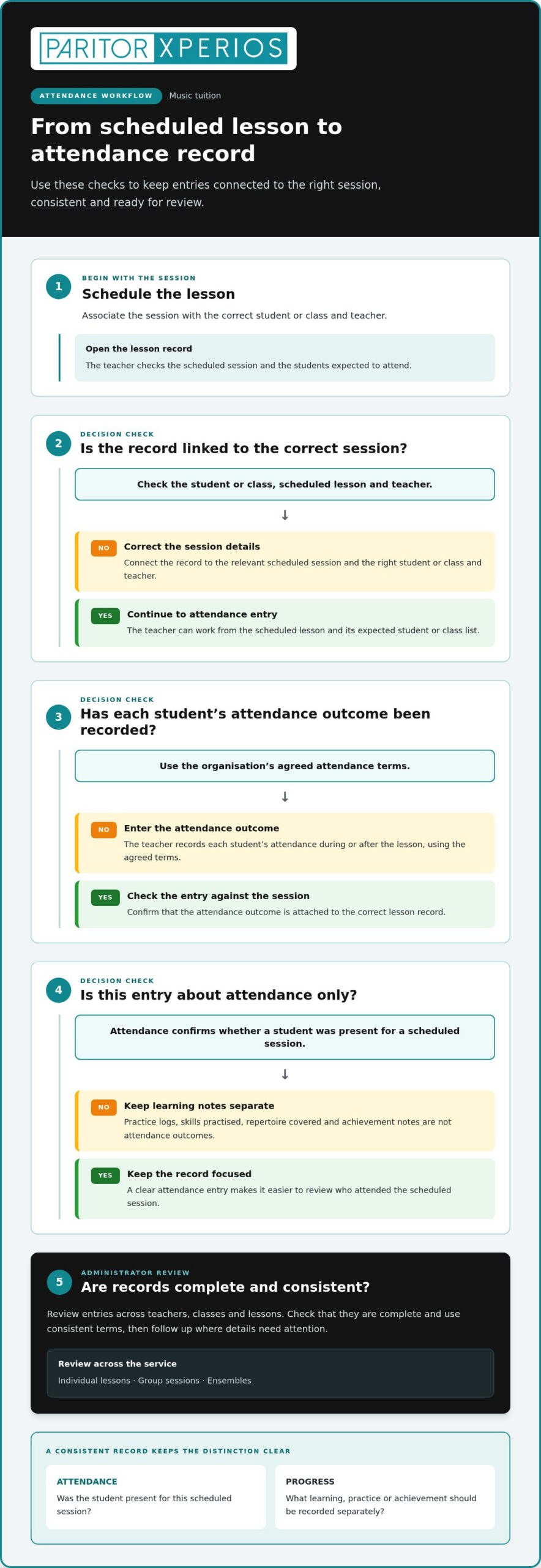
Attendance is different from progress. Attendance confirms whether a student was present for a scheduled session. Progress records relate to learning, such as skills practised, repertoire covered or achievements. Keep these records distinct so a missed lesson is not mistaken for a lack of progress, and a progress note is not treated as confirmation that a lesson took place.
What information belongs in an online attendance record?
Keep the core entry focused on the student, the scheduled lesson and the attendance outcome. Agree on a short set of terms and apply them consistently across teachers and classes. If one teacher records “absent” and another uses a different label for the same situation, it becomes harder to compare entries and identify what needs review.
- Student: identify who the record relates to.
- Scheduled lesson: connect the entry to the relevant session.
- Attendance outcome: record the agreed status for that session.
Practice logs and achievement notes serve different purposes, so keep them separate from the attendance outcome. A student may practise between lessons or make progress over time, but neither detail confirms whether they attended a particular scheduled session.
Why does attendance tracking matter for music tuition?
Music services deliver different kinds of provision, each with its own attendance picture. An individual lesson has one student’s attendance to record. A group session involves several students in the same class, while an ensemble has its own participant list. A consistent method helps teachers record each type of session in a way administrators can review.
Without a shared process, administrators may need to collect records from teachers across different classes, check for missing entries and interpret inconsistent terms. That makes it harder to judge whether records are complete or review patterns over time. Consistent entries let administrators review attendance across lessons, groups and ensembles, while reducing the need for teachers to clarify what they meant.
For example, a service can check whether scheduled individual lessons have an attendance outcome, then review group and ensemble records using the same agreed terms. This gives administrators a clearer overview of provision without making assumptions about why a student was absent. For music services, online attendance tracking is a shared digital record of student attendance at scheduled lessons, groups and ensemble sessions.
How does online student attendance tracking work from lesson to record?
A useful process starts with the scheduled music lesson and ends with a record an administrator can review. Teachers enter attendance against the right session rather than reconstructing it later from paper notes or messages. Keep the steps clear enough to follow during a busy teaching day, while allowing for individual lessons, classes and ensembles.
A practical lesson-to-record sequence is:
- Schedule the lesson. Associate the session with the correct student or class and teacher.
- Open the lesson record. The teacher checks the scheduled session and the students expected to attend.
- Enter attendance. During or after the lesson, the teacher records each student’s attendance using the organisation’s agreed terms.
- Review the entry. The teacher checks that the outcome is attached to the correct session.
- Review records across provision. Administrators check entries across teachers, classes and lessons, then follow up where details need attention.
This is a working sequence, not a fixed rule. Your attendance policy and lesson setup determine when teachers make entries, which outcomes they use and how administrators review them. Agreeing these details in advance helps keep records consistent without adding unnecessary steps.
How can teachers record attendance during a lesson?
A student list linked to the scheduled lesson helps teachers check who is expected and record the attendance outcome. A teacher portal provides a mobile-responsive interface for teachers to log attendance. They can enter the record during the session or afterwards, depending on your process. The task is to record attendance, not assess learning or add progress notes.
For an individual lesson, the teacher checks the student’s entry. For a group session, they work through the class list. This keeps the task focused and makes it easier to complete records consistently across different types of music tuition.
How do administrators review attendance records?
Administrators can review entries across lessons, classes and teachers to check that records are complete and use consistent terms. With real-time data access, updated information is available across devices, helping staff work from current records rather than waiting for registers to be collected and entered elsewhere. Reviewing entries alongside scheduled provision can also help administrators spot gaps or patterns that may need follow-up.
From scheduled lesson to administrative review, online attendance tracking gives teachers a clear way to record attendance and administrators a shared record to check. Xperios brings attendance tracking together with scheduling and bookings in a cloud-based platform, supporting this wider workflow. Explore how a music service platform can fit attendance into day-to-day administration.
Is a basic attendance tracker enough for a music service?
A simple online register may suit one class with a consistent timetable and a straightforward attendance process. But a music service with different lesson types, teachers and schedules may need attendance records linked to wider organisational information. The right approach depends on how varied your provision is and how teachers and administrators need to use attendance data.
A standalone tracker focuses on recording attendance. That may be enough if one teacher manages one class and reviews the register directly. As provision becomes more varied, recording attendance is only part of the job. Administrators may also need to relate entries to scheduled lessons, classes and staff records instead of gathering information from separate places.
| Consideration | Standalone tracker | Attendance linked to wider records |
|---|---|---|
| Workflow fit | May suit a single, consistent class. | Can connect attendance with schedules and organisational records. |
| Teacher access | Teachers need a clear, direct way to enter outcomes. | Teachers can access the lesson information they need to record attendance. |
| Reporting | Review may focus on the register itself. | Records can be reviewed across lessons, classes and staff. |
| Data protection | Consider how student information is handled and who can access it. | Access should suit each person’s role and your data protection regulations. |
When can a simple online register work well?
A small teaching setup with one class, a stable schedule and few people entering records may not need links to wider systems. In that case, a simple register can make the process easier to follow. Ease of entry matters: if teachers record attendance themselves, the steps should fit naturally into their lesson routine.
There’s no need to add complexity for its own sake. Start with the records you genuinely need to maintain and review.
When should you look beyond a standalone tracker?
Consider how attendance fits into the whole service if several teachers manage scheduled lessons, or administrators oversee different classes and types of provision. Check whether staff copy details between tools or spend time matching entries to schedules. If they do, a connected approach can reduce separate record-keeping and make reviews more straightforward.
Include data protection in your assessment. Student attendance is personal information, so consider how it is stored, who needs access and whether access reflects each person’s role. Your organisation’s data protection regulations and processes should guide those decisions. Tracking student attendance online should suit the scale and variety of your music service, not impose a larger system than your day-to-day work requires.
How to build a reliable online attendance process
A reliable process makes clear what teachers record, when they do it and how administrators check that lesson records are complete. Keep the routine practical: it should support accurate administration without interrupting teaching or creating extra work for staff.
Use this sequence to establish a consistent approach:
- Agree the attendance terms. Choose a short set of outcomes that teachers can apply to the lessons and activities your service runs. Explain what each term means so staff use them consistently.
- Assign responsibilities. Decide that teachers record attendance for the sessions they teach, while named administrative staff review records and follow up missing or unclear entries.
- Show teachers the process. Explain where to enter attendance and when to complete it. Keep the steps simple enough to fit around a lesson, whether teachers update records during a session or afterwards.
- Set a review routine. Agree when administrators check for lessons with no attendance entry or records that need clarification. Follow up through your usual internal process.
- Review and refine. If staff regularly find a step confusing or time-consuming, discuss how to simplify it while keeping the record clear.
How should a music service standardise attendance entry?
Consistency starts with shared terms and clear instructions. Explain the agreed outcomes before routine online recording begins, and give teachers a simple reference for applying them to their sessions. This helps avoid different interpretations between teachers or classes. Keep the entry focused on attendance; other lesson information should follow its own process.
Build the routine around teaching, not the other way round. For example, a teacher might record attendance after finishing a session if that better suits the lesson format. The key is that staff understand the same process and know who to approach internally if an unusual situation does not fit the standard outcomes.
How can administrators keep records useful and secure?
Administrators can make record checks part of an existing workflow, such as reviewing lesson entries at an agreed point. Checking for blank or unclear records helps identify where follow-up is needed, without asking teachers to report the same information through several channels. Keep responsibilities clear: teachers enter the outcome, and administrators review the records and coordinate any follow-up.
Consider access as part of the review routine. Give staff access that suits their role and follows your organisation’s procedures, so teachers can carry out their work and administrators can oversee records appropriately. Your approach to student information should reflect the data protection regulations that apply to your organisation. This section offers practical process guidance, not legal advice; use your established data protection procedures when deciding how records are handled.
A clear routine can make tracking student attendance online more useful without turning it into another layer of administration. Explore attendance management for music services and see how a connected process can support your team’s day-to-day work.
How Xperios connects online attendance with music service administration
Tracking student attendance online is most useful when the record fits the practical workflow of running a music service. Xperios is Paritor’s cloud-based platform for music and performing arts services. It brings attendance tracking together with scheduling and bookings, linking lesson information with the administration around it.
For administrators, attendance becomes part of the wider service record rather than an isolated register. For teachers, a dedicated portal provides a direct way to log attendance. This creates a clearer flow of information between lesson delivery and administration, so your team can spend less time handling separate records and more time supporting teaching.
How does attendance fit alongside lessons and teacher access?
Scheduling and bookings provide context for attendance, helping teachers and administrators relate an entry to organised lesson activity. The teacher portal is mobile-responsive and gives teachers a place to log attendance. This supports a consistent route from lesson to record, while administrators can review information across the service.
The wider workflow matters because music provision can include different lesson arrangements and teaching staff. Connecting attendance with scheduling and bookings can reduce the need to manage these details as disconnected tasks. To explore the wider administrative context, consult the music service management guide alongside your own service processes.
What should you expect from a cloud-based platform?
A cloud-based platform is software hosted on remote servers, providing scalability and remote access. In practice, this means the system is hosted online rather than solely on a local computer, so users can access it remotely. Xperios is hosted on Microsoft Azure, and Paritor states that Xperios meets GDPR requirements.
These details help explain where the platform is hosted and its stated approach to data protection. You should still manage attendance information according to your organisation’s procedures and data protection regulations, including decisions about who can access records.
Xperios connects attendance with scheduling and bookings, while its teacher portal gives teachers a mobile-responsive way to log attendance. This joined-up approach can reduce the effort of keeping lesson records separate from wider administration. Explore how Xperios could support your music service workflow and give your team more time for teaching.
Make attendance work for your teaching team
Start by looking at how attendance information moves from each lesson to the people who review it. Notice where teachers spend time entering details, where records need chasing and which handovers could be simpler. This gives you a practical starting point, whether you’re refining an existing register or introducing tracking student attendance online.
A clear routine, supported by tools that fit your service, can reduce repetitive administration without making attendance recording harder for teachers. Xperios is designed for music services and brings attendance into the wider work of managing provision. Explore how it can support your organisation and a more connected approach to lesson administration.
Explore Xperios for Music Services and take a practical step towards spending less time on administration and more time supporting teaching.
Frequently Asked Questions
How do you track student attendance online?
Set a routine for entering attendance against each scheduled session, then check that each record is complete. For example, a teacher could review the day’s lesson list at the end of teaching and flag any session without an outcome. An administrator can follow up through the organisation’s usual process. Agreeing when entries are made helps prevent a backlog and makes records easier to review.
Can teachers record student attendance on a mobile device?
They can when the attendance system supports access from their device. Consider where teachers teach, what devices they can use and whether the entry steps are clear on a smaller screen. These practical details help your team decide how mobile access fits into its regular routine.
Is an online attendance tracker suitable for music lessons?
It can be suitable if its records and workflow reflect how your music service operates. Check whether the system can accommodate your lesson formats and the way you organise teaching, rather than assuming a general class register will fit every arrangement. Keep attendance separate from lesson notes and learning assessments. This helps staff understand what an attendance record confirms and what it does not.
What information should an online student attendance record include?
Include enough information to identify the student, the session and the attendance outcome, using the fields and terms your organisation has agreed. Keep entries relevant to attendance rather than adding unrelated personal detail. If staff need to explain an unusual entry, follow your organisation’s established process for recording that context. Clear, limited records are easier to interpret and keep the register focused on its purpose.
How can administrators review attendance across different teachers?
Use a consistent review routine to spot entries that are missing, unclear or recorded differently from the agreed process. For instance, an administrator might check a reporting period and list sessions that need internal follow-up. Ask the relevant teacher to clarify an entry through the usual channel, then update the record in line with your procedures. This keeps oversight focused on record quality without assuming why an absence occurred.
Is student attendance data stored securely in a cloud-based platform?
Cloud hosting is only one part of how information is protected. Consider the platform’s security and data-handling information alongside your organisation’s procedures for access, devices and record use. Give staff access appropriate to their responsibilities and review it when roles change. Xperios is hosted on Microsoft Azure, and Paritor states that Xperios meets GDPR requirements. Your data protection lead or established guidance can help assess whether your organisation’s own approach meets its requirements.
Can attendance tracking connect with lesson scheduling software?
Yes. Connecting attendance records with lesson schedules helps staff associate an entry with the correct session and spot scheduled lessons that still need an attendance outcome. This can reduce manual matching between separate records. Decide how your team will handle lesson changes so the attendance record remains clear if a session is moved or cancelled.