

What if the report you need starts with a better question, not another spreadsheet? Customisable reporting for music services is most useful when it helps you answer the operational and financial questions that matter to your team. Information can be spread across separate records and processes, standard reports may not show what managers or stakeholders need to know, and inconsistent data can make activity hard to interpret.
You shouldn’t have to spend hours gathering information before you can make a decision. Start by defining what you need to understand, such as service activity, attendance or income and expenditure. Then consider how consistent, organised information can make those answers easier to find, compare and explain.
This article explores how to shape reports around clear questions, reduce avoidable manual collation and use information to support planning. It also looks at how connected workflows in a cloud-based platform such as Xperios can organise the administration behind reporting, leaving you more time to focus on teaching and service delivery.
Key Takeaways
- Shape customisable reporting for music services around clear operational and financial questions, rather than exporting data without a specific purpose.
- Build more useful reports from accurate, consistent records across bookings, attendance, teacher activity, invoicing and instrument management.
- Choose summary, detailed or exception-focused views to match the decision you need to make.
- Set a practical reporting process by defining the question, selecting relevant data, assigning ownership and reviewing the result.
- Start with a small number of recurring reports, using organised service information to support planning whilst keeping teaching in focus.
What customisable reporting means for a music service
Customisable reporting for music services means shaping the information and its presentation around the questions your organisation needs to answer. You might choose a reporting period, group records by service area or start with a concise overview before examining individual details. The aim is not to produce more data. It is to make the right information easier for a particular reader to understand and use.
A large export can contain plenty of detail yet leave you with more work: sorting entries, checking what they mean and pulling out the points that matter. A useful report gives information a purpose by connecting records to a decision. That might mean reviewing lesson attendance, understanding booking activity or checking the status of instruments. Clear definitions and consistent categories help readers interpret the results with confidence.
Music services need to understand activity across connected areas. Teaching and attendance information can help managers review how lessons are running. Staffing and booking records provide context about delivery. Financial information supports oversight of income and expenditure, while instrument records help teams understand assets and maintenance history. This is distinct from the wider music industry, which includes areas such as recording and digital distribution. Here, the focus is the administration behind music education and service delivery.
Which questions should a music service report answer?
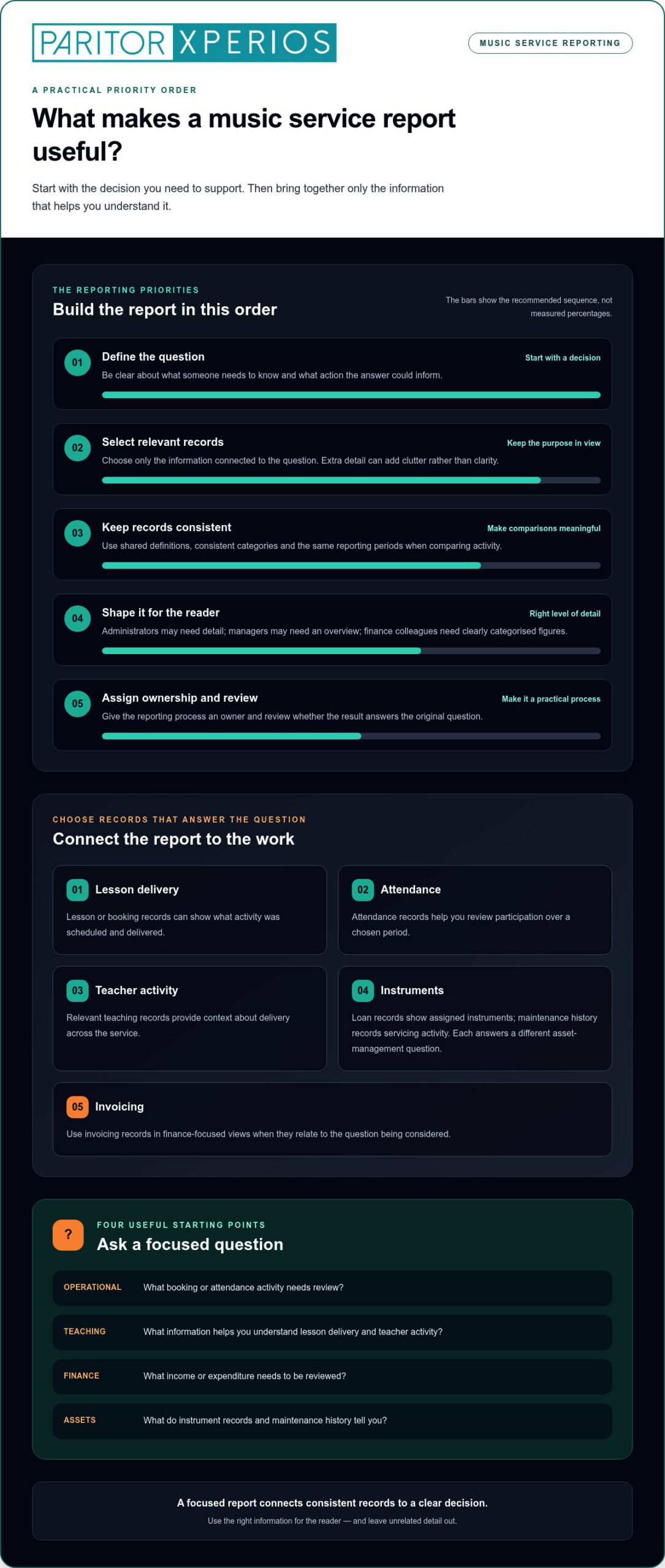
Start with a decision, not with an available chart or field. Ask what someone needs to know, what action the answer could inform and which records are relevant. Then identify the intended reader. Administrators may need detail to follow up activity, managers may need an overview for planning, and finance colleagues may need clearly categorised income and expenditure.
- Operational: What booking or attendance activity needs review?
- Teaching and staffing: What information helps you understand lesson delivery and teacher activity?
- Finance: What income or expenditure needs to be reviewed?
- Assets: What do instrument records and maintenance history tell you?
These questions keep each report focused. They also help you avoid collecting personal or administrative detail that does not serve its purpose. Before building a view, write down the decision it should support and the records needed to inform it.
How is customisable reporting different from financial reporting?
Financial reporting is the process of recording, categorising and analysing income and expenditure for an organisation. It answers finance-focused questions, such as what has been received or spent and how those figures are categorised.
Operational reporting has a wider focus. It may cover lessons, attendance, bookings, teacher activity and instruments. A manager could consider lesson activity alongside booking patterns when planning service delivery, while finance colleagues review income and expenditure separately. Related views can inform planning without turning every report into a finance report. This distinction helps you select relevant information for each reader and avoid adding unnecessary administration.
Build music service reports from consistent administrative data
Reports are only as useful as the records behind them. If the same lesson type, attendance outcome or instrument status is recorded in different ways, a report may group similar activity separately or make changes harder to interpret. Consistent records make comparisons more meaningful because like-for-like information can be reviewed across the same categories and reporting periods.
For music services, relevant information may sit across several parts of day-to-day administration. Bring together only the records that answer the question you are asking. A report about lesson delivery may need lesson and attendance information, whilst an instrument review may need loan details and maintenance history. Combining everything by default can add clutter rather than clarity.
What information might music service reports bring together?
Consider the records connected to the work you need to understand:
- Lesson delivery: Lesson or booking records can show what activity was scheduled and delivered.
- Attendance: Attendance records can help you review participation over a chosen period.
- Teacher activity: Relevant teaching records can provide context about delivery across the service.
- Instrument management: Loan records show which instruments are assigned, while maintenance history records servicing activity. These records are related, but they answer different asset-management questions.
- Invoicing: Invoicing records can inform finance-focused views when they relate to the question being considered.
Keep the purpose in view. If you are reviewing attendance, include the period and categories needed to understand attendance patterns, not unrelated instrument or invoicing detail. For asset planning, focus on instrument records and maintenance history. This makes each view easier for its intended reader to follow and act on.
How can you improve reporting data quality?
Agree a shared approach before reports become routine. Define what each important field or category means, and use the same reporting periods when comparing activity. For example, if staff use different labels for the same attendance outcome, agree which category to use and how existing records should be handled. Clear conventions reduce ambiguity when information is brought together.
Next, assign responsibility for keeping key records accurate and up to date. The person entering information should know which fields matter and when to update them. A brief review can identify missing details, inconsistent categories or entries that need correction before a report informs planning.
Where appropriate, an audit trail, a chronological record of all changes made to asset and financial data, can help staff understand what changed and when. This is useful when reviewing a record’s history rather than relying on the latest entry alone.
These habits support customisable reporting for music services by giving each view a more dependable foundation. Organised administrative workflows can also reduce repeated information gathering. See how music service administration can support the records and processes behind your reporting.
Choose report views that help managers compare and act
The right report format depends on the decision and the person who needs to make it. A manager planning service delivery may need a concise overview, whilst an administrator investigating a booking or attendance discrepancy needs the underlying detail. Finance colleagues may need a separate, clearly defined view focused on financial reporting. One format rarely serves every purpose equally well.
Summary, detailed and exception-focused views present information in different ways. A summary brings key service information together for oversight. A detailed view supports closer checking of relevant records. An exception-focused view highlights entries that need review, such as missing information or a discrepancy identified during a check. Choose the view that helps the reader take a sensible next step.
Which reporting view suits each audience?
Use the comparison below to match a report’s audience and purpose with information and a format that may help. It is a planning guide, not a set of universal measures. Your service’s own questions should determine what belongs in each view.
| Audience | Purpose | Information needed | Suitable view |
|---|---|---|---|
| Managers | Oversee activity and plan service delivery | Relevant service-level activity for an agreed period | Concise summary, with detail available for follow-up |
| Administrators | Resolve a booking or attendance discrepancy | Records linked to the individual issue and period | Detailed view or focused list of items to check |
| Finance colleagues | Review defined financial information | Relevant income and expenditure categories | Separate, clearly labelled finance view |
Keep the presentation practical. A manager should not have to scan every record to understand the overall position, and an administrator should not have to search through a summary that hides the detail needed to resolve a query.
How should you compare reporting options?
Test a proposed view against routine decisions. Can the intended reader find the relevant information, understand the reporting period and see how entries are grouped? Check whether date ranges or other filters help narrow the view to the question at hand. Make sure labels are clear and comparisons use consistent categories and periods.
Frequency matters too. A report about a fast-moving administrative workflow may need reviewing more often than one used for broader planning. Set a cadence that reflects how quickly the information changes and when someone can act on it. Reporting too often can create work without adding insight; reviewing too slowly may leave a decision based on outdated records.
For customisable reporting for music services, tailoring means choosing the question, audience, period and level of detail, then presenting relevant information clearly. Build the view around what users need to see and the decisions they need to make. Keep the focus on useful information without taking attention away from teaching and service delivery.
Set up a practical reporting process without adding admin
A reporting routine should make useful information easier to review, not create another task that takes time away from service delivery. Start small: choose one recurring question, agree who needs the answer and build a process around records your team already maintains. A repeatable reporting cycle defines the question, selects relevant data, assigns ownership, reviews the result and refines the approach.
Use this sequence to introduce a new routine:
- Define the question. Choose a practical administrative question with a clear purpose, such as whether booking information is ready for a regular planning review.
- Select the data. Identify the records needed to answer it and leave out details that do not help.
- Assign ownership. Name who keeps the source information up to date, who prepares the view and who reviews it.
- Review the result. Check whether the intended readers can understand the information and use it for the decision at hand.
- Refine the routine. Gather feedback from staff who prepare or use the report, then adjust definitions, presentation or timing where needed.
Keep the first routine manageable. A small set of recurring reports is easier to establish than changing every administrative process at once. Document what each category means, which period the report covers and who is responsible for relevant records. That shared reference helps colleagues interpret the information in the same way, even when staff responsibilities change.
How do data protection and access affect reports?
Before sharing a report, consider whether each personal detail is needed for its purpose. Apply relevant data protection regulations when deciding what information to include, and limit access according to a person’s role and reason for using the report. A manager may need an overview, whilst an administrator handling a specific query may need more detail. Keep the view relevant to each audience.
Two further considerations may apply to the systems and information behind a report. Data sovereignty means storing data within a specific national jurisdiction to meet legal requirements. Real-time data access means information is immediately available as it is updated, rather than only in a later batch. These terms describe different things: storage location and how current information is when accessed. Consider them in the context of your organisation’s data-handling needs, and decide what information each report should contain.
Keep definitions and ownership alongside the routine, so staff know how to prepare and interpret each view. This supports customisable reporting for music services without requiring a wholesale process change. As you shape reporting around your team’s work, explore Xperios for Music Services as a platform for music service administration.
How Xperios can support reporting for music services
Useful reporting depends on the administrative information behind it. Xperios for Music Services brings together areas of music service administration, including scheduling, bookings, attendance, invoicing and instrument management. These connected workflows help organise the information and context behind the questions you want to answer.
For example, a service may need to understand how scheduled activity relates to bookings and attendance, or review invoicing alongside relevant finance records. For asset oversight, instrument loan details and maintenance history provide a different view. The information you draw on should reflect the decision, the intended reader and the records your team maintains.
Bring reporting needs into the wider service workflow
Connected administrative processes can make it easier to keep relevant service information organised. Xperios supports scheduling, bookings, attendance tracking and invoicing, as well as instrument and asset management. This gives your team a practical basis for deciding where information is recorded and how it can support later review. Not every workflow belongs in every report.
Teacher, parent and student portals give their users access to relevant service information. Consider what each group needs to see and how that information relates to your reporting purpose. For asset reporting, records across the instrument lifecycle, from loan through maintenance, can help you consider instrument status and history. Maintenance history provides useful context when reviewing asset records, but each report should still answer a clearly defined question.
Explore a reporting approach shaped around your service
Before assessing a system, map your key questions to the workflows and information you already rely on. Note who needs each answer, where its source records sit and what detail will help them act. This gives you a grounded way to discuss reporting needs, distinguish essential information from useful background and identify where administrative processes could be better organised.
Xperios is a cloud-based platform hosted on Microsoft Azure, with data protection and GDPR compliance built into its service. Its music-service administration context can help you consider how scheduling, bookings, attendance, invoicing and asset management fit into your wider processes. Paritor’s sector experience and user-centred development approach provide context for that work, while your service’s own questions should guide what you assess.
Customisable reporting for music services starts with understanding what your team needs to know and how its records support that need. Explore Xperios for Music Services and discuss your reporting priorities with Paritor. You can also explore the Music Service Management Guide to consider how reporting fits within the wider work of running a music service.
Take the next step towards clearer decisions
Make your next reporting improvement a practical one. Choose a question that regularly slows a decision, then consider what information would help your team answer it with confidence. A focused review can reveal where records are hard to interpret, who needs access and which administrative steps could be clearer. That gives you a useful starting point without asking staff to overhaul every process at once.
Customisable reporting for music services works best when it reflects the way your team plans, teaches and manages its service. Use your reporting priorities to guide conversations about the workflows and information your organisation needs from its systems. Well-organised records can reduce repeated collation and return attention to teaching and service delivery.
Explore how Xperios for Music Services could fit your administrative needs and reporting priorities. Explore Xperios for Music Services and take a considered next step towards information that helps your team plan with clarity.
Frequently Asked Questions
What is customisable reporting for music services?
Customisable reporting for music services is an approach for specifying what a report should contain and how readers will use it. A short reporting brief can record its purpose, audience, scope, included fields and exclusions. For instance, note whether a report is for a planning meeting or staff follow-up. This gives colleagues a shared reference when preparing or updating the report.
Which reports does a music service need?
Choose reports by listing the recurring decisions your team makes, then note what information supports each one. A service might need a view for planning future delivery, a list of unresolved administrative queries or a review of instrument availability for allocation. Keep a simple register of reports, their intended readers and the decisions they inform. This helps identify gaps and retire reports that no longer serve a useful purpose.
How can I make music service reports more accurate?
Before circulating a report, compare selected entries with their original records and check for duplicates, blank fields and dates outside the period being reviewed. For totals, check that the figures reconcile with the relevant source information. Add a clear “prepared on” date so readers can distinguish the current version from an older copy. These checks can catch errors before they shape a discussion or follow-up.
Can reports include instrument loans and maintenance history?
Yes. A team considering instrument allocation could review the recorded loan status alongside relevant maintenance notes before making a decision. Keep the instrument’s identifier consistent across records so staff can follow its history without confusing it with another asset. Treat the report as a prompt for review, not as a substitute for checking the underlying record.
How often should a music service review its reports?
Set a review point that fits the decision, such as before a planning meeting or at the end of a reporting period. You can also agree an event that prompts a check, such as a process change or a recurring issue raised by staff. Record the review date and responsible person. This helps your team see when a report needs attention without creating unnecessary checks.
How should music services protect personal information in reports?
Prepare and share reports through your organisation’s approved systems and follow its data-handling procedures. Before circulation, check the recipient list, remove unnecessary identifying details and avoid creating extra copies that are difficult to track. If a report is used for discussion, consider whether a grouped view will serve the purpose. Keep working files in approved locations and follow your organisation’s retention arrangements.
What does an audit trail show in asset or financial data?
An audit trail can help staff investigate an unexpected change by providing a record to compare with the current entry. Depending on the system, it may show details such as when a change took place or which account made it. Use this information to guide a review of the record and related documents. A change history can support an investigation, but it may not explain why someone made an update.