

What if billing followed naturally from the way your music school already manages lessons, families and instrument hire? With the right music school billing software, invoicing need not mean another round of spreadsheets, corrections and reminders. It can become part of a connected administrative process.
If you’re manually checking invoices, chasing late payments or untangling sibling discounts and hire fees, finance administration can quickly take time away from teaching. You need a reliable way to manage family accounts and keep billing organised, while maintaining the personal service parents expect.
This guide explains how automated billing can reduce repetitive work and help you build a clearer invoicing cycle. You’ll learn what to look for in a financial management module, how a parent portal can make account information easier to access, and why billing works best alongside the wider management of your music service. We’ll also cover security and data protection when assessing your options, including Xperios, a cloud-based platform hosted on Microsoft Azure. The aim is practical: less time spent on paperwork and more time for your school’s educational mission.
Key Takeaways
- See how music school billing software can reduce manual invoicing and help you manage family accounts, discounts and instrument hire more clearly.
- Learn why connecting lesson and attendance information with financial management can support a smoother billing process.
- Explore how a parent portal can make it easier for families to access payment information and manage their accounts.
- Know what to review before moving to automated billing, including recurring billing patterns and the accuracy of student and parent records.
- Find out what to consider when assessing cloud hosting, security and the features your music school needs.
Why Traditional Billing Fails Modern Music Schools
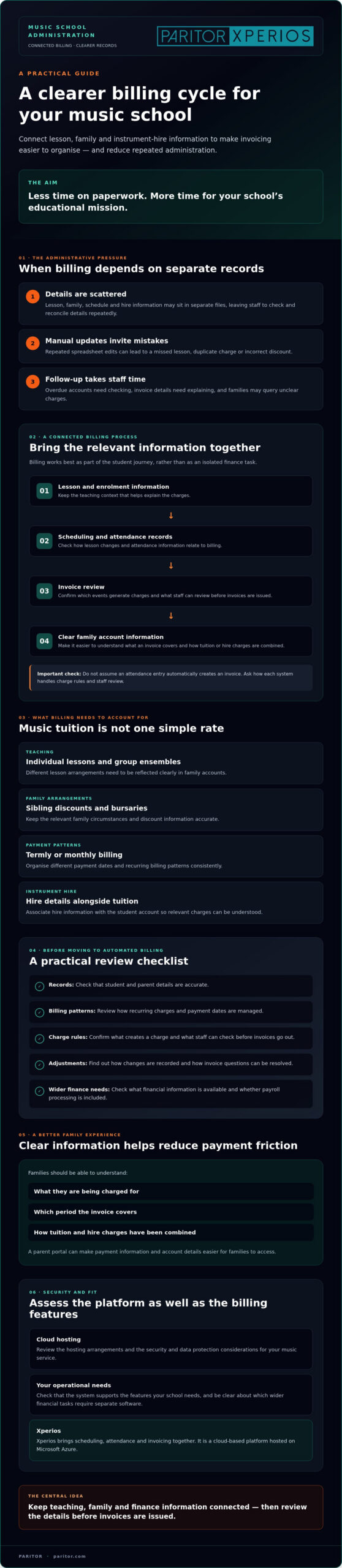
Music school billing software connects lesson and enrolment information with invoicing and financial administration. Instead of rebuilding charges from separate records each billing period, it can help organise tuition and hire details into a consistent process. General accounting software covers core tasks such as billing, bookkeeping and reporting, but music services also need to manage how lessons, families, teachers and instruments fit together.
Spreadsheets can seem manageable at first. As your service grows, each manual update creates another chance of a missed lesson, duplicate charge or incorrect discount. A sibling discount or bursary may depend on a family’s circumstances, while a teacher’s schedule can change across schools and locations. If those details sit in separate files, your team has to check and reconcile them repeatedly. That takes time and makes it harder to be confident that each invoice reflects the right information.
The Complexity of Music Tuition Fees
Music tuition rarely follows one simple rate. A student might have individual lessons as well as group ensemble sessions, and instrument hire may need to appear alongside tuition on the same invoice. Families may pay termly or monthly. Managing these arrangements by hand means tracking different rules and dates, then checking each account before invoices go out. A system designed for music services should help you organise these variations without repeated spreadsheet edits.
Generic accounting software can record transactions, but may not hold the teaching and scheduling context that explains them. For example, a change to a peripatetic teacher’s schedule can affect the lesson information used to prepare charges. If attendance, timetable and finance records are disconnected, staff may need to compare several sources to resolve a query.
The Problem with Arrears and Late Payments
Late payments can affect cash flow, particularly for small and medium-sized arts organisations that rely on tuition income to plan activities. Manual follow-up adds another task: someone must identify overdue accounts, check the invoice and contact the family. When staff spend time chasing payments, conversations can shift from supporting a student’s education to discussing an outstanding balance.
Clear information can reduce avoidable payment friction. Parents need to understand what they’re being charged for, which period an invoice covers and how tuition or hire charges have been combined. When records are unclear, families may query an invoice or wait for an explanation before paying. A joined-up billing process can help your team answer questions consistently and spend less time on manual follow-up. For organisations looking to make payment collection as frictionless as possible across every touchpoint, discover Strictly to explore how unified omni-channel payment processing allows you to accept payments online, in person, or via mobile.
The Architecture of Integrated Music School Financial Management
Billing works best as part of the student journey, not as an isolated finance task. A lesson register records what has been arranged or attended. An integrated system can connect that information with financial management, reducing the need to re-enter details in another file. Xperios brings scheduling, attendance and invoicing together, giving your team a shared record to work from.
That connection matters in practice. If a lesson changes, staff need to know which information informs the relevant charge. Before choosing music school billing software, ask how information moves from registers to invoices, what staff can check before invoices are issued and how adjustments are recorded. The Invoice Processing Platform (IPP) offers a public-sector example of invoice processing supported by a digital platform, illustrating how structured workflows can reduce manual handling.
Synchronising Scheduling and Invoicing
Attendance and scheduling records can provide useful billing context, but don’t assume every system automatically creates an invoice from an attendance entry. Check which events generate charges, what staff can review before invoices are issued, and how parents can see relevant lesson information. A clear history can help your team explain an invoice and resolve questions without searching through separate records.
When comparing systems, ask what financial information is available and how it can be used for oversight. Confirm whether a platform includes payroll processing or only helps you review financial information. That distinction matters when you’re planning budgets and deciding whether you’ll need separate software for other financial tasks.
Instrument Inventory and Hire Billing
Instrument hire adds another link between administration and finance. A connected approach can associate hire details with a student account, making the relevant charge easier to review alongside tuition. Check how the system records instrument allocations and whether staff can see the information they need when reviewing a charge. Explore instrument inventory management software to see why accurate asset records matter beyond billing.
The Xperios Parent Portal gives families a route to account information. When assessing a system, ask what parents can view and whether they can access payment information directly. Bursary adjustments, discounts and credit notes also deserve attention: check how they’re recorded, approved and shown in financial records. A useful system makes these exceptions traceable rather than leaving the details in email threads or spreadsheets.
For a joined-up view, consider what you need to see across income, teaching activity and instrument hire, and how often that information needs updating. You can explore the Xperios music management platform as one example of a system that brings music-service administration and financial management together.
Key Features to Seek in a Music School Billing System
The right music school billing software should fit the way your organisation works, rather than forcing every family and lesson into the same billing pattern. Look for clear ways to set billing rules, handle different payment cycles and review changes before invoices are sent. Ask how the system handles common exceptions, such as a student joining part-way through a term or a family receiving a discount. These checks help you decide whether it can support your real processes.
The Professional Parent Portal
A parent portal gives families a self-service route to account information. Depending on its functions, parents may be able to check balances, view invoices or update their details, reducing routine enquiries for your office team. Ask to see exactly what families can access and how the portal presents charges and payment information. For more ideas, read this parent portal strategy guide for music schools.
Include access and usability in your assessment. The portal should be straightforward for parents to use, while your organisation remains in control of its records and communications. Consider how families will get help if they have difficulty accessing their accounts.
UK Data Security and GDPR Compliance
Data protection deserves close attention because music services handle personal information about students and families. Ask where the provider stores data, who can access it and how access is managed when staff roles change. A provider familiar with data protection regulations can offer relevant context, but you should still review its current information about compliance and data handling. Don’t assume cloud hosting alone confirms where data is held.
Ask the provider to explain its safeguards in plain language, including encryption, backups or redundancy, and access controls. Treat these as points to verify, rather than features to assume. Clear answers help you assess whether the system suits your organisation’s needs and supports responsible handling of family information.
Financial administration is part of running a music organisation, not a distraction from it. Berklee College of Music also treats financial planning as a subject for music professionals in its financial planning process for musicians course. With the Xperios Parent Portal, you can assess whether a dedicated portal would make account information more convenient for families.
Implementing Automated Billing: A Strategic Roadmap
A careful transition helps protect the accuracy of your accounts and gives staff and families time to adjust. Before adopting music school billing software, map your current billing process, including exceptions that may exist only in spreadsheets or staff knowledge. Then agree what needs to be checked before the new process becomes your main system.
Four steps to prepare
- Audit your current data. List your billing cycles, tuition types, instrument hire charges and recurring adjustments. Note where each piece of information comes from and who checks it.
- Clean your records. Review student and parent details, remove duplicates and resolve incomplete or outdated entries before migration. Consistent records make it easier to match accounts and invoices.
- Set and test billing rules. Document how you apply sibling discounts, bursaries and other adjustments. Compare representative accounts with your existing records to spot differences before invoices are issued.
- Plan the Parent Portal launch. Tell families what will change, how to access the portal and where to find account and payment information. Clear guidance can help parents understand the new process.
Manage the transition with staff and parents
Give administrative staff time to practise key workflows, including reviewing charges, correcting records and responding to parent questions. Explain the change to families in plain language, focusing on how they can view account information and make payments. If practical, compare draft billing from the new system with your existing records during an agreed test period. Check any differences before relying on the new process.
Plan onboarding around your data
A do-it-yourself setup may seem straightforward, but unclear rules or poorly mapped records can lead to repeated corrections. Ask prospective providers how they handle data migration, what information they need from you and how staff learn the new workflows. Confirm who checks imported data and how exceptions are handled. Structured preparation gives you a clearer basis for a controlled changeover.
Paritor’s guide to music service management software offers further context as you assess the wider system around billing. For a product-specific discussion, explore Xperios for Music Services and consider how its scheduling, attendance and invoicing functions could fit your processes.
Reclaiming Your Time with Xperios Financial Management
Automated billing should do more than send invoices. It should give your team a dependable way to manage the financial administration around lessons, payments and instrument hire, so staff can spend less time checking records and more time supporting students. Xperios Financial Management is part of a platform for music services that brings scheduling, attendance and invoicing together.
Technology doesn’t replace your team’s judgement. Staff still set and review billing rules, handle exceptions and respond to families. The benefit is support for repeatable work, with records that help your team check what has been charged and why. A consistent process can make financial administration clearer for staff and parents.
A partner in music education administration
Paritor was founded in 1993 and develops software for the administrative needs of music services. That focus is relevant when your processes involve more than standard invoices, from tuition and attendance to instrument management. As you assess a system, ask how it supports your organisation’s existing workflows and whether its functions can accommodate changes as your service develops. Check the platform’s capabilities and limits against your requirements rather than assuming they will match.
In 2026, Xperios helps music services bring key administrative tasks together, supporting clearer financial processes and more time for teaching.
Next steps: securing your financial future
Before changing systems, identify the work you most want to improve: preparing invoices, reviewing adjustments, answering account queries or understanding income. Take those needs into a conversation with a provider and ask to see the relevant workflows. You can also ask about onboarding, data migration, staff training and how the platform handles your organisation’s billing arrangements.
Xperios is hosted on Microsoft Azure. Include this in your discussion about hosting and security, and also ask how your organisation’s information is managed and what responsibilities remain with your team. Choose a system that supports your processes and gives you confidence in how financial records are handled.
Planning ahead for the next term gives you time to review records, configure billing rules and prepare families for changes to the payment experience. Modernising administration is a practical step towards a more organised service, and can help return staff attention to students and teaching. Discuss your requirements with Paritor to find out whether Xperios Financial Management could support your billing process.
Make More Space for Music Education
Better billing starts with connected information. When lesson activity and financial records work together, you can spend less time reconciling spreadsheets and more time supporting students. Clear billing rules and a parent portal can also help families understand their accounts and find payment information more easily.
The right music school billing software should fit your organisation’s processes and handle the details that make music services different. Xperios brings scheduling, attendance and invoicing together, with its financial management module hosted on Microsoft Azure. Paritor develops software for music services, with functionality covering areas such as instrument management and secure online portals for teachers, parents and students.
Moving to automated billing takes planning, from checking your data to preparing staff and parents for a new process. Review your billing rules, records and requirements before choosing a system. Contact Paritor to discuss Xperios and how it could support your music service’s billing needs.
Frequently Asked Questions
Can music school billing software handle sibling discounts and bursaries automatically?
It may help apply recurring billing rules, but confirm how a specific system handles sibling discounts and bursaries before choosing it. Ask whether staff can set adjustments against a family or student account, how changes are recorded and whether someone can review them before invoices are issued. This avoids relying on assumptions and gives your team a clear way to check exceptions.
Is our student and financial data secure with cloud-based software?
Cloud hosting can provide remote access, but it doesn’t by itself guarantee that your information is secure. Ask the provider where data is hosted, how access is controlled and what measures protect and back up records. Xperios is hosted on Microsoft Azure. Paritor states that it is a UK-based provider and that its services are GDPR compliant. Review the provider’s data-handling information and your own responsibilities before making a decision.
How does automated billing reduce late payments from parents?
Automated billing can help issue invoices more consistently and reduce delays caused by preparing them manually. Clear invoices and timely communication also help parents understand what they need to pay and when. Whether a system sends payment reminders automatically depends on its features, so check this with the provider. A parent portal can give families a convenient place to view account information, which may help prevent queries caused by unclear or missing invoices.
Can we integrate instrument hire fees with our tuition invoicing?
A music service platform with financial and instrument management functions can help bring hire charges and tuition billing into a joined-up process. Xperios offers instrument and financial management. Ask how hire charges are linked to student accounts, how changes are reflected on invoices and what checks your team can make before billing.
Will the software work for both individual lessons and large ensembles?
A platform designed for music services can support administration across different teaching formats, but check how its features match your programme. Xperios offers music service and ensemble management. Ask how individual lessons, group activity, attendance and related billing are recorded, and whether your team can review the information used to prepare charges. This helps confirm that the system suits your teaching structure rather than only a standard lesson model.
What happens if a student joins halfway through a term?
The charge for a student who joins part-way through a term depends on your organisation’s billing policy and the software’s configuration. Before using a new system, decide how you treat late starts, missed sessions and relevant adjustments. Then ask the provider how staff can record the student’s start date, apply your policy and check the resulting invoice. Testing a sample account can help identify errors before billing a family.
Do we need to install software on our office computers?
Xperios is a cloud-based platform hosted on Microsoft Azure, so the service is hosted remotely rather than set up as an entire system on an office computer. Cloud access can support work across locations, but check the provider’s current device and browser requirements before implementation. Confirm how staff sign in and whether any local software is needed for specific tasks. This helps you prepare your team and equipment.
Is Xperios compliant with UK GDPR regulations?
Paritor states that it is a UK-based provider and that its services are GDPR compliant. Your organisation should still check the provider’s current information about data handling, access and security, and understand its own responsibilities when using the platform. Ask how student and parent information is managed and what support is available for your processes. This gives you a clearer basis for assessing whether Xperios fits your data protection needs.