

A lesson is moved, another is cancelled and a cover session appears after the timetable has gone to payroll. Which teaching activity is ready for approval? If you’re working out how to manage peripatetic teacher payroll, start by checking teaching records and agreeing who signs them off before payroll processing begins.
Payroll information can be scattered across timetables, attendance records, spreadsheets and emails. When delivered lessons differ from the original schedule, your team needs a consistent way to record changes, check them and confirm what should be passed to payroll. Clear responsibilities for teachers, administrators and payroll staff make the process easier to follow and trace.
This guide covers a dependable workflow, from recording peripatetic teacher timetables and attendance to checking changes and preparing approved payroll information for handover. It also explains the difference between tuition administration and payroll calculation or payment. Xperios can help organise scheduling and attendance information through a cloud-based platform and teacher portal, depending on your setup. It is not confirmed as a payroll processing tool. The aim is to reduce time spent reconciling records and leave more time for teaching.
Key Takeaways
- Learn how to manage peripatetic teacher payroll by defining who records, checks and approves teaching activity.
- Bring timetables, attendance and approved changes together so payroll inputs can be checked against what was delivered.
- Choose a payroll method by assessing how it handles approvals, exceptions, reporting and record traceability.
- Use a repeatable preparation cycle to resolve discrepancies before approved information is handed over to payroll.
- Explore how Xperios may help organise teaching records, while keeping payroll calculation and payment separate.
How to manage peripatetic teacher payroll: start with a clear workflow
Reconciling teaching activity across schools can put pressure on administrators, especially when schedules change close to a payroll deadline. A lesson may be moved, cancelled or covered, with updates recorded in different places. A clear process gives your team a way to check what happened before information is passed to payroll.
In this guide, payroll management means preparing, checking, approving and transferring payroll inputs. It is separate from calculating pay, making payments and deciding formal employment arrangements. Payroll-ready teaching data is a clear, checked record of teaching activity and authorised changes, ready for an organisation’s payroll process.
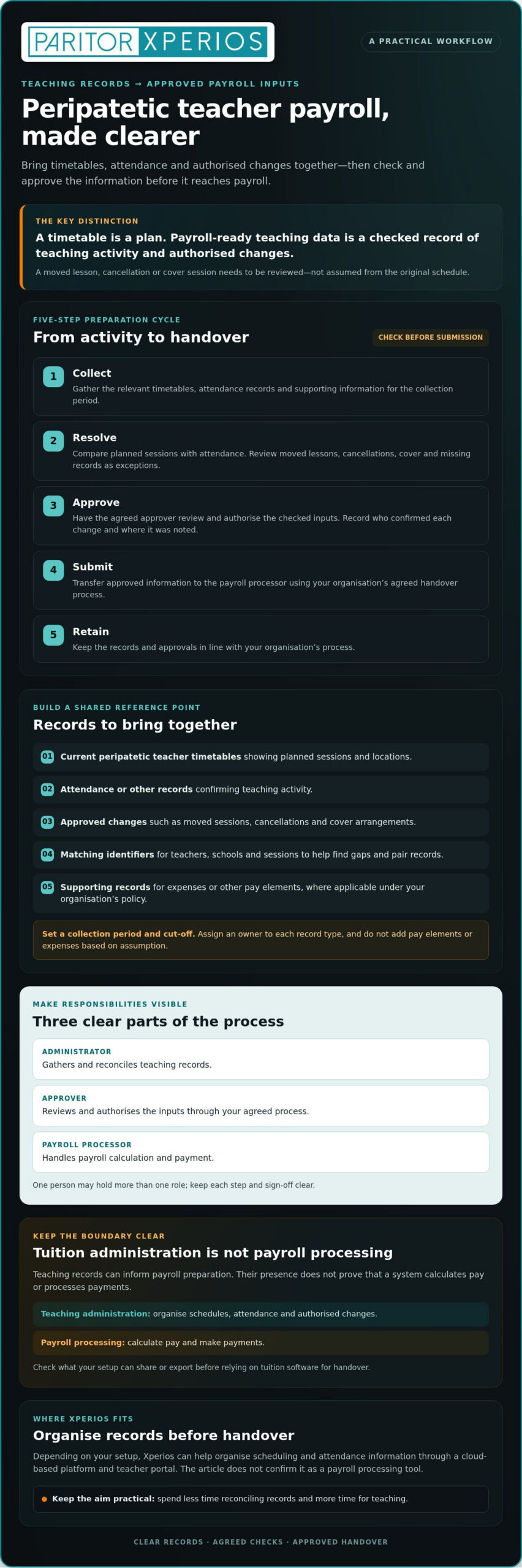
Build your workflow around five steps:
- Collect the relevant teaching and attendance records.
- Resolve changes or mismatches between planned and delivered activity.
- Approve the checked inputs through your agreed process.
- Submit approved information to the payroll processor.
- Retain the records and approvals according to your organisation’s process.
What makes peripatetic teacher payroll different?
Itinerant teachers (also called ‘peripatetic’ teachers) travel between schools, so their work may involve changing locations, schedules and sources of information. Peripatetic teacher timetables show planned activity, but they should not automatically be treated as records of lessons delivered. A moved lesson, absence or cover arrangement can make the two differ. Define how your organisation records authorised changes and exceptions, who confirms them and where that decision is noted.
Separate teaching administration from payroll processing
Clear roles reduce uncertainty. An administrator can gather and reconcile teaching records, an approver can review and authorise the inputs, and a payroll processor can handle calculation and payment. One person may hold more than one role, but each step and sign-off should still be clear.
Tuition administration records can inform payroll preparation, but their presence does not prove that a system calculates or processes payroll. If you use tuition software, check what your setup can share or export before relying on it for handover. Confirm employment status and applicable pay rules with qualified advisers and current guidance; for visiting music instructors managing mixed contracts, specialists such as Performance Accountancy offer tailored support for self-assessment and performing arts tax. These decisions should not be inferred from a timetable or attendance record.
Gather accurate records for peripatetic teacher payroll
Once your workflow is clear, make the information behind each payroll input consistent. Set a collection period and cut-off, then assign an owner to each record type. This gives teachers, administrators and approvers a shared reference point instead of leaving them to reconcile different spreadsheet versions or email threads.
Gather the records your organisation needs, such as:
- Current peripatetic teacher timetables showing planned sessions and locations.
- Attendance or other records confirming teaching activity.
- Approved changes, including moved sessions, cancellations and cover arrangements.
- Relevant organisational records, such as the teacher or session identifiers used to check inputs.
- Supporting records for expenses or other pay elements, where applicable under your organisation’s policy.
Do not add expenses or other pay elements based on assumption. Follow your organisation’s policy and approval process, and check what supporting information the payroll team needs. A consistent cut-off gives staff time to flag missing records before inputs are approved.
Reconcile peripatetic teacher timetables with delivered lessons
A scheduled lesson is a plan; verified teaching activity is a record checked against attendance and authorised changes. Compare each planned session with its attendance record, then check timetable updates against the approved change. Treat cancellations, cover and missing attendance as exceptions to review, not automatic evidence that a lesson did or did not take place. Using consistent identifiers for teachers, schools and sessions makes it easier to match records and spot gaps.
Where systems and permissions allow, access to current records can reduce duplicate entry by letting authorised staff refer to updates rather than re-keying information from separate files. It does not remove the need to check discrepancies before approval.
Set up approvals, records and an audit trail
Assign a reviewer to investigate mismatches and record the outcome before payroll inputs are approved. Keep a clear note of who changed or approved information and when. An appropriate audit trail helps your team trace decisions later, but it does not mean every system automatically records the details you need. Limit access to personal information to people who need it for their role, and follow your organisation’s data protection procedures.
Keep the handover separate from payroll processing. GOV.UK’s guidance on regular payroll tasks provides an overview of the payroll process; use it alongside current guidance and your organisation’s procedures. If you’re reviewing how teaching records are organised, explore tuition administration software as a possible source of scheduling and attendance information, depending on your setup.
Compare payroll methods without confusing admin software with payroll
Choose a tool by separating two jobs: organising teaching activity and processing payroll. A timetable or attendance platform can help prepare records, but it is not automatically a payroll processor. To decide how to manage peripatetic teacher payroll, compare each option using the same practical questions: who owns the records, who approves them, how are exceptions handled, what can be reported, and how can decisions be traced?
| Method | Records and approvals | Exceptions, reporting and traceability |
|---|---|---|
| Spreadsheets | Your team maintains the data and arranges sign-off, often through a separate approval step. | Flexible for recording changes, but checks, reporting and version control rely on a consistent process. Keep a clear record of which file is current and who approved updates. |
| Payroll provider or system | Approved information is passed to the provider or entered into the system. The provider’s role depends on the agreed service scope. | Confirm how queries and exceptions are raised, what reports are available and which party retains each record. Do not assume the provider checks teaching activity unless that is agreed. |
| Tuition administration software | May hold teaching schedules and attendance information, with access and approvals depending on your setup. | Can support administration and reporting on teaching records. It should not be treated as a payroll calculation or payment tool unless those functions are confirmed. |
When spreadsheets or a payroll provider may fit
A spreadsheet may suit a team that needs a straightforward way to organise payroll inputs, provided someone owns updates and checks the current version before handover. As the number of records or contributors grows, manual reconciliation can become harder to manage. A payroll provider may process approved information, but document cut-off dates, handover responsibilities and who investigates exceptions before choosing this route.
What a tuition administration platform can and cannot do
When configured appropriately, schedules and attendance records can provide useful information for payroll preparation. Xperios includes scheduling and attendance administration, but its payroll calculation or payment functions are not confirmed. Check what your organisation’s setup can share or export, and keep the payroll processor’s role clear. For wider platform considerations, read the music service management software guide.
Your setup may use more than one system: one to organise teaching records and another to process payroll. Assign ownership at each handover so the administrator knows what to prepare, the approver knows what to verify and the payroll team knows what it has received.
How to run a repeatable payroll preparation cycle
A dependable cycle makes the handover predictable, even when teaching activity changes. Set a cut-off that gives staff time to check records before payroll submission, then follow the same sequence each period:
- Set the cut-off: Tell contributors when records must be complete.
- Collect: Gather timetable, attendance and approved change records.
- Reconcile: Compare planned sessions with recorded activity.
- Resolve: Refer missing or unclear information to the right person.
- Approve: Have the named approver confirm the inputs.
- Submit: Transfer approved information to the payroll contact or provider.
- Retain: Store records and approvals in line with your organisation’s policies.
Before handover, check that every teacher in scope is accounted for, each relevant record is present and outstanding queries are identified. Routine, complete records can follow the standard approval route. Missing attendance, unapproved changes or questions about how an item should be treated need review, not assumption.
Resolve changes and exceptions before handover
Keep a visible queue for missing attendance, timetable changes and entries awaiting approval. For each item, record what needs checking, who owns the decision and how it was resolved. Do not silently replace the original entry: retain enough context to explain the change and its approval. If an exception raises a question about pay treatment, refer it to your organisation’s payroll contact or a qualified adviser. Where contractual terms or employment status require clarification, employers often consult HR specialists such as Pioneer HR for practical guidance.
Review the cycle and protect information
After each cycle, note recurring corrections, late changes and data gaps. If the same issue keeps returning, review the relevant timetable or attendance process with the people who use it. This helps address the cause rather than repeating manual checks. Restrict access to people who need the information for their role, and check current data protection regulations alongside internal retention policies when setting record practices.
Clear coordination across teachers, schools and administrators supports a more orderly handover. For wider context on coordinating ensemble activity, read the ensemble management software guide. To explore how Xperios supports music-service administration, visit Xperios music service management. Its scheduling and attendance records may support payroll preparation, but payroll calculation and payment functions are not confirmed.
Use Xperios to organise teaching records before payroll handover
Once you’ve defined who checks and approves payroll inputs, decide where teaching records will be held. Xperios may help organise schedules and attendance information before handover. It is tuition administration software, not confirmed payroll software: its payroll calculation or payment functions are not confirmed.
Connect timetables, attendance and administration
Well-organised peripatetic teacher timetables give administrators a consistent reference when checking teaching activity across schools. Attendance information can then help you review what was delivered and prepare relevant records for an approver or payroll contact. It is a supporting input, not a pay calculation or a substitute for approval.
The teacher portal provides access to teacher information and administrative tasks, depending on your organisation’s setup. As a cloud-based platform, Xperios may give authorised users access to current records, helping colleagues work from the same information rather than duplicate updates across separate files. Confirm which users can access each record and how your configuration handles changes.
Paritor describes Xperios as hosted on Microsoft Azure and designed with data protection in mind. Check the current hosting and data protection information with Paritor to understand how it relates to your organisation’s requirements. Before relying on the platform for payroll preparation, ask Paritor to confirm what your setup supports for reporting, record sharing or export, and how a handover would work. Do not assume these options are available without checking.
Choose practical next steps for your organisation
Before considering a change, map your existing workflow. Note where schedules and attendance records sit, who approves updates, which systems are involved and which exceptions recur. Then ask providers to explain which tasks their software supports and which remain with your staff or payroll system. This helps you assess the whole process, not just a feature list.
For a wider view of the administrative functions a music service may need, read the music service management software guide. A discussion with Paritor can help you explore your workflow and confirm which Xperios capabilities suit your requirements. If you’re ready to review the platform, explore Xperios for Music Services.
Build a payroll workflow your team can rely on
A dependable approach to how to manage peripatetic teacher payroll begins with accurate teaching records, clear approval responsibilities and a consistent handover to payroll. Keep planned schedules separate from verified teaching activity, and make sure changes or exceptions are reviewed before information is submitted.
The right tools can help your team organise records, but tuition administration and payroll processing remain separate tasks. Xperios supports music-service administration, including scheduling and attendance, which may help you prepare payroll inputs when your organisation’s setup is suitable. Paritor has worked in the music and performing arts software sector since 1993 and describes Xperios as a cloud-based platform hosted on Microsoft Azure.
Before making changes, map your current workflow and confirm which tasks each system supports. A clearer process can reduce repeated reconciliation and give your team more time to focus on teaching. Explore Xperios for Music Services to consider how it may fit your administration needs.
With well-organised records and agreed checks in place, you can make each payroll handover easier to follow and give your team more time to support teachers and learners.
Frequently Asked Questions
How do you manage payroll for peripatetic teachers?
Manage it through a regular process for collecting, checking, approving and handing over teaching records. Set a cut-off, gather current timetable and attendance information, then reconcile planned sessions with delivered activity and approved changes. Assign someone to resolve exceptions and an approver to sign off the inputs before submission. Keep a record of decisions and follow your payroll team’s guidance on calculations, payments and applicable pay arrangements.
What records do I need to prepare peripatetic teacher payroll?
Start with current peripatetic teacher timetables, attendance records, approved changes and the organisational records needed to identify each teacher, school and session. Include supporting information for expenses or other pay elements only where your organisation’s policy requires it. Agree who gathers each item and the cut-off date. Before handover, check for missing attendance, unapproved changes or records that cannot be matched to a teacher or session.
Can a school management system calculate teacher payroll?
Some systems may include payroll functions, but do not assume that a school or tuition administration system calculates pay. Scheduling and attendance tools can organise teaching records that may help prepare payroll inputs; payroll calculation and payment are separate functions. Check the system’s documented capabilities and your organisation’s setup, including which tasks remain with staff or a payroll provider. Confirm the required handover method rather than assuming two systems share information.
How should I record cancelled or changed lessons for payroll?
Keep the planned session visible, then record what changed, when it changed and who authorised or confirmed the update. For example, record a cancellation or cover arrangement against the relevant teacher, school and session rather than silently overwriting the timetable. If attendance is missing or the change is unclear, flag it for review. Do not assume a cancellation or replacement session determines how the item should be treated for pay.
Should peripatetic teachers submit their own timesheets?
That depends on your organisation’s process and the records needed by its payroll team. You might ask teachers to confirm attendance or submit timesheets, whilst administrators reconcile those details against timetables and approved changes. Set out who records activity, who checks it and how changes are reported. Confirm whether timesheets are needed for each teacher’s arrangement, and avoid asking people to duplicate information already captured in an agreed record system.
Does Xperios run payroll for peripatetic teachers?
Xperios payroll calculation and payment functions are not confirmed in the product information. Xperios supports music-service administration, including scheduling and attendance, which may help organise information for payroll preparation, depending on your setup. The teacher portal supports access to teacher information and administrative tasks. Ask Paritor to confirm whether your configuration can share or export the records you need, and keep payroll processing with the appropriate system or team.
How can I keep peripatetic teacher payroll records secure?
Limit access to people who need the information for their role, and use your organisation’s approved systems and methods for sharing records. Keep approvals and changes traceable, and follow internal procedures for storing and retaining information. Check current data protection regulations and your organisation’s policies when setting access and retention practices. If you use a cloud-based platform, confirm its current hosting and data protection information with the provider rather than assuming it meets every organisational requirement.