

It is the end of the summer term, and your inventory spreadsheet insists that three cellos are safely in storage, yet the cupboard stands empty. This scenario is all too familiar for music service leads who struggle with the administrative weight of manual tracking and the high rate of missing instruments. When you are weighing up asset tags vs barcodes for instrument tracking, the decision involves more than just selecting a label; it’s about choosing a physical identifier that survives the school-to-home journey whilst powering a centralised digital inventory.
We recognise the taxing nature of managing a hire scheme, especially when you’re worried about damaging expensive instruments with sub-standard adhesives or permanent marks. You deserve a system that provides total visibility without the headache of manual data errors. This guide will help you discover the most effective physical tracking methods to safeguard your inventory and streamline your hire schemes. We will examine the costs, durability, and practicalities of different tagging options to ensure your inventory looks professional for auditors and functions seamlessly for your team during the busy check-in and check-out periods.
Key Takeaways
- Understand why physical tracking is essential to eliminate ghost assets and protect your music service from avoidable financial loss.
- Navigate the debate of asset tags vs barcodes for instrument tracking by choosing durable materials that withstand the rigours of student hire.
- Learn professional placement techniques that safeguard delicate finishes, ensuring labels remain scannable without causing damage to the instrument.
- Discover how Xperios Instrument Management acts as the brains of your system, instantly converting physical scans into actionable loan and repair records.
- Follow a practical roadmap to transition from error-prone spreadsheets to a foolproof, professional, and audit-ready inventory.
Instrument Inventory: Why Physical Tracking is Essential for Music Services
Effective management of a music service relies on a delicate balance between educational delivery and administrative precision. Asset tracking in this sector is the intersection of physical identification and digital record-keeping. It is not enough to simply know you own fifty violins; you must know exactly where each one is at any given moment. Without a robust system, instruments often vanish into a black hole of administrative oversight. This is where the debate over asset tags vs barcodes for instrument tracking begins, as the physical label serves as the primary link between the instrument in a student’s hand and the data on your screen.
When instruments are lost but remain on your digital records, they become ghost assets. These phantoms inflate your inventory value on paper whilst leaving your actual cupboards bare. Beyond the financial loss, you have a duty of care regarding instrument maintenance and safety. Every hired instrument requires regular checks. If you cannot locate a brass instrument for its scheduled valve service or an electric guitar for PAT testing, you are failing both your budget and your safety obligations. Manual spreadsheets simply cannot keep pace with the fluid nature of peripatetic teaching, where instruments move between schools and homes daily.
The True Cost of Poor Inventory Management
The financial drain of unreturned instruments can cripple a music hub’s ability to invest in new stock. Every unrecovered cello represents a significant capital loss that could have funded several years of tuition for a disadvantaged student. The administrative burden is equally taxing. Staff spend hundreds of hours every year chasing parents and students for returns based on outdated records. Using a system like Xperios Instrument Management provides the clarity needed to satisfy insurance providers and funding auditors, proving that every penny of investment is accounted for and utilised.
From Storage to Student: The Lifecycle of a Hired Instrument
An instrument’s journey is rarely a straight line. It moves from a central hub to a school, sits in a teacher’s cupboard, and eventually travels to a student’s home. Maintaining a chain of custody across these transitions is impossible without a unique physical identifier. Whether you are weighing up asset tags vs barcodes for instrument tracking, the label ensures that the specific flute handed to a student in Year 4 is the same one returned three years later. This level of detail allows a music service to scale its hire scheme without losing control of its most valuable assets. It turns a chaotic storage room into an organised, professional inventory that empowers teachers to focus on music rather than paperwork.
Asset Tags vs Barcodes: Understanding the Differences for Instrument Tracking
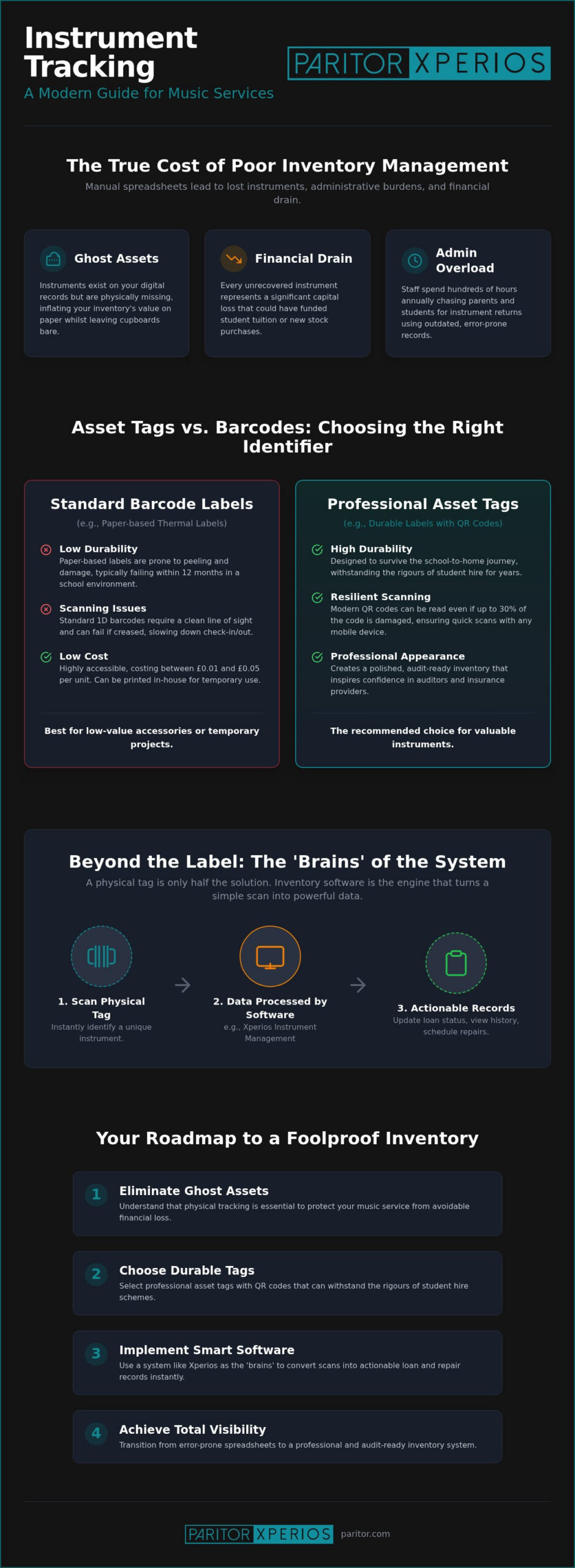
Choosing between asset tags vs barcodes for instrument tracking often feels like a choice between budget and longevity. It is helpful to first distinguish between the data and the physical carrier. A barcode is a visual representation of data, such as a serial number, which an optical reader or smartphone camera translates into text. An asset tag is the physical label itself. Whilst a barcode can be printed on a simple paper sticker, a professional asset tag is a durable carrier designed to protect that barcode from the rigours of school life.
In a busy school hall during a check-out day, speed is your greatest ally. Standard 1D barcodes (the traditional “zebra stripes”) require a clean line of sight and can be finicky if the label is slightly creased. Modern QR codes are more resilient. They can hold more data in a smaller area and remain scannable even if up to 30% of the code is obscured or damaged. For music services managing thousands of assets, the ability to scan a code quickly with a mobile device allows for a more fluid, professional experience for both staff and parents.
Standard Barcodes: Cost-Effective and Accessible
Standard thermal barcode labels are highly accessible, often costing between £0.01 and £0.05 per unit. You can print these in-house using a standard label printer, making them an attractive option for temporary projects or lower-value accessories. However, they have distinct limitations. Paper-based labels typically fail within 12 months as they are prone to peeling and damage from moisture or the heat inside a cramped instrument case. If a label becomes unreadable, the digital link to your records is broken, leading back to the manual data entry errors you are trying to avoid.
Professional Asset Tags: Durability for the Long Term
For your primary inventory, professional asset tags made from polyester or anodised aluminium offer a much higher return on investment. These materials are designed to last between three and five years under normal conditions. Many music services opt for tamper-evident “void if removed” labels. These act as a powerful theft deterrent; if someone attempts to peel the tag off, it leaves a permanent mark on the instrument or the label itself. Whilst these require third-party manufacturing and a higher initial outlay, the security they provide for a £2,000 saxophone is invaluable.
The real power of these identifiers is realised when they are paired with a system that understands the nuances of music education. You can organise your entire inventory using these tags to ensure that every scan updates your records in real time, providing the administrative relief your team needs. By selecting the right physical carrier, you ensure your digital biography of every instrument remains intact for its entire lifecycle.
Placement and Protection: Labelling Different Instrument Types
A common concern amongst music hub managers is whether a physical identifier will mar the finish of a high-value violin or a professional-grade flute. This anxiety often leads to hesitation when deciding on asset tags vs barcodes for instrument tracking. You don’t want to choose a tracking method that safeguards your budget but damages your assets. Modern adhesives and strategic placement ensure that you can maintain a foolproof inventory without compromising the aesthetic or structural integrity of your fleet.
The key to successful labelling is non-destructive placement. For metal instruments like brass or silver-plated woodwinds, permanent adhesives are generally safe and highly effective. For wooden instruments with delicate varnishes, you must be more selective. Using high-tack polyester tags on the tailpiece of a cello rather than the body itself provides a secure scanning point that won’t strip the finish. If you are dealing with “un-labellable” items like bows or small mouthpieces, consider using mini-tags or “flag” labels that wrap around the item without leaving a large footprint.
Where to Tag: A Guide by Instrument Family
Strategic placement ensures your team can scan items quickly during a busy school visit without fumbling with the instrument. Consider these industry-standard locations:
- String Instruments: Avoid the body. Place the tag on the tailpiece or the back of the scroll. Some services place a secondary tag inside the F-hole, though this can be harder to scan.
- Brass and Woodwind: The underside of the bell or the main body tube away from the keywork is ideal. Ensure the tag doesn’t interfere with the player’s grip or the movement of valves and keys.
- Percussion and Pianos: Use discreet placement on the underside of frames or behind the keyboard block. These areas are accessible for auditors but hidden from the audience.
Case vs Instrument: Should You Tag Both?
In the chaotic environment of a school music room, cases and instruments are frequently separated. If you only tag the case, you risk a “mismatch” where a student returns a high-quality instrument in a basic case, or vice versa. Implementing a matched-pair system is the most reliable approach. By tagging both the instrument and its case, you create a dual-layered safety net. When using a system like Xperios Instrument Management, you can link these two unique identifiers into a single “hire kit” record. This ensures that when a scan occurs, the software immediately flags if the instrument and case belong together, maintaining a clear chain of custody throughout the loan period.
Beyond the Label: Why Your Inventory Software is the Real Brains
A barcode or an asset tag is essentially just a name tag for an object. It identifies the item, but it cannot tell you who has it, how much they are paying for it, or when it was last serviced. In the context of asset tags vs barcodes for instrument tracking, the physical identifier is simply the gateway to a much deeper digital biography. The real administrative power lies in your software, which acts as the centralised brain for your entire music service.
By utilising a cloud-based platform hosted on Microsoft Azure, your team can access inventory data from any school or hub site. This eliminates the siloed information often found in manual spreadsheets. When a teacher scans a tag, the system doesn’t just display an ID number; it instantly retrieves the full history of that instrument, including its current hire status and financial records. This integration ensures that your inventory remains a live, accurate reflection of your service’s assets, satisfying both internal managers and external auditors.
Automating the Hire Process with Xperios
Transitioning from a manual check-out process to an automated one provides immediate relief for busy administrative staff. When you implement professional instrument inventory management software, the point of loan becomes a seamless digital transaction. Scanning a tag can trigger an automated hire agreement sent directly to a parent’s email. This reduces manual data entry to virtually zero and ensures that no instrument leaves the building without a legally binding signature. It is a modern approach that replaces paperwork with progress.
Tracking Maintenance and Repairs Digitally
Beyond simple loans, your software should manage the health of your instruments. Every scan provides an opportunity to update the asset’s condition or log a repair. This proactive management, built on 30 years of sector experience, allows you to modernise your instrument management and focus on your core educational mission. By making your data actionable, you transform a simple sticker into a powerful tool for organisational growth.
- Log PAT testing results for electronic equipment to ensure safety compliance.
- Set automated reminders for routine maintenance like bow re-hairing or string changes.
- Maintain a permanent audit trail of every repair cost to calculate the total cost of ownership.
Implementing Your New Tracking System: A Practical Roadmap
Transitioning your music service to a modern tracking system is a significant step towards professional maturity. It is the moment you reclaim your time from repetitive paperwork and focus on your core mission of music education. To ensure a smooth transition, you need a logical, steady approach that addresses both the physical assets and the people who manage them. Following a structured roadmap allows you to modernise your operations without disrupting the ongoing delivery of your hire schemes.
The first step is a full physical audit. You cannot build a reliable digital inventory on a foundation of outdated spreadsheets. This process allows you to identify every instrument in your care, ensuring your digital records match the reality in your storage cupboards. Once your audit is complete, you must decide on your tagging standard. When weighing up asset tags vs barcodes for instrument tracking, many hubs now favour QR codes. These are highly tolerant of the scuffs and scrapes common in school music rooms and can be scanned instantly with a smartphone or a dedicated reader.
Choosing the right software partner is the third pillar of your roadmap. You need a system that understands the specific lifecycle of a hired instrument, from initial purchase to student return. Finally, you must train your staff and peripatetic teachers on the new scanning workflow. Clear, supportive training reduces administrative resistance and ensures that data integrity is maintained from the very first scan.
Choosing Your Hardware: Scanners vs Mobile Apps
Your choice of hardware depends on where the tracking happens. Dedicated Bluetooth scanners are excellent for bulk check-in days at a central hub, offering high-speed performance for hundreds of items. However, for peripatetic teachers on the move, mobile apps are often the more practical choice. Most modern music service management software is designed to work seamlessly with smartphone cameras. This allows teachers to process a loan or return directly from the school music room, eliminating the need for separate hardware and ensuring the central database is updated in real time.
Launching the System to Parents and Students
Transparency is key when introducing a new tracking system to your community. Communicate clearly with parents about the benefits, such as easier returns and more accurate billing. The Xperios Parent Portal complements your physical tracking by giving families direct visibility of the instruments they have on hire. This partnership between physical labels and digital access creates a sense of accountability and professional trust. It’s time to move beyond the frustration of missing stock and embrace a system that empowers your organisation to grow.
Explore how Xperios can transform your instrument tracking today and discover the relief of a truly organised inventory.
Secure Your Inventory and Reclaim Your Time
Transitioning to a professional tracking system is a vital step in modernising your organisation. We’ve explored the practicalities of asset tags vs barcodes for instrument tracking, highlighting how the right physical identifier prevents financial loss and ensures a professional audit trail. By selecting durable materials and prioritising non-destructive placement, you safeguard your most valuable assets whilst streamlining the daily administrative burden on your staff.
The true power of this system lies in the digital biography created by your software. Built on 30 years of expertise in music service administration, Xperios provides the reliable, Azure-hosted infrastructure you need to manage complex hire schemes with confidence. Our platform is GDPR compliant and already trusted by leading UK music hubs to eliminate ghost assets and automate the check-out process. It’s time to move beyond the frustration of manual spreadsheets and embrace a solution that allows you to focus on your primary creative mission.
Ready to modernise your approach? Book a demo of Xperios Instrument Management today and discover how we can help your service grow with ease.
Frequently Asked Questions
What is the difference between a barcode and a QR code for instrument tracking?
QR codes are 2D symbols that can be scanned from any angle and remain readable even if they are partially scratched or scuffed. Standard 1D barcodes, the traditional “zebra stripes”, require a direct, horizontal line of sight to scan correctly. For music services, QR codes are often the preferred choice because they are more resilient to the wear and tear of being transported in student bags.
Will an asset tag adhesive damage my violin’s varnish?
Strategic placement is the best way to prevent damage to delicate varnished surfaces. We recommend applying tags to non-varnished areas, such as the tailpiece or the back of the scroll, rather than the main body of the instrument. High-quality polyester tags use adhesives designed to stay put, but choosing the right location ensures your high-value assets remain in pristine condition for years to come.
Can I use my smartphone to scan instrument barcodes in Xperios?
Yes, you can use any modern smartphone camera to scan codes directly into the system. This feature provides immense relief for peripatetic teachers who need to process loans or returns whilst moving between schools. It eliminates the need for bulky hardware and ensures your central inventory is updated instantly from the classroom.
How do I track instruments that are currently out on loan to students?
Once an instrument is scanned and assigned to a student in Xperios, its status is updated in the cloud database. You can instantly see a full list of “out” assets, including the student’s name, their school, and the date the hire agreement began. This real-time visibility allows you to manage your fleet effectively without relying on outdated manual spreadsheets.
Should I tag the instrument or the case?
The instrument itself should always carry the primary identifier to maintain a true chain of custody. However, tagging both the instrument and the case as a “matched pair” is the most robust strategy for music hubs. This approach prevents students from accidentally swapping cases and ensures that a high-quality cello doesn’t end up in a basic student-grade bag during a busy check-in day.
Is RFID better than barcodes for a large music hub?
RFID technology offers significant labour savings because it can scan multiple items simultaneously without a direct line of sight. Whilst it’s highly efficient for hubs managing over 2,000 assets, the upfront investment for readers and infrastructure is considerably higher than barcode systems. When evaluating asset tags vs barcodes for instrument tracking, most music services find that barcodes provide the best balance of cost and practical utility.
How much does it cost to implement an instrument tracking system?
The cost depends on the scale of your inventory and the durability of the labels you choose. Basic thermal labels are very inexpensive, typically costing a few pence each, whilst professional-grade polyester or metal tags require a larger initial investment. Pairing these physical tags with a dedicated management module like Xperios ensures you get a professional ROI by reducing the financial impact of lost or “ghost” assets.
What happens if a student removes the asset tag from an instrument?
Using tamper-evident labels acts as a strong deterrent because they leave a “VOID” mark or a visible residue if peeled away. If a tag is removed, you can easily identify the instrument using the serial number or unique characteristics already logged in your software. The system’s audit trail allows you to re-assign a new tag and maintain the instrument’s historical record without losing any data.