

A workshop and masterclass booking system should do more than record an enrolment. It should help your team carry session details and attendee information through scheduling, delivery and attendance. When those details sit in separate processes, staff spend time bringing information together instead of supporting teaching and programme delivery.
When comparing systems, look beyond the booking form. You need a practical way to manage enrolments and make current information accessible to the people who need it. This guide helps you assess workshop and masterclass requirements, connect booking and attendance information, and identify where automation could give your team more time for learners.
We’ll explore how to assess booking, scheduling and attendance features alongside usability, cloud access and data protection. We’ll also consider how a platform such as Xperios connects bookings with wider music and performing arts administration, including scheduling, attendance tracking and automated invoicing. The goal is to help you choose a system that supports your day-to-day work rather than adding another disconnected process.
Key Takeaways
- Assess a workshop and masterclass booking system by how well it connects enrolment with the administration that follows.
- Map the attendee journey from session details and booking through to attendance and follow-up to find gaps and repeated tasks.
- Compare scheduling, communication and attendance features against your programme formats, staff roles and learner needs.
- Use a practical checklist to identify where booking information becomes difficult to access or manage.
- Xperios connects bookings with scheduling, attendance tracking and automated invoicing on a cloud-based platform.
What should a workshop and masterclass booking system solve?
A booking tool records who has signed up, but the administrative work continues afterwards. Staff may need to organise schedules, make attendee details available, share session information and record attendance. When these tasks sit in separate processes, a change can mean updating information in several places and checking that everyone has the latest details.
A booking tool captures enrolments; connected education administration carries that information through scheduling, communication and attendance. That distinction matters when you’re choosing a workshop and masterclass booking system. Automation can reduce repetitive steps, but the aim is not simply to take bookings faster. It is to make the information useful to the people delivering and managing your programme. The idea behind business process automation applies here: use technology to support repeatable work while keeping staff in control of the service.
What is included in workshop and masterclass booking?
At a basic level, booking information describes the session and its participants. You may need to communicate dates, times and locations, manage capacity and record attendee details. The process begins with clear session information and continues as a learner enrols and staff use the booking record to organise delivery.
Session formats affect what you need to manage. A one-off masterclass may involve one date and a defined group of attendees. A recurring workshop or multi-session course needs clear information about each date and who is enrolled across the sessions. Look for a system that lets staff distinguish these formats and understand each booking in context.
Why do music and performing arts organisations need a closer fit?
In music and performing arts, an enrolment sits alongside teaching schedules, tutors, venues and learner records. A booking may need to inform both the staff coordinating a programme and the people delivering sessions. If attendee details are isolated from the rest of your administration, staff can end up reconciling records manually, particularly when schedules or participant details change.
A closer fit helps you manage what happens after registration: how staff access current information, record attendance and share session updates with the right people. This can make routine administration easier and leave more time for teaching and learners. For a wider view of how these processes fit into music-service operations, read the music service management software guide.
How should a booking system support the journey from enrolment to attendance?
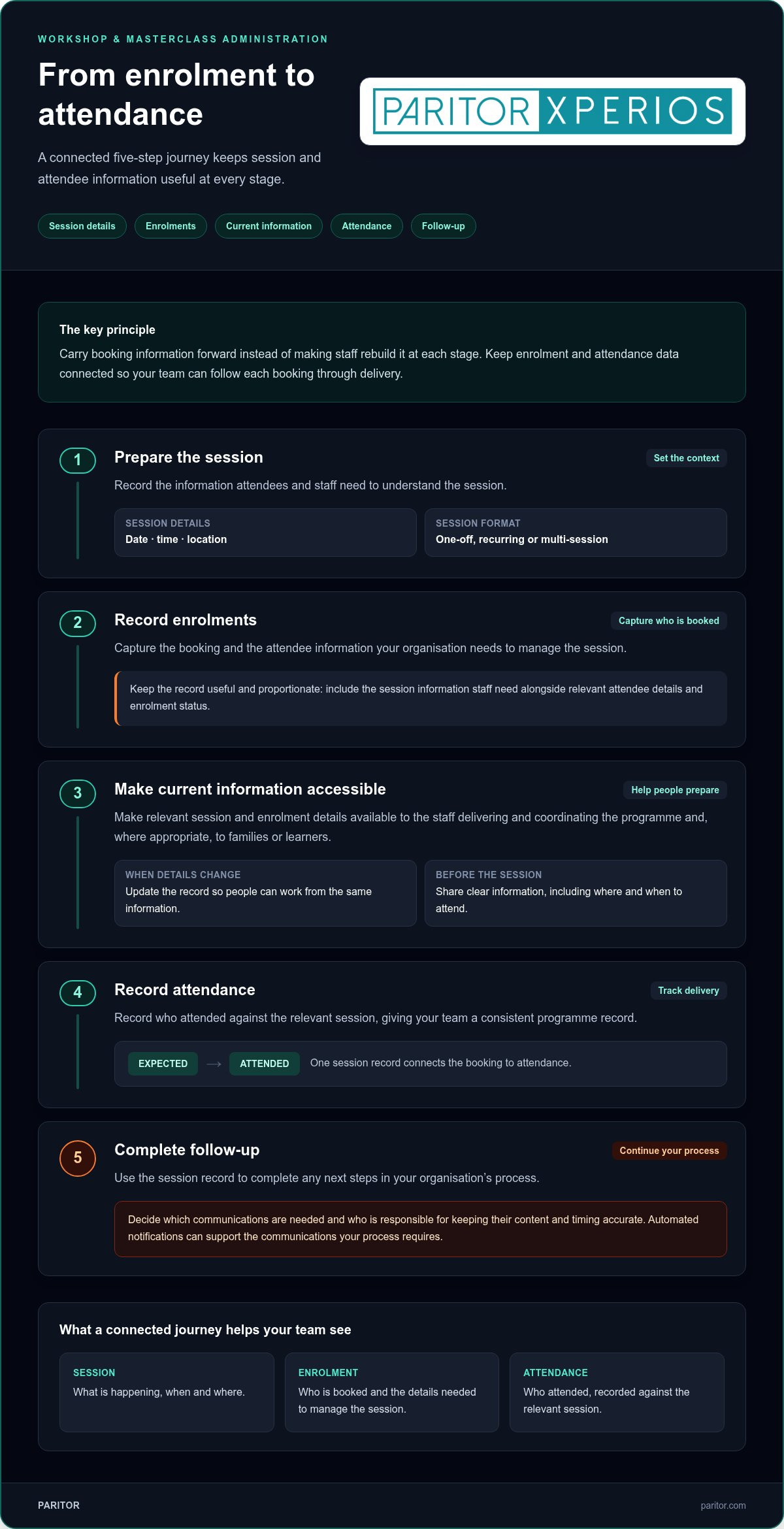
A useful process carries information forward rather than making staff rebuild it at each stage. When assessing a workshop and masterclass booking system, trace the journey in order: prepare the session, record enrolments, make relevant details accessible, record attendance and complete follow-up. Each step should support the next, with clear responsibility for keeping information current.
- Session setup: Record the details attendees and staff need, such as dates, times, location and session format.
- Enrolment: Capture the booking and the attendee information your organisation needs to manage the session.
- Information access: Make current session and enrolment details available to relevant staff and, where appropriate, families or learners.
- Attendance: Record who attended against the relevant session.
- Follow-up: Use the record to complete any next steps in your organisation’s process.
Keep booking and attendance data connected so staff can follow each enrolment from registration through delivery without reconciling separate records. This gives your team a consistent view of who is expected and who attended.
Which information should follow a booking?
Keep the record useful and proportionate. It may include attendee details alongside the session information staff need to deliver the programme, such as the date, time, location and enrolment status. Decide what to record based on your processes and the needs of each session. Collecting details staff do not need can make records harder to manage.
Timely access matters when a schedule changes or staff are preparing for a session. When the people coordinating delivery can view up-to-date details, they can work from the same information. Set a clear process for updating records so changes do not remain in one person’s inbox or a separate document.
How can attendance and communication reduce admin?
Recording attendance against the relevant session gives your team a consistent programme record and avoids transferring details later from separate notes. Sharing clear information in advance, including where and when to attend, can also reduce avoidable questions from participants and families.
Automated notifications are system-generated alerts. Use them to support the communications your process requires, such as sharing relevant session updates with participants. Decide which messages need to be sent and who is responsible for keeping their content and timing accurate. For ideas on giving families access to relevant information, read the parent portal strategy guide.
For a wider view of connected administration, explore the Xperios platform for music and performing arts organisations.
Which workshop booking system features matter most for music and performing arts?
Prioritise features that support your programme and the people running it. A workshop and masterclass booking system should fit how you organise sessions, coordinate staff and record learner participation, not just offer a long list of functions. Compare each system against the work your team does every day.
| Area | What to assess | Why it matters |
|---|---|---|
| Session formats | Can your process accommodate one-off masterclasses, recurring workshops and multi-session courses? | Your programme mix determines how enrolments and session details need to be organised. |
| Scheduling | Can staff work with the dates, times, venues and teaching arrangements relevant to each session? | Clear scheduling helps coordinators and tutors work from consistent information. |
| Attendance | Can attendance be recorded against the relevant session and enrolment? | Connected records support consistent programme administration. |
| Communication | Can you share the session information participants need and manage communications through your established process? | Clear details can reduce avoidable questions and uncertainty. |
| Administration | How does booking information relate to your wider records and routine tasks? | A good fit can limit duplicate entry and disconnected follow-up. |
Can one system handle workshops, masterclasses, and courses?
Start with your actual programme mix. A one-off masterclass centres on a single session, while recurring workshops and courses involve multiple dates or stages. Assess flexibility against these formats rather than relying on a feature label. Check that staff can identify each format, see who is enrolled and understand which sessions each person will attend.
A standalone booking tool may collect registrations effectively but leave scheduling, attendance or other administration elsewhere. Staff then have to transfer details between records. Assess the whole workflow, not only the attendee-facing booking step.
How should you assess access, records, and data protection?
List what administrators, teachers, parents and students need to access, and consider how your organisation manages those records. Access should reflect each person’s role and information needs. Keep the information you collect relevant to your process, and decide how it will be kept up to date and used during programme delivery.
Data protection regulations govern how personal information is handled. They affect how an organisation collects, stores and uses details about attendees and learners. This is a practical consideration, not legal advice. Xperios is a cloud-based platform hosted on Microsoft Azure, and Paritor states that it supports GDPR compliance. Include hosting and data protection in your assessment alongside the system’s day-to-day fit.
How can you assess whether a booking system fits your organisation?
Compare systems against the work your team does, not just the features on a product page. Before choosing a workshop and masterclass booking system, map your programme formats, staff responsibilities and the route information takes from enrolment to attendance. This makes it easier to spot where a system could reduce repeated tasks and where your processes may need to change.
What should you map before comparing systems?
Follow a booking from session planning to delivery and note who handles each step. Your map might include:
- Session setup: Who creates the session details and keeps dates, times and locations current?
- Enrolments: Who manages bookings and attendee information, and where is it recorded?
- Attendance: Who records participation, and how does that information reach administrators?
- Queries: Who responds to questions from learners, parents or teaching staff?
- Information access: Which staff and learners need real-time data access, and what details do they need?
Then mark every hand-off. If someone copies attendee details into a separate record, checks several calendars to find the current schedule or passes attendance information on manually, you’ve identified a repeated task to assess. Use these examples to compare how each system could support your actual workflow.
How can you plan a manageable transition?
Adopting a new system involves more than transferring records. Identify the session information, attendee details and existing processes staff will need in the new workflow. Agree who is responsible for keeping each type of information current, and plan how staff will learn the tasks relevant to their roles. Structured onboarding can help staff use the system consistently and maintain reliable records.
Plan how you’ll review the process once staff begin using it. Are bookings easier to follow through to attendance? Are there fewer manual hand-offs? Can the right people access current information? These practical checks keep implementation focused on everyday administration and the time your team wants to return to teaching and learners.
For additional guidance on system selection in the performing arts, read the performing arts administration system guide.
Ready to explore how connected administration could fit your organisation? Explore Xperios for music and performing arts organisations.
How does Xperios connect workshop bookings with wider administration?
A booking is one part of a music or performing arts service. Xperios is Paritor’s cloud-based platform for music services and performing arts organisations. It brings bookings, scheduling, attendance tracking and automated invoicing into a wider administration platform. You can manage enrolments alongside the work of coordinating teaching and maintaining programme records.
For an organisation comparing a workshop and masterclass booking system, this means the booking process can sit within wider administration rather than being treated as an isolated task. Staff can work with booking, schedule and attendance information as part of their service administration instead of managing each activity as a separate process.
How can connected administration give staff more time?
Scheduling helps staff organise teaching activity, while attendance tracking supports a consistent record of participation. When these tasks sit alongside bookings in the same administration platform, staff have a clearer way to refer to the information involved in planning and delivering programmes. Automated invoicing also supports the administrative work connected to your organisation’s services.
The practical value is reducing the need to gather or re-enter information across separate processes. The impact depends on your current workflows, but connecting relevant administration can help staff spend less time coordinating records and more time supporting teaching and learners.
Xperios includes secure portals for teachers, parents and students. These give relevant users access to information through role-appropriate routes, helping connect communication to each group’s needs. Consider what information each group needs as part of your wider approach to managing access and records.
What should you expect from a cloud-based platform?
A cloud-based platform is hosted on remote servers, so authorised users can access it online rather than relying on one computer or location. This helps staff work with current information across different settings. Cloud services can also scale to meet changing requirements.
Xperios is hosted on Microsoft Azure. Paritor states that the platform supports GDPR compliance. These details can inform your assessment of how personal information is managed, alongside your organisation’s own data protection processes and responsibilities.
Paritor develops Xperios in collaboration with users. This user-centred approach brings practical experience into software development and recognises that administrative systems need to support real teaching and service workflows.
Explore how Xperios can support your music or performing arts organisation’s administration, from bookings and scheduling to attendance tracking and invoicing.
Choose a system that supports the work beyond booking
The right workshop and masterclass booking system should do more than capture enrolments. Assess how well it connects session information with scheduling, attendance records and the administration your team manages every day. Clear information flows can reduce repeated manual tasks and give staff more time to focus on teaching and learners.
Xperios supports bookings, scheduling, attendance tracking and automated invoicing, with secure portals for teachers, parents and students. These capabilities connect programme administration with relevant information for the people involved. Paritor has operated since 1993 and develops its software in collaboration with users, bringing practical perspectives into the way the platform evolves.
Ready to explore how connected administration could support your organisation? Explore how Xperios can support your organisation. Start with your current processes and see how Xperios can help connect bookings with the administration around them, leaving your team more time for teaching.
Frequently Asked Questions
Can a workshop booking system manage both one-off masterclasses and recurring courses?
Assess the system against your programme structure. Consider one-off masterclasses, recurring workshops and multi-session courses. Check how each format is set up and how enrolments relate to the sessions participants will attend. If your programme includes several formats, review each one rather than assuming general booking features will suit them all.
How can a booking system help manage workshop attendance?
A booking system can help staff manage attendance when enrolment details and attendance records are easy to access and keep current. Staff can use booking information to see who is expected, then record attendance against the relevant session. Xperios supports bookings and attendance tracking, helping staff work from shared information and maintain consistent programme records.
Can parents or students book workshops online?
When assessing a system, distinguish between viewing session information and completing an enrolment. Xperios includes secure portals for parents and students to access relevant information. Your booking process should make clear how participants enrol and how their details are then used to manage the session.
What should a music service look for in a masterclass booking system?
Set criteria that reflect your programme and workflow. Assess whether the system suits your session formats, supports the scheduling staff need and helps maintain attendance records. Consider how you’ll communicate session information and what teachers, parents, students and administrators need to access. Prioritise connected processes over a long list of features so the booking system fits your wider administration.
Is a general class booking system suitable for a performing arts organisation?
How does a cloud-based platform support workshop administration?
A cloud-based platform is hosted on remote servers and accessed online, helping authorised users work with up-to-date information across different settings. Xperios is hosted on Microsoft Azure, and Paritor states that it supports GDPR compliance. Include hosting and data protection in your assessment alongside how the platform supports your organisation’s processes for managing information.
How can workshop booking software reduce administrative work?
Connecting bookings, scheduling and attendance tracking can help staff avoid handling the same information repeatedly across separate processes. Xperios also supports automated invoicing as part of wider administration. Map repeated steps in your current process, then assess where connected information and automation could give staff more time for teaching and learners.