

Imagine spending your Sunday evening reconciling instrument hire fees against messy spreadsheets, only to find half the data is outdated. You didn’t enter the arts to become a full-time data entry clerk, yet the administrative weight of managing ensembles and peripatetic staff often feels overwhelming. This 2026 onboarding guide for school management software is designed to lift that burden and return your focus to the creative mission of your service.
We understand that moving away from legacy systems is daunting, especially when facing resistance from staff or complex billing requirements. By following our step-by-step framework, you’ll master the transition to a modern system like Xperios. Our goal is to help you build a centralised database that works for your specific needs, resulting in automated invoicing that actually saves time and high adoption rates amongst your team.
This article provides a clear roadmap for your digital transformation. We’ll explore how to migrate data securely, configure your financial management modules, and ensure your parent and teacher portals are ready for a successful launch.
Key Takeaways
- Learn the five essential pillars for a seamless rollout, ensuring your new system is configured to solve your specific administrative burdens from day one.
- Follow our comprehensive onboarding guide for school management software to transition from messy legacy spreadsheets to a secure, centralised database.
- Discover the best methods for handling niche data, such as managing complex ensemble schedules and tracking instrument repair history alongside loan status.
- Implement role-based training strategies that overcome staff resistance by demonstrating exactly how new technology reclaims valuable teaching time for your educators.
Preparing for Change: Why Onboarding Defines Your Software Success
Onboarding is far more than a simple technical installation. It’s the vital process of configuring a student information system to mirror your unique organisational workflows. For music and performing arts services, this means ensuring your software understands the difference between a one-to-one violin lesson and a large-scale youth orchestra rehearsal. This onboarding guide for school management software highlights that successful implementation is the bridge between purchasing a tool and actually reaping its benefits.
Poor implementation remains the primary reason why digital transitions fail to deliver a return on investment. If the system doesn’t fit the way your peripatetic teachers actually work, they simply won’t use it. A successful rollout requires a delicate balance; you must manage the technical migration of data whilst simultaneously navigating the cultural change within your staff. Setting clear, measurable goals for your first 90 days, such as completing your first automated billing cycle or achieving high teacher portal login rates, creates a sense of early momentum and relief.
Defining Your Implementation Timeline
A “big bang” launch often creates unnecessary stress in an already busy arts environment. We recommend a phased approach. Start by migrating your core student records before moving on to complex modules like ensemble management or instrument hire. Identify “quiet periods” in the academic year, such as the summer break or late October half-term, to handle the heaviest data lifting. It’s essential to allocate realistic hours for training; using a structured onboarding guide for school management software ensures these hours are spent effectively rather than during the peak of exam season or concert rehearsals.
Assembling Your Implementation Team
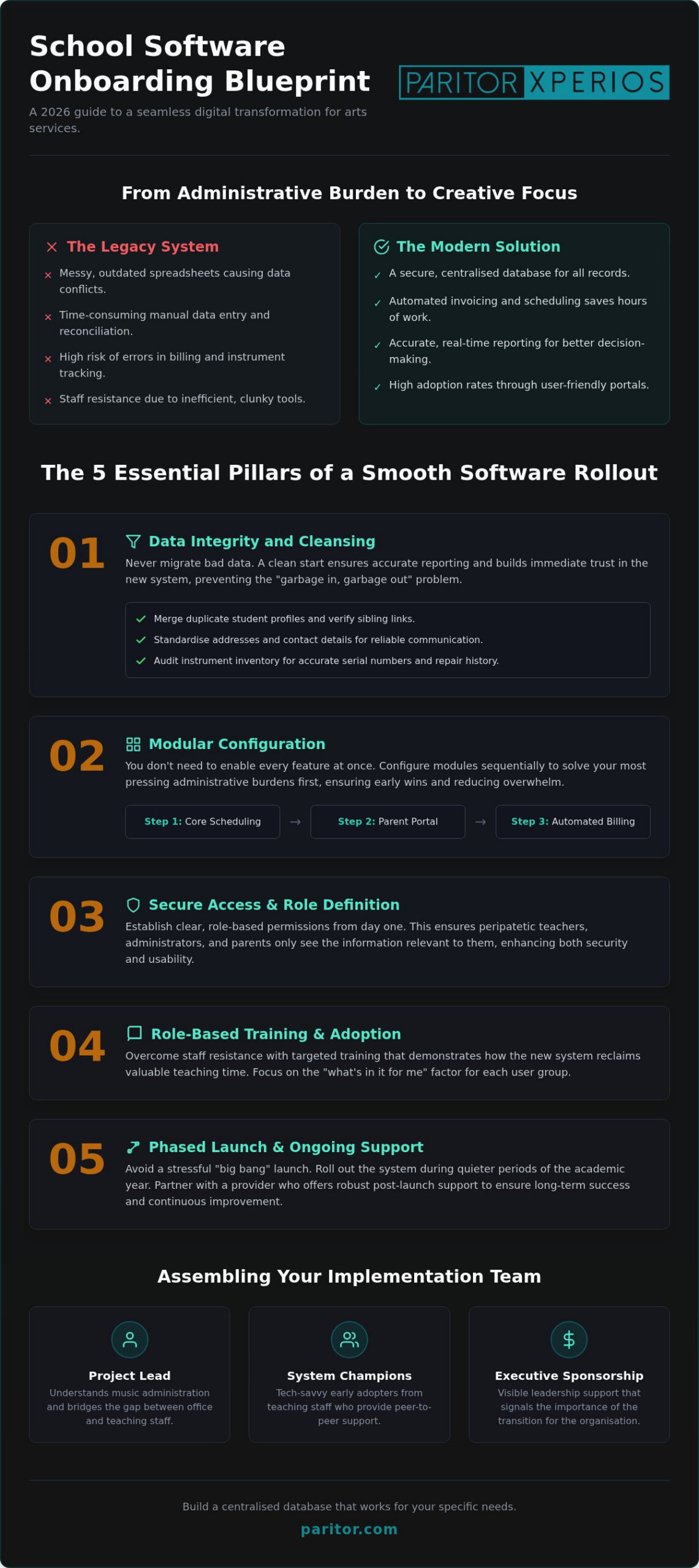
Your project needs a lead who understands the nuances of music administration. Unlike traditional schools where roles are strictly hierarchical, music services often have flatter structures that require a lead who can bridge the gap between the office and the stage. Alongside this lead, identify your “Xperios Champions” amongst the teaching staff. These tech-savvy early adopters provide peer-to-peer support and help demonstrate the “what’s in it for me” factor to more hesitant colleagues. Finally, ensure you have executive sponsorship. When leadership visibly supports the new system, it signals that the move is a necessary step in the professional journey of the organisation.
The 5 Essential Pillars of a Smooth School Software Rollout
A successful rollout doesn’t happen by accident. It requires a structured approach that prioritises clarity and technical precision. Whilst the previous section focused on the human element of change, these five pillars provide the technical foundation for your digital journey. Using this onboarding guide for school management software, you can transform a complex migration into a manageable series of wins for your team.
Data Integrity and Cleansing
The “Golden Rule” of software implementation is simple: never migrate bad data into a new system. If your current spreadsheets are riddled with duplicate student records or outdated contact details, those errors will only amplify in a more powerful environment. Before you begin the migration process, dedicate time to a thorough cleansing phase. Use this checklist to ensure your data is ready:
- Merge duplicate student profiles and verify sibling links for family billing.
- Standardise contact details to ensure automated emails reach the correct parents.
- Audit your instrument inventory, ensuring serial numbers and repair histories are accurate.
Clean data ensures that your initial reports are accurate, building immediate trust with your administrative staff and board members. It eliminates the frustration of “garbage in, garbage out” and sets the stage for reliable automation.
Modular Configuration for Maximum Impact
You don’t need to switch on every feature at once. We recommend configuring modular features to solve your most pressing administrative burdens first. For most arts services, this starts with core scheduling. Once your timetables are live and accurate, you can then introduce the parent portal for music schools. This specific sequence reduces phone enquiries and empowers parents to manage their own schedules, freeing up your office staff for more complex tasks.
Third, establish secure access controls. It’s vital that sensitive data remains protected whilst allowing teachers and parents the right level of visibility. Fourth, integrate your financial workflows. By connecting your scheduling directly to Xperios Financial Management, you automate the invoicing process and significantly reduce late payments. Finally, customise your dashboard. This provides a real-time view of the metrics that matter most to your organisation, from ensemble attendance to instrument loan ratios. If you’re ready to see how these pillars function in a live environment, you can explore our specialised modules today. Following a dedicated onboarding guide for school management software ensures that each of these steps is taken with confidence and precision.
Managing Niche Data: From Instrument Inventories to Ensemble Grades
Music and performing arts services operate with data structures that generic educational platforms simply aren’t built to handle. Whilst a standard classroom has a one-to-one relationship with its register, your ensembles often involve complex “many-to-many” relationships. A single student might participate in a brass band, a jazz collective, and private tuition, each with different billing rates and attendance requirements. This onboarding guide for school management software ensures these intricate webs of data are captured accurately from the outset.
Digitising student assessments and exam progress is another vital step in the modernisation journey. Moving away from paper-based grade tracking allows you to create a longitudinal view of a learner’s musical development. By mapping your existing financial nominal codes to your new automated invoicing system early in the setup, you ensure that every lesson taught is correctly accounted for in your ledger without manual intervention. It’s about creating a system that understands the rhythm of your organisation.
Migrating Complex Musical Assets
Managing a fleet of instruments requires more than just a list of names. It demands robust instrument inventory management software capable of tracking thousands of items across multiple sites. During the configuration phase, focus on linking specific instrument serial numbers directly to student hire agreements. This creates a clear audit trail for insurance and accountability purposes, which is essential for large-scale hubs.
The system should also track the repair history and maintenance schedules for each asset. Knowing that a cello was last re-strung six months ago or that a piano is due for tuning helps you manage depreciation and budget for replacements effectively. This level of detail transforms your inventory from a static list into a dynamic administrative tool that actively supports your service delivery.
Setting Up Teacher and Student Portals
The success of your new system relies heavily on the daily engagement of your peripatetic staff. Configuring the Teacher Portal for real-time attendance tracking allows tutors to mark registers on their mobile devices whilst moving between schools. This immediate data entry eliminates the end-of-week scramble to update paper registers and ensures your records are always current. It’s a significant relief for staff who previously felt bogged down by administrative debt.
Simultaneously, enabling student self-service through the Student Portal empowers learners to manage their own exam registrations and ensemble bookings. When portals are fully mobile-responsive, they become an essential tool for staff and students alike, rather than a digital hurdle. A well-executed onboarding guide for school management software prioritises this ease of access, ensuring high adoption rates across your entire musical community from the very first day of go-live.
Overcoming Resistance: Training and Adoption Strategies for Arts Educators
Even the most sophisticated cloud platform is only as effective as the people using it. Within music and performing arts services, resistance often stems from a valid fear that new technology will add to an already heavy administrative workload. This onboarding guide for school management software prioritises empathy by showing staff exactly how the system removes repetitive tasks. Instead of generic sessions, tailor your training to specific roles. Administrators require deep-dive configuration skills, whilst teachers simply need to know how to record attendance and view their schedules in seconds.
The “What’s in it for me?” approach is your most powerful tool for driving adoption. When a teacher realises they no longer have to manually reconcile registers at the end of every week, their perspective shifts from skepticism to relief. To support this, swap lengthy manuals for bite-sized video tutorials. Short, 90-second clips showing how to mark a register or request an instrument repair are far more likely to be watched than a dense PDF. Use the first month as a collaborative feedback loop. Gathering input from your team allows you to refine settings and demonstrates that the software is built on their professional insights.
Engaging Peripatetic and Visiting Staff
Peripatetic teachers often work across multiple schools and hubs, making them particularly sensitive to complex login procedures and fragmented data. Simplify their experience by ensuring the Xperios Teacher Portal is accessible via a single, secure login on their mobile devices. When teachers see they can receive instant timetable updates and replace paper registers with a few taps, the transition feels like an upgrade rather than an imposition. They reclaim time previously spent on Friday afternoon data entry, allowing them to focus entirely on their students. If you want to see how we support your team through every step of this journey, book a personalised Xperios demonstration to explore our training resources.
Measuring Initial Success and Adoption
Data provides a clear window into how well your new system is being embraced across the organisation. Monitor portal login rates to identify individuals or departments that might be struggling with the change. A low login rate isn’t a sign of failure; it’s an opportunity for targeted, supportive training. Simultaneously, watch for a reduction in manual invoicing errors. As Xperios Financial Management takes over the labour-intensive billing tasks, the number of disputes should drop significantly. Following this onboarding guide for school management software ensures you also gather parent feedback. If parents find the Parent Portal makes payments and event bookings easier, their satisfaction becomes a powerful endorsement for the system’s long-term success.
Partnering for Progress: The Xperios Onboarding Experience
Choosing a partner for your digital transformation is a significant decision for any educational institution. Xperios has become the music service management software standard because it’s built on direct collaborative input from industry veterans. This isn’t a detached service provider relationship; it’s a dedicated ally in your mission. Our structured programme guides you from initial data migration through to comprehensive go-live support, ensuring every student record and instrument hire agreement is accurately transitioned. By leveraging the Microsoft Azure cloud, we provide institutional-grade security and full GDPR compliance. This foundation of professional trust ensures your data remains safe, redundant, and accessible only to those with the correct permissions.
Professional Implementation Services
Your organisation has its own unique rhythms and administrative complexities. Our UK-based professional services team provides expert configuration to match your specific arts workflows, ensuring the software fits your service rather than forcing you to change your behaviour. We don’t just hand over a login; we configure the system to eliminate your most repetitive burdens from day one. As your music or performing arts school grows, the modular nature of Xperios allows you to scale with ease. You can add specialised modules for Event Management or Exams and Assessments exactly when you’re ready. This onboarding guide for school management software highlights that you’re joining a community of best-practice sharing, where the platform evolves through constant user insights.
The Long-Term Benefits of Modernisation
The ultimate goal of this modernisation journey is empowerment and relief. By automating labour-intensive tasks, you can reclaim hundreds of administrative hours every academic year. This allows your team to restore their focus to the primary creative and educational mission of the service. Beyond internal efficiency, a modern parent portal and automated billing significantly improve the professional image of your organisation amongst parents and the wider community. It signals that your service is stable, contemporary, and deeply committed to a seamless user experience. Adopting Xperios is the essential step forward in the professional journey of an organisation, providing the industrious engine that allows your educators to excel in their own roles.
Embrace the Future of Arts Administration
Transitioning to a modern system is more than a technical upgrade; it’s a strategic move to reclaim your time and refocus on your musical mission. By prioritising clean data migration and role-specific training, you ensure that your new platform becomes a supportive engine rather than an administrative hurdle. This onboarding guide for school management software has outlined how a structured, phased approach eliminates the chaos of legacy spreadsheets and complex billing.
Success lies in partnering with experts who understand the unique demands of performing arts services. Xperios is designed specifically for UK music and arts services, hosted on the secure Microsoft Azure cloud for total peace of mind. With our expert UK-based implementation and support, you aren’t just buying software; you’re gaining a partner dedicated to your long-term growth and stability.
Ready to eliminate repetitive burdens and empower your educators? Discover how Xperios can transform your music service administration and start your journey toward a more organised, efficient future today. Your staff, parents, and students will thank you for the clarity and simplicity that follows.
Frequently Asked Questions
How long does the onboarding process for school management software typically take?
The timeline varies based on your organisation’s size, but a typical implementation takes between eight and twelve weeks. We recommend a phased approach to ensure each module is correctly configured before moving to the next. This onboarding guide for school management software prioritises stability over speed; we work with you to identify quiet periods in the academic calendar for the heaviest data lifting.
Is our data secure when moving to a cloud-based management platform?
Your data is exceptionally secure because Xperios is built on the Microsoft Azure cloud platform. This infrastructure provides advanced encryption, multi-factor authentication, and automated data redundancy. We host your information in UK-based data centres, ensuring it meets the high security standards required by educational institutions. You can rest assured that your sensitive student and financial records are protected by industry-leading safety protocols.
Can we migrate data from our existing spreadsheets and legacy systems?
Yes, we specialise in migrating data from legacy systems and complex spreadsheets into a centralised database. Our professional services team provides a structured framework for cleansing and standardising your records before they are imported. This process eliminates duplicates and ensures that sibling links and instrument histories are preserved. It’s a vital step in modernising your service and removing the burden of manual data entry.
Do we need an IT department to set up and manage Xperios?
You don’t need a dedicated internal IT department to manage Xperios because it is a fully managed cloud-based platform. We handle the technical infrastructure, security updates, and server maintenance on your behalf. This allows your administrative team to focus on service delivery rather than troubleshooting software. Our UK-based team provides the technical expertise required to keep your system running smoothly and reliably.
What kind of training is provided for our peripatetic music teachers?
We provide role-specific training designed for the busy schedules of peripatetic staff. Instead of long manuals, teachers receive access to bite-sized video tutorials and a mobile-responsive Teacher Portal. These resources show them exactly how to mark registers and view timetables in seconds. This approach ensures high adoption rates by demonstrating immediate time-saving benefits, allowing tutors to focus on teaching rather than paperwork.
Can the software handle complex instrument hire and ensemble billing?
Xperios is specifically designed to handle the complex billing requirements of music hubs and performing arts schools. The Xperios Financial Management module automates many-to-many relationships, such as charging for instrument hires alongside ensemble fees. By mapping your existing financial codes to the system, you reduce manual invoicing errors and improve cash flow. It’s a robust solution for managing the intricate financial needs of arts services.
Is Xperios compliant with UK GDPR requirements for student data?
Xperios is fully compliant with UK GDPR requirements and uses Microsoft Azure’s accredited security framework. We prioritise data privacy by ensuring all student and parent information is stored securely within the UK. Our system includes features for data minimisation and clear access controls, allowing you to manage permissions effectively. This foundation of institutional safety is a core part of our commitment to professional trust and regulatory compliance.
What happens if we need help after the initial onboarding period is over?
Our support continues long after your initial go-live date through our dedicated UK-based professional services team. You’ll have access to ongoing technical help, regular software updates, and our active user community for best-practice sharing. Whether you’re scaling your service or adding new modules like Event Management, we remain a committed ally. We ensure your system evolves alongside your organisational needs for years to come.