

A music timetable isn’t just a list of lesson times; it’s a living ecosystem where pupil progress depends on the perfect synchronisation of teachers, specialised rooms, and instrument availability. If you’re still wrestling with spreadsheets every Sunday evening, you’re likely facing the same manual data entry errors and subject clashes that plague many administrators. Learning how to create a music school timetable that actually works shouldn’t feel like a full-time job in itself.
We understand that chasing peripatetic teachers for their availability whilst trying to keep parents updated is exhausting. It’s a taxing, repetitive burden that pulls you away from your primary educational mission. This guide promises to help you master the complexities of peripatetic rotations and room management without the administrative headache. We’ll explore a clear, repeatable process that reduces labour and restores focus to what matters most: the students.
Key Takeaways
- Learn how to implement rotating lesson structures that protect core academic progress whilst ensuring students never miss the same subject twice.
- Discover the most efficient method for how to create a music school timetable by centralising teacher availability and mapping specific room requirements.
- Build a scalable ‘Template Week’ that serves as a reliable foundation for your entire term, reducing the need for constant manual adjustments.
- Transition away from high-risk manual spreadsheets and paper notices to digital portals that provide real-time updates for parents and staff.
- Reclaim your time by using Xperios to automate the complex synchronisation of peripatetic staff, instruments, and specialised teaching spaces.
The Unique Challenges of Music School Timetabling
A standard school timetable is usually a rigid, predictable grid where subjects remain fixed in their allocated slots. Music scheduling is entirely different. It’s a fluid, high-stakes puzzle that requires constant adjustment. When you’re learning how to create a music school timetable, you quickly realise that you aren’t just managing time; you’re synchronising human expertise, specialised physical environments, and expensive equipment across multiple locations.
The complexity increases when you factor in peripatetic staff. These teachers often work across several sites, meaning their availability is restricted by travel windows and external commitments. Unlike a classroom teacher who stays in one room, a music tutor’s day is a series of transitions. You must also balance one-to-one tuition with larger ensemble rehearsals, ensuring that a violin student’s individual lesson doesn’t clash with their senior orchestra practice. It’s a taxing administrative burden that requires a deep understanding of your school’s specific rhythm.
What is a Rotating Music Schedule?
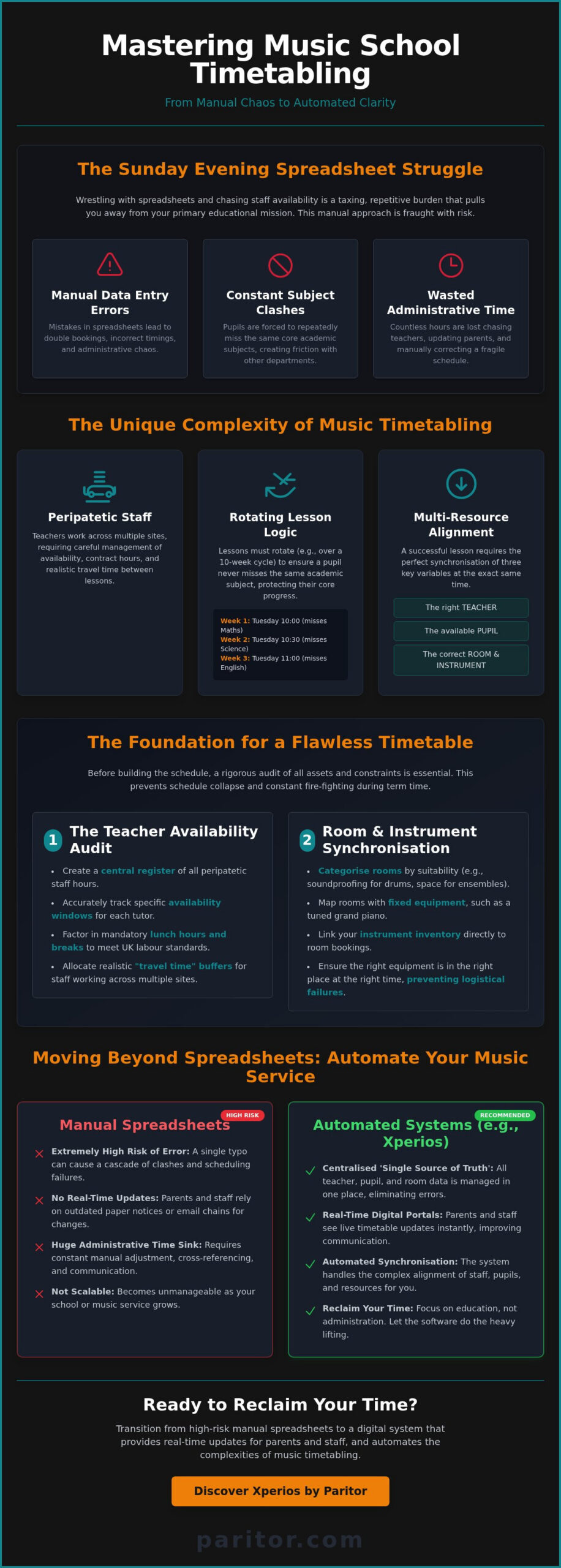
In the UK, many successful music departments use a 10-week or 12-week rotation logic. This system ensures that a pupil who has a guitar lesson at 10:00 am on Tuesday in Week 1 will have it at 10:30 am in Week 2, and so on. This prevents the student from consistently missing the same core academic subject, such as Maths or English. By rotating the slot, you protect the pupil’s academic performance and maintain positive relations with other department heads. Explaining this “fairness” logic to parents and headteachers is vital for gaining their support for the music programme.
Managing Multi-Resource Constraints
Effective scheduling requires the perfect alignment of three variables: the teacher, the pupil, and the specialised room. You can’t simply move a drum lesson into a small office; it requires a sound-treated booth. Similarly, a piano teacher needs a room with a tuned instrument, not just any available space. When you’re figuring out how to create a music school timetable, you must map these acoustic properties and fixed equipment before you even start booking slots.
Don’t forget to account for travel time for your peripatetic staff. If a teacher is travelling between two school sites, they need a realistic buffer to pack their instruments, drive, and set up in the next location. Forcing back-to-back lessons across different postcodes is a recipe for stress and late starts. By acknowledging these physical constraints early, you create a more stable, professional environment for everyone involved.
Step 1: Auditing Your Resources and Constraints
Before you can master how to create a music school timetable, you must conduct a rigorous audit of your available assets. It’s impossible to build a stable schedule on shifting sands. This initial phase involves identifying every constraint, from teacher contract hours to the specific acoustic properties of your practice rooms. A survey of educational timetabling highlights that these “hard constraints” are the foundation of any successful system. If you don’t account for them now, your term will be defined by constant fire-fighting and manual corrections.
The Teacher Availability Audit
Collecting peripatetic staff hours shouldn’t involve chasing endless email threads. You need a central register that tracks contract hours and specific availability windows. It’s essential to factor in lunch hours and breaks to remain compliant with UK labour standards. For staff working across multiple sites, you must account for “travel time” buffers. Forgetting this trap is a primary cause of schedule collapse; a teacher can’t be in two places at once without a realistic transition period. Verification of these hours early prevents the frustration of clashing commitments later in the term.
Room and Instrument Synchronisation
Not all rooms are created equal. You must categorise your spaces by their suitability for specific instruments. A brass lesson requires different soundproofing than a vocal session, and an ensemble needs floor space that a standard drum booth simply can’t provide. This level of detail ensures that your physical environment supports, rather than hinders, the learning experience.
This is where your instrument inventory management software becomes a vital tool. By linking your kit list directly to your room bookings, you ensure that a specialised harp or a tuned grand piano is actually in the room when the student arrives. It eliminates the embarrassment of a teacher and pupil standing in an empty space because the equipment was moved for an assembly. To avoid these logistical failures, many organisations choose to centralise their administration through a dedicated platform.
Identifying Blackout Periods
Finally, map out your “blackout” periods. These are the non-negotiable dates where rooms or pupils are unavailable. Identifying these hurdles early allows you to build a schedule that is resilient rather than fragile. Key dates to include are:
- School Assemblies: These often occupy the main hall or large practice spaces.
- Mock and Final Exams: These require total silence in corridors near music blocks and often repurpose music rooms for invigilation.
- Staff Training Days: Ensure your term dates align with the specific local authority calendar to avoid booking lessons when the school is closed.
Understanding how to create a music school timetable starts with this data-gathering exercise. Once your resources are mapped, you can begin the creative work of designing the actual lesson blocks.
Step 2: Designing the Core Timetable Structure
Once your audit is complete, you can begin the architectural work of building the schedule. Learning how to create a music school timetable requires a shift from viewing time as a static block to seeing it as a dynamic sequence. Most schools operate on a 10-lesson per term or 30-lesson per year basis. Your first task is to plot these dates against the academic calendar, ensuring you’ve accounted for the blackout periods identified in Step 1. It’s about creating a rhythm that supports both the teacher’s energy and the student’s academic progress.
Start by placing your ‘anchor points’. These are typically fixed ensemble rehearsals or group classes that cannot move. Because these involve multiple students and staff, they provide the rigid framework around which individual tuition must flow. Next, prioritise your senior pupils and those preparing for imminent exams. These students often require specific slots or longer durations, so securing their places early prevents logistical bottlenecks as the deadline approaches. By organising the high-priority slots first, you ensure the most critical needs are met before the grid becomes crowded.
Building Your Template Week
Start with your fixed constraints; identify exactly when rooms and teachers are definitely available without conflict. Place individual lessons into the gaps that remain around your fixed ensemble times. A Template Week is the static master-grid from which all subsequent rotations originate. This master document serves as your single source of truth. It allows you to see the entire department’s capacity at a glance, making it much easier to spot potential room double-bookings before they happen.
Implementing the Rotation Logic
Rotation is the engine of a fair music service. You must decide between weekly or fortnightly shifts for your service. Typically, this involves moving a pupil’s slot by 20 or 30 minutes each week. This ensures they don’t miss the same academic lesson more than once or twice a term. If a rotation hits a fixed school event, such as a sports day or assembly, you’ll need a pre-defined ‘clash’ protocol to handle the disruption without collapsing the whole day’s schedule.
Visualising this movement is essential for clarity. Use colour-coding to track pupil movement across the day; it makes the logic immediately apparent to both staff and students. This level of organisation transforms a chaotic list of names into a professional, predictable system. If managing these manual shifts feels overwhelming, modular tools like Xperios Ensemble Management can handle the heavy lifting, allowing you to focus on the quality of instruction rather than the mechanics of the grid.
Communicating the Schedule and Managing Clashes
The first draft of your timetable is rarely the version that survives the first week of term. This “Feedback Loop” is a necessary part of the process where teachers, pupils, and parents identify minor conflicts that weren’t visible in the initial planning phase. Managing these adjustments manually is where many administrators lose their weekends. When you’re refining how to create a music school timetable, you must build a system that allows for these iterations without the risk of version-control chaos. Physical paper notices pinned to a corridor wall are no longer a viable solution; they’re outdated, difficult to update, and present a significant security risk.
In the UK, maintaining GDPR compliance is non-negotiable. Displaying pupil names alongside their lesson times in a public space or emailing unprotected spreadsheets is a data security breach waiting to happen. You need a method that ensures sensitive information is only accessible to authorised parties. It’s about protecting the privacy of your students whilst maintaining an efficient flow of information.
Secure Distribution via Portals
Moving away from email attachments protects your organisation and your students. A secure parent portal for music schools provides a central, encrypted location where families can check their specific schedules in real-time. This eliminates the “I didn’t get the email” excuse and ensures that parents always have the most current version of the rotation.
Teachers also benefit from this digital shift. By using a dedicated portal, peripatetic staff can view their live schedules on mobile devices whilst on-site or travelling between schools. If a room changes at the last minute, the update is immediate. This level of transparency builds trust and professionalises the relationship between the music service and its stakeholders.
Managing Absence and Rescheduling
No schedule is immune to teacher illness or pupil absence. To prevent these disruptions from derailing your entire term, you must establish clear, written policies for “make-up” lessons and short-notice cancellations. Having these rules in place from day one provides a framework for consistent decision-making. Setting these boundaries early reduces the emotional labour of negotiating with disappointed parents or frustrated staff.
When a change occurs, you need to notify everyone affected instantly. Digital systems allow you to track attendance in real-time, which feeds directly into your billing and financial reporting. This automation removes the need for manual reconciliation at the end of the month. If you want to eliminate the administrative labour of manual updates, you can explore how Xperios automates these workflows for you. By centralising your communication, you transform a reactive process into a proactive service that empowers your entire musical community.
Moving Beyond Spreadsheets: Automating Your Music Service
Manual spreadsheets have a ceiling. Whilst they might suffice for a handful of private pupils, they quickly become a liability when managing complex peripatetic rotations across multiple school sites. The manual effort required to maintain a DIY database often leads to administrative burnout and data silos. If you’re looking for a permanent solution for how to create a music school timetable, you must look beyond static grids and move towards dynamic automation. Xperios by Paritor is designed to handle the heavy lifting, allowing your team to step away from the keyboard and back into the classroom.
The software automates the entire “rotating” logic that we explored in previous sections. Instead of manually shifting slots by 20 minutes every Sunday evening, the system performs these labour-intensive tasks for you. It also provides a single, cloud-based centre to manage multiple school locations simultaneously. This scalability ensures that as your music service grows, your administrative burden doesn’t grow with it. By centralising your operations, you create a more resilient organisation that isn’t dependent on a single person’s knowledge of a complex Excel formula.
Integration is the final piece of the puzzle. When your timetable is linked directly to your financial system, you can automatically bill for the lessons you’ve booked. This synchronisation ensures that every minute of tuition is accounted for, providing a seamless transition from the teaching room to the bank account. It eliminates the need for manual reconciliation and provides a professional experience for parents who receive accurate, timely invoices.
The ROI of Administrative Automation
The return on investment for automation is measured in both time and financial security. By automating rotations and attendance tracking, organisations often save dozens of hours each term. This reclaimed time allows staff to focus on high-value activities like curriculum development and pupil engagement. Automation also significantly reduces “revenue leakage.” In a manual system, unbilled or forgotten lessons are common; a digital system ensures that every scheduled event is captured for billing. It’s a stable, predictable way to protect your department’s budget. For departments that also coordinate concerts, showcases, and end-of-term performances, performing arts event management software extends this same automation logic to your entire events calendar, eliminating double-booked rehearsal spaces and frantic last-minute communications.
Why Xperios is the UK Standard
Xperios is built on direct user collaboration. It is designed specifically for the unique, often fragmented workflows of UK music hubs and performing arts services. We understand that your requirements differ from standard academic departments, which is why our platform handles everything from instrument inventory to ensemble management in one modular system. Data safety is our priority; the platform is securely hosted on Microsoft Azure, providing institutional-grade reliability and peace of mind. For music services operating across several campuses, dedicated managing multiple school locations software is what transforms fragmented data silos into a single, coherent operation.
Discover how Xperios transforms music school administration and see how our person-centric approach can help you master how to create a music school timetable without the administrative headache. It is time to modernise your service and empower your staff with tools built for the future of music education.
Modernise Your Music Service
Mastering how to create a music school timetable is a journey from manual labour to strategic oversight. By auditing your physical resources and implementing a robust rotation logic, you protect the academic progress of your students whilst ensuring a fair distribution of teaching time. Moving away from the risks of physical notices and unprotected spreadsheets allows you to build a professional, secure environment that parents and teachers can trust.
You don’t have to tackle these complexities alone. Xperios is built on 30 years of industry experience and is trusted by major UK Music Hubs to deliver secure, GDPR-compliant cloud hosting. It’s the industrious engine that allows you to reclaim your time and focus on your core educational mission. Book a demo of Xperios to automate your music school scheduling and discover how a person-centric platform can transform your administration. You’ve built a thriving musical community; now it’s time to give it the modern foundation it deserves.
Frequently Asked Questions
How do I handle a music lesson clash with a core academic subject?
Implement a rotating schedule to ensure students don’t miss the same academic lesson consistently. By shifting the music slot by 20 or 30 minutes each week, a pupil only misses a specific subject once or twice a term. This approach protects their academic progress and maintains positive relationships with other department heads. It’s a fair, transparent system that prioritises the student’s overall education whilst allowing for high-quality music tuition.
What is the best way to manage peripatetic teacher travel time between schools?
Build realistic travel buffers directly into your master grid. You must account for the time needed to pack instruments, drive between sites, and set up in a new room. Forcing back-to-back lessons across different postcodes is a primary cause of schedule collapse and staff burnout. Acknowledging these physical constraints early creates a more stable, professional environment for your visiting teachers and ensures lessons start punctually.
How often should a music lesson timetable rotate?
Most UK music services find that a weekly rotation over a 10 or 12-week term is the most effective frequency. This regular movement ensures the “fairness” logic is maintained and prevents pupils from falling behind in any single academic subject. When you’re refining how to create a music school timetable, a weekly shift provides the most predictable rhythm for students, parents, and classroom teachers to follow.
Is it better to use a spreadsheet or dedicated software for music scheduling?
Dedicated software is far superior for scalability, security, and reducing administrative labour. Whilst spreadsheets might work for very small studios, they lack the automated “rotating” logic and secure portal access required for modern music hubs. Using a platform like Xperios is a necessary step in how to create a music school timetable that is repeatable, professional, and free from the risks of manual data entry errors.
How can I ensure our music school timetable is GDPR compliant?
Stop using paper notices in corridors and unprotected email attachments immediately. The most secure method is to use encrypted portals where parents and teachers only access the specific data relevant to them. This ensures pupil information is protected and your organisation meets UK regulatory standards. Centralising your data in a secure cloud environment like Microsoft Azure provides the institutional-grade safety required for handling sensitive student records.
How do I schedule group lessons with pupils of different ability levels?
Group students by their grade or skill level rather than their age or year group. Use your ‘Template Week’ to fix these group slots as permanent anchor points, as they involve more variables than individual tuition. This ensures the learning environment remains productive for everyone involved. Fixing these slots early prevents the logistical headache of trying to move multiple students simultaneously later in the term.
What happens to the timetable during school exam weeks?
Identify these dates as ‘blackout periods’ during your initial resource audit. You’ll need to either pause lessons or relocate them to alternative spaces to maintain the silence required for invigilation. Mapping these hurdles early allows you to build a schedule that is resilient rather than fragile. It ensures your teachers still meet their contract hours without disrupting the school’s high-stakes academic requirements.
Can I link my music timetable to my instrument hire scheme?
Yes, you can synchronise these functions by using integrated modules like Xperios Instrument Management. This allows you to verify that the specific kit required for a lesson is available and located in the correct room before the student arrives. Linking your inventory to your schedule eliminates the embarrassment of equipment being moved for an assembly when a student has a scheduled lesson or rehearsal.