

A timetable alone can’t keep registrations, class capacity and instructor availability in sync. Group class scheduling software brings these tasks together, helping you publish sessions, manage bookings and coordinate instructor availability. It can also support reminders, rescheduling and cancellations, making changes easier to manage.
If you’re juggling spreadsheets, messages and last-minute timetable updates, administration can take time away from teaching and supporting learners. A booking system organises these tasks in one place and gives students and instructors clearer information about upcoming classes.
This article explains how a class booking system manages registration and scheduling, tracks instructor availability, and supports integrations, reminders, rescheduling and cancellations. You’ll learn what to look for and how the right setup can simplify day-to-day class administration.
Key Takeaways
- Set clear booking, cancellation and waiting-list policies so learners know what to expect and you can manage class places consistently.
- Choose integrations that fit your workflow, and consider how calendar, video-conferencing and payment connections can reduce repeat administration.
- Make online registration and changes straightforward by setting out how learners can book, reschedule or cancel a place.
- Use confirmations and reminders to keep learners informed, then plan follow-ups around the next step they need to take.
- Coordinate class times with instructor availability, locations and capacity to build a timetable that works in practice.
What is a class booking system?
A class booking system publishes sessions, records bookings and manages capacity. Learners can choose a session, while administrators manage class records in one place.
There’s no single best group class scheduling software for every UK organisation. Compare how systems handle registration, class limits, instructor availability, cancellations and the way learners book.
Test common tasks when comparing platforms, such as finding a class, booking a place and changing a booking. Check that the learner view is clear and administrators can update class information without unnecessary steps.
For UK GDPR and data protection, consider what personal information the system collects, who can access it and how records are managed. Review the privacy information and controls available to protect personal data.
Security also depends on managing access appropriately. Look for role-based permissions so staff only see or change information relevant to their duties. Review how the cloud platform stores and protects booking records, and how administrators can update access when staff responsibilities change.
Set a capacity limit for each session and use a waiting list when all places are taken. For recurring sessions, publish each date and apply consistent booking and cancellation rules.
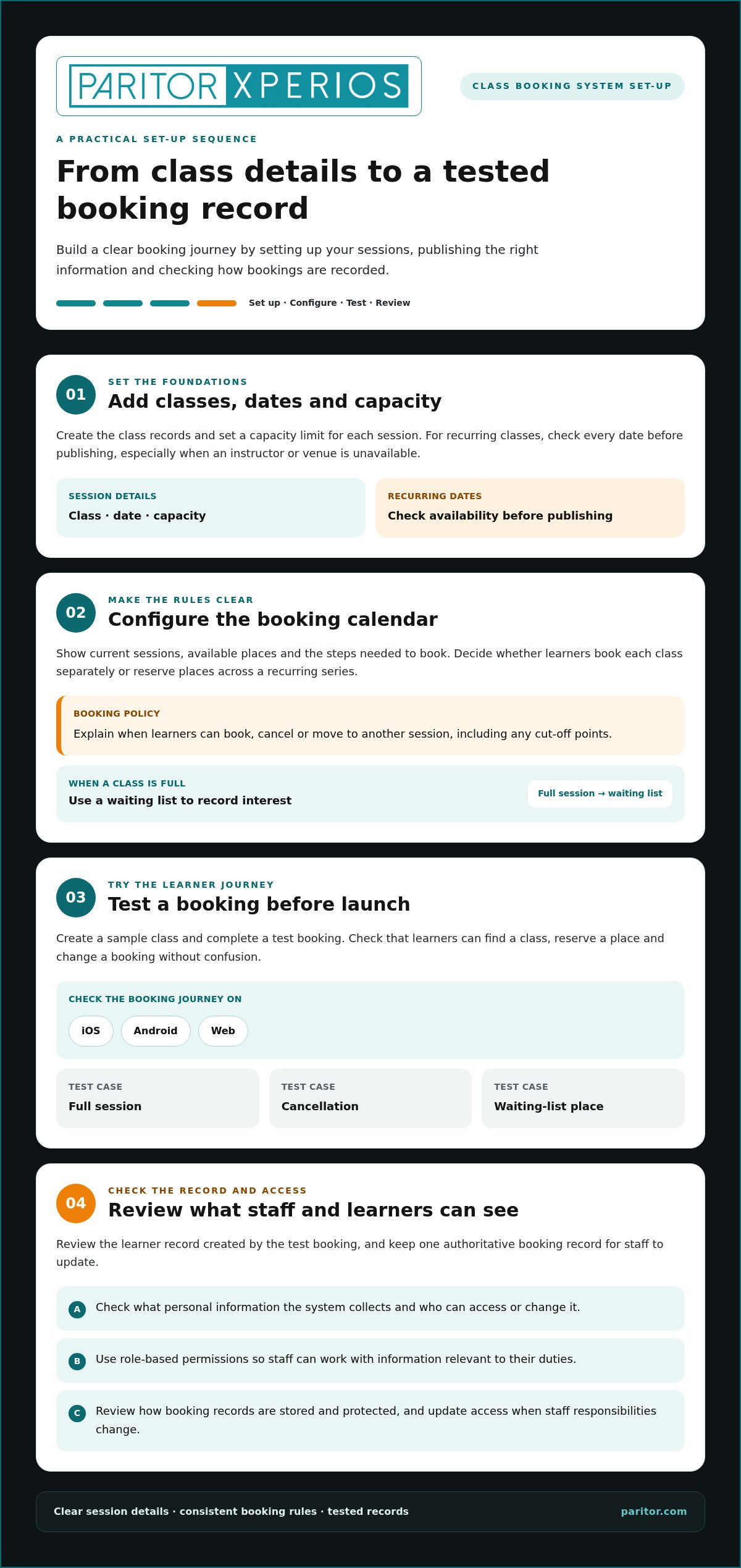
To set up a system, first add your classes, dates, capacity and booking policies. Then configure the booking calendar, test a student booking and review the resulting record.
Common problems include outdated availability, confusing cancellation rules and duplicate records when bookings are managed in several places. Review the timetable regularly and keep one authoritative booking record for staff to update.
Booking policies and waiting lists
A booking policy explains when learners can reserve a place, cancel or move to another session. Set out any cut-off points and what happens after cancellation, so learners understand the process before booking.
When a class is full, a waiting list records interest and can help fill a place after a cancellation. Check how learners join the list and how you offer newly available places.
Booking across devices and websites
Learners may use an iPhone, Android device or computer to find a class. Test the booking journey on iOS, Android and the web, including how the timetable appears on smaller screens.
A website booking calendar should show current sessions, available places and the steps to complete a booking. Check that it fits your organisation’s website and makes it easy for learners to find the right class.
Recurring availability and booking rules
Recurring availability lets you publish a series of classes, such as a weekly evening session, instead of entering each date separately. Review the dates before publishing, especially if a venue or instructor is unavailable for a session.
Apply booking rules consistently across the series. Decide whether learners book each class individually or reserve places for recurring sessions, then explain the process in the booking calendar.
Automated scheduling and student self-booking
Automated scheduling can apply set availability and capacity rules when sessions are published. Student self-booking lets learners choose an available class, reducing the need to process every request manually.
Before launch, create a sample class, complete a test booking and review the learner record. Check how the system handles a full session, a cancellation and a waiting-list place. Also assess whether payment options, such as Stripe, suit your process.
Integrations with calendars, video conferencing and payments
Integrations connect class bookings with the tools you already use. Calendar connections can help learners and instructors keep session details visible, while video and payment links can reduce separate administrative steps. Before choosing a system, map how a booking moves from selection to confirmation, attendance and payment.
Compare systems by their functions and how they fit your organisation’s workflow. Check whether calendar connections, payment handling and administrative access work together to keep class records clear.
For calendars, check whether a booked session can appear in a learner’s or instructor’s calendar, such as Google Calendar or Microsoft Outlook. Confirm which details transfer, including the class name, date, location and joining instructions. Consider what happens after rescheduling: the calendar entry should show the new session, without leaving conflicting details behind.
Online classes add another connection to consider. If instructors use Zoom or Microsoft Teams, establish how learners receive the correct meeting details after booking. Test the route from the class calendar to the online session, including what happens if the instructor changes the meeting link. A clear process avoids sending different joining instructions through separate messages.
Payment options should match how you deliver classes. A drop-in session may suit payment during booking, while a course package could involve paying for several sessions together. Decide whether learners can use credit from an existing package, and make the balance or remaining sessions clear. This helps staff answer payment questions without checking several records.
Discount codes and memberships need clear rules. Decide whether a code applies to one class, a course package or a membership, and state any limits before checkout. Check how membership affects class access and whether the system distinguishes included sessions from separately paid bookings. Clear records help you reconcile attendance with payments.
Prepayment can secure a place before a class begins, while payment after attendance may suit other arrangements. Choose a consistent approach for each class type, then test a booking, cancellation and any credit adjustment. Check that payment records connect to bookings, so staff can see the status without manually matching separate lists.
For music organisations, music service administration tools can bring class organisation and supporting administration into one workflow.
Online registration, rescheduling and cancellations
A clear online process lets learners book, change or cancel a class without relying on separate messages. Configure the booking page and cancellation rules together, so every learner sees the same instructions.
Online registration and booking changes
Use the booking page to collect only the details needed to manage registration, such as the learner’s name, contact details and chosen class. Show the session date, location and any joining information before the learner confirms. This helps prevent avoidable questions about what they booked.
For changes, decide whether learners can move their own booking or need to contact your team. A flexible process might let someone switch to another available session while keeping the original place visible until the change is complete. Test a booking, rescheduling and cancellation from the learner’s view before opening registration.
Wait lists and cancellation refunds
When a class is full, a waiting list can record learners who want a place. Decide how you’ll offer a place after a cancellation and whether the learner must accept within a set period. Explain the process on the booking page, so people know that joining the list doesn’t mean they have a confirmed place.
Refund handling depends on your cancellation policy and payment process. If the system supports automatic refunds, define which cancellation types qualify and how staff review exceptions. Otherwise, record the cancellation and refund decision together, so booking and payment records stay aligned.
Customer reminders and cancellation policies
State the cancellation policy before a learner completes registration. Explain how to cancel, whether a cancelled place can be transferred, and what happens to a payment or class credit. For example, distinguish a learner cancelling from your organisation cancelling a session, then make the next step clear in each case.
Use reminders to direct learners to their booking details and cancellation options. A group class reminder can include the session date, venue or online joining information. Keep the wording consistent with the booking page to avoid conflicting instructions.
Payments linked to cancellations
Connect payment status with the booking record, so staff can see whether a learner paid, cancelled or received credit. Before launch, test an online payment followed by a cancellation. Check that the booking no longer occupies a place and that the payment record reflects the action taken.
Set out how your organisation handles prepayments, transfers and refunds before accepting online payments. For cancellations that qualify for a refund, define who approves it and how it is recorded. Booking software should make these steps visible to staff, rather than leaving them to reconcile separate lists manually.
Automated confirmations, reminders and follow-ups
A class booking system can send messages at key points in the learner’s journey. Make each message support a clear action, such as confirming a place or sharing online class details.
Booking confirmations and follow-ups
After an online booking, a confirmation should state the session name, date, time and location. For a remote class, include the joining instructions or explain where learners can find them. A clear receipt gives families and instructors one reliable reference, rather than making them search through earlier messages.
Plan follow-ups around the next useful step. For example, a message after registration can explain what to bring, while a post-session note can direct learners to a future booking. For recurring sessions, include the relevant date in each message so learners can distinguish one class from another.
Reminders and no-show prevention
Schedule reminders before sessions at a time that suits your learners and teaching routine. A reminder can repeat the class date, venue and preparation details, helping learners spot a diary mistake or missing information before travelling.
For an online class, include the correct meeting instructions and any required preparation. Keep reminders focused on the action the learner needs to take. Reminders can prompt attendance, but they can’t ensure everyone attends, so record attendance separately and use that information to follow up appropriately.
Email and text notifications
Email works well for detailed information, such as a course update or venue instructions. Text messages suit concise alerts, such as a change to a session time. Choose the channel for the message and keep essential details consistent across formats.
Before enabling notifications, check that the learner’s contact details are accurate and messages reach the intended person. For a child’s booking, consider whether the parent or guardian should receive the confirmation. Give staff a way to review message status and correct an inaccurate contact record.
Changes need their own notification. If an instructor moves a session, send an updated message with the revised details instead of relying on the original confirmation. For cancellations, explain what happens next, such as how to choose another class or where to find a follow-up update.
Review message templates alongside the booking process. Test a new registration, a recurring class reminder and a schedule change before using them with learners. This helps catch outdated venue details, unclear instructions or messages referring to the wrong session.
Class scheduling and instructor availability
A timetable works only when class demand fits instructor availability, room access and location. Booking software helps you see these constraints together before students reserve places.
Start by recording each instructor’s working hours, teaching locations and the classes they can lead. Then add room availability and travel time between venues. For example, an instructor teaching at one school in the morning may not be available to teach elsewhere straight afterwards. Build realistic gaps into the schedule to avoid clashes and rushed changes.
Next, set up classes with their dates, capacity and assigned instructor. A recurring session should follow a pattern that matches actual availability, rather than automatically copying the same slot across every week. Review dates affected by school closures, room changes or instructor leave before publishing. This keeps the booking page aligned with the timetable staff can deliver.
Give availability a clear owner. Decide who can change an instructor’s hours, assign a substitute or move a class. When an instructor reports an absence, staff need to identify affected sessions, find a suitable replacement and update the published timetable. Keeping the change in one record helps prevent team members from working from an old version.
Class size also affects instructor planning. Set capacity to suit the teaching format, room and available support, then prevent further bookings when the limit is reached. If several instructors can teach the same class, show who is assigned to each session. Students can make an informed choice, and administrators can see where cover is still needed.
For services running across schools or venues, organise schedules by location as well as instructor. Check that each class has a suitable room and that the instructor can reach it. A timetable view filtered by teacher, venue or session can help administrators spot overlaps before students book. Keep the published schedule consistent with internal records.
Test the process with a sample timetable: assign an instructor, add a venue, publish a session and change its availability. Check that the update appears in the booking view and reminders use the revised details. If students use a portal, make sure they can access their current timetable without relying on older messages. A credit card payment may confirm a booking, but it can’t resolve a scheduling conflict.
Where students need access to their current timetable, a student timetable portal can form part of the administration workflow. Review how your scheduling process gives students accurate session information whilst keeping instructor and venue changes manageable.
Paritor: Xperios for Music Services
Paritor’s Xperios for Music Services supports music organisations with scheduling, bookings, attendance and invoicing. It brings these tasks together so your team can spend less time coordinating records and more time supporting teaching.
For performing arts organisations, private teachers and ensembles, Xperios also offers options designed for those settings. Choose the fit that reflects how you organise classes and instructors, whether you manage a music service, teach independently or coordinate ensemble activity.
If class administration is taking attention away from your core work, explore how Xperios could support your processes. Contact Paritor or visit paritor.com to discuss your requirements.
Make your next step practical
The right group class scheduling software should fit the way your organisation teaches, not force your team into a cumbersome process. Before deciding, choose a typical class and map its journey from timetable planning to learner attendance. Note where staff repeat work, then use those points to judge whether a new system would support day-to-day priorities.
Consider how your classes, instructors and administrative responsibilities may change over time. A system that suits your current timetable should also support how you organise future teaching. Focus on the work that matters most, and involve the people who manage bookings and deliver sessions in the decision.
Paritor offers Xperios for Music Services, Xperios for Performing Arts and Xperios for Private Teachers. Contact Paritor to discuss your needs and explore which option aligns with your organisation’s teaching administration. A considered next step can help you spend less time coordinating paperwork and more time supporting learning.
Frequently Asked Questions
Why use scheduling software for classes?
Class scheduling software helps you coordinate teaching information in one system instead of separate spreadsheets and messages. For example, administrators can review enrolments alongside instructor and room assignments before confirming a new session. This makes clashes easier to spot and gives staff a consistent record. It also helps identify where repeated administration takes time away from lesson planning and learner support.
What features should group class scheduling software include?
Look for tools that match your teaching operation, including class scheduling, learner records, attendance tracking and clear staff access controls. A useful system lets you review who is enrolled and who can update class information. Reporting can help administrators understand participation across programmes. For a music organisation, group class scheduling software should fit alongside tuition administration, rather than leaving you to maintain separate class and learner records.
Which scheduling tools integrate with UK payment providers and accounting software?
Choose a system that supports your organisation’s payment providers and connects payment records with bookings. Paritor supports Worldpay, Stripe, Sage Pay and Schooble, and can integrate with third-party accounting software. Before adopting a workflow, map how a payment is recorded, reconciled and linked to a learner’s account. This helps staff trace transactions without relying on disconnected booking and finance records.
How do customers book, pay for, cancel or reschedule group classes online?
Customers usually select a session through your online booking page, provide the requested details and follow the payment instructions. They can then use your organisation’s stated process to cancel or request a change. Explain what happens to their place and payment in each case, such as moving to another session or receiving credit. Clear instructions help families understand the steps and give staff a consistent record to manage.
What is the best group class scheduling software in the UK?
There’s no single best option for every UK organisation. Compare how systems handle registration, capacity, instructor availability, cancellations and learner bookings, then test common booking and change tasks.
How do popular class scheduling platforms compare on features and usability?
Compare registration, capacity limits, instructor availability, cancellations, integrations and how clearly learners can find, book or change a class. Test these tasks from both the learner and administrator views.
How much does group class scheduling software cost in the UK?
Pricing for group class scheduling software in the UK typically varies depending on your organisation’s size, the number of active learners, required integrations, and the level of support needed. Many providers use a tiered subscription model or charge per administrator and instructor licence. When budgeting, consider whether setup fees, payment gateway transaction charges, and training costs are included in the quoted price, and request a tailored demonstration to get an accurate estimate for your specific requirements.