

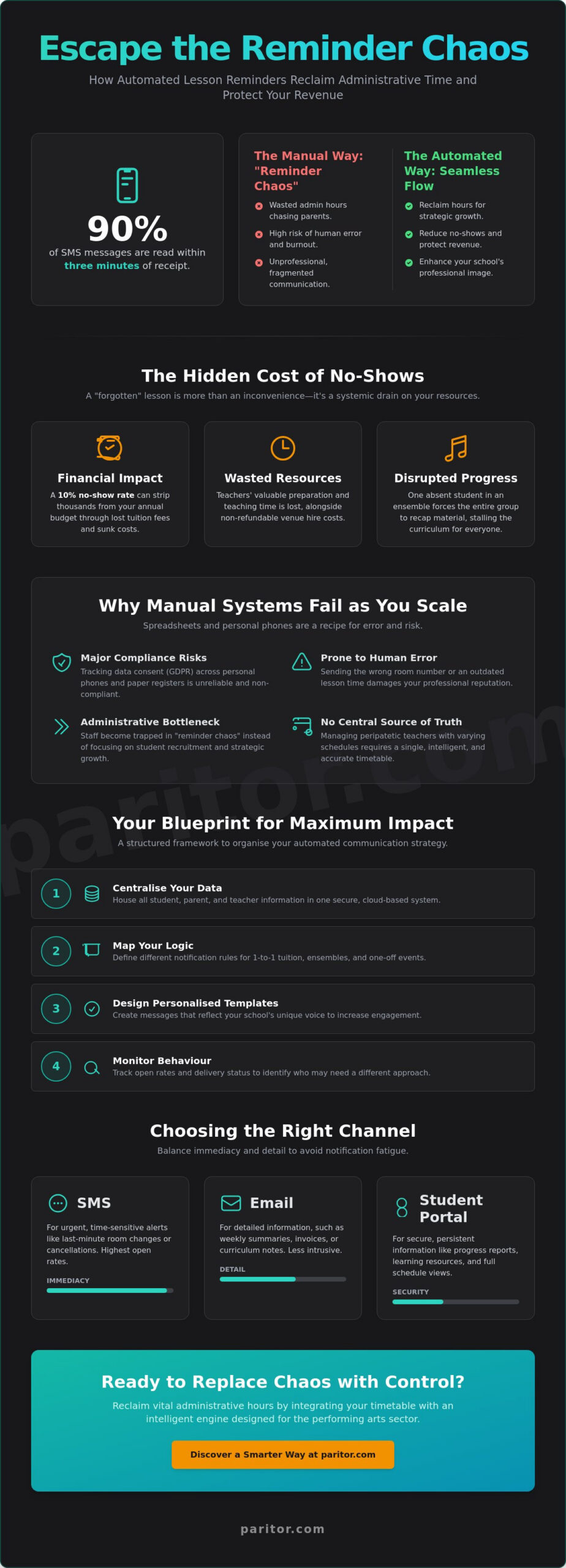
Did you know that 90% of SMS messages are read within just three minutes of being received? For a busy music or performing arts school, implementing automated lesson reminders for students is about more than just modernising; it’s about reclaiming the rhythm of your day and protecting your bottom line. You likely entered this profession to inspire creativity, not to spend your evenings manually chasing parents or staring at an empty studio because a student simply forgot their slot. It’s a taxing administrative burden that drains your energy and stunts your school’s growth.
We agree that the “reminder chaos” of manual texting is a professional headache you don’t need. This article explores how to eliminate no-shows and reclaim vital administrative hours through intelligent, automated communication strategies. We’ll preview the transition from disjointed scheduling to a seamless integration between your timetable and the student’s phone. You’ll discover how to professionalise your outreach whilst ensuring your teachers stay focused on their primary mission: teaching the arts.
Key Takeaways
- Understand the true financial and operational impact of student no-shows, from lost tuition fees to the hidden cost of teacher frustration.
- Discover how implementing automated lesson reminders for students can replace manual “reminder chaos” with a streamlined, professional communication system.
- Learn to balance SMS, email, and student portals to ensure high open rates for urgent alerts whilst providing detailed notes through secure channels.
- Master the art of personalisation at scale to avoid notification fatigue and maintain a high standard of professional student engagement.
- Reclaim hours of administrative time by integrating your timetable directly with an intelligent engine designed specifically for the performing arts sector.
The Hidden Cost of Manual Lesson Reminders and Student No-Shows
Every music school leader knows the sinking feeling of an empty studio. You’ve prepared the scores, the teacher is ready, and the venue is paid for, but the student hasn’t arrived. This isn’t just a minor inconvenience; it’s a systemic drain on your resources. Relying on manual outreach often leads to what we call “manual chaos.” Texting 50 parents individually from a personal mobile is a recipe for burnout and human error. In 2026, students and parents expect digital-first, seamless interactions. If your communication feels fragmented or inconsistent, it risks damaging the professional reputation of your music service. Modern appointment scheduling software has evolved to solve this, yet many schools still struggle with the administrative weight of “forgotten” lessons.
The Financial Impact of “Forgotten” Lessons
The financial leak caused by a 10% no-show rate can quietly strip thousands from your annual budget. It’s not just the lost tuition fees; it’s the sunk cost of wasted venue hire and the teacher’s time that could have been allocated elsewhere. When you implement automated lesson reminders for students, you directly protect your revenue. The ripple effect of a missed lesson is equally damaging. One missing violin in a string quartet or a absent lead in a musical theatre rehearsal disrupts the progress of the entire group. This forces teachers to spend valuable time recapping old material during the next session instead of advancing the curriculum.
Why Manual Systems Fail as You Scale
Scaling a music or arts school brings unique challenges that spreadsheets simply can’t handle. Tracking data consent across various personal phones and paper registers is a major compliance risk. Manual systems are inherently prone to human error; it’s far too easy to send the wrong room number or an outdated lesson time to a parent. Managing a team of peripatetic teachers with varying schedules requires a central, intelligent source of truth. Without automated lesson reminders for students, your admin team becomes a bottleneck. They spend their days trapped in “reminder chaos” rather than focusing on strategic growth, student recruitment, and the creative mission of your organisation. Transitioning to an automated system provides the relief and empowerment your staff need to excel in their roles.
How to Organise Automated Lesson Reminders for Maximum Impact
Organising your communication strategy is the first step toward a more professional and efficient music service. When you implement automated lesson reminders for students, you create a reliable safety net for your schedule. To move away from “manual chaos,” you need a logical framework that ensures every message serves a purpose. It’s not just about sending a text; it’s about sending the right text at the right time. By following a structured implementation plan, you can transform your administration into a silent, industrious engine that supports your creative mission.
- Centralise your data: Ensure all student, parent, and teacher information is housed in a secure, cloud-based environment to prevent data silos.
- Map your logic: Define different notification rules for 1-to-1 tuition, larger ensembles, and one-off events.
- Establish consent: Use clear protocols to manage communication preferences in line with GDPR.
- Design templates: Create messages that reflect your school’s unique voice; research on personalized reminders shows that tailored communication is far more effective than generic templates.
- Monitor behaviour: Track open rates and delivery status to identify students who may need a different communication approach.
Mapping the Student Journey
The timing of your alerts is just as vital as the content. A 24-hour reminder gives students time to prepare, whilst a 1-hour alert acts as a final nudge. Regular weekly lessons benefit from consistent triggers, but one-off exams require a bespoke sequence. When coordinating large groups, using ensemble management software allows you to update dozens of students simultaneously without clogging up your admin team’s afternoon.
Intelligent Scheduling Integration
Accuracy is the foundation of professional trust. Your automated lesson reminders for students must pull real-time data from your central timetable to avoid sending outdated information. If a teacher is unwell, the system should handle the update automatically. Dynamic scheduling is the synchronisation of live calendar data with automated outbound messaging. This level of automation provides instant relief for staff. If you’re ready to streamline your school, you can explore our software solutions to see how these steps work.
Choosing the Right Channel: SMS vs Email vs Student Portals
Selecting the correct medium for your automated lesson reminders for students is a strategic decision that balances urgency with detail. Not every update requires the same level of intrusion; a change in venue requires an immediate “ping,” whilst a detailed summary of a violin grade syllabus is better suited to a long-form format. By diversifying your communication channels, you ensure that your messages are both respected and acted upon. This multi-layered approach moves your school away from the pitfalls of “notification fatigue” and creates a more professionalised experience for every family.
- SMS: Boasting a 98% open rate, this is the essential tool for urgent, time-sensitive alerts that must be read within minutes.
- Email: The ideal channel for detailed lesson notes, attachments, and formal communications that students may need to archive for future reference.
- Student Portals: A central “single source of truth” that allows students to check their own schedules without digging through a cluttered inbox.
Balancing effectiveness with cost is vital. Whilst SMS carries a small per-message fee, its ability to reduce no-shows often provides a far higher return on investment than “free” channels that are easily ignored. The goal is to create a communication ecosystem where each channel supports the other, providing a seamless flow of information that empowers your students to succeed.
The Power of the Student and Parent Portal
A dedicated digital hub transforms the way families interact with your school. By implementing a parent portal for music schools, you provide a definitive anchor for all school interactions. This drastically reduces the volume of inbound “when is my lesson?” enquiries, as parents can access live timetable data at any time. Students can even confirm their attendance via the portal, giving your teachers the confidence to prepare their materials in advance. This structured approach is highly valued by the learners themselves; student attitudes towards reminders indicate that they perceive these digital prompts as a necessary and beneficial part of their educational journey.
Secure Communication on Microsoft Azure
In an era of strict data protection, where you host your automated lesson reminders for students is just as important as what they say. Hosting your communication engine on a world-class cloud platform like Microsoft Azure ensures that your school meets the highest global security standards. All student and parent data is encrypted whilst in transit and at rest, protecting sensitive information from unauthorised access. This level of technical assurance is a key marker of a mature music service; it builds trust with your local authority and ensures your school remains fully compliant with modern data regulations. By choosing a system built on secure, redundant architecture, you protect your school’s reputation whilst providing a stable, high-performance service for your community.
Best Practices for Professional Lesson Reminders in 2026
Reminders shouldn’t be a nuisance. They should be a resource. In 2026, the leading cause of ignored communication is “notification fatigue,” where parents and students stop engaging because they feel overwhelmed by digital noise. To solve this, sophisticated music services are adopting the “Smart Daily Digest.” Rather than sending four separate texts for four different children, your system should bundle these alerts into a single, coherent message. This approach respects the recipient’s time whilst ensuring that automated lesson reminders for students remain a helpful tool rather than a source of frustration.
Personalisation at scale is the key to maintaining a professional teacher-student relationship. A generic message feels robotic and is easily dismissed. By using intelligent placeholders for student names, specific instrument types, and room numbers, you demonstrate that your school is organised and attentive. Your tone should remain supportive; you aren’t just “chasing” a student, you’re facilitating their creative progress. Clear Calls to Action (CTAs) are equally vital. If a student cannot attend, the reminder must provide a clear, immediate path to notify the school, preventing the “manual chaos” of last-minute phone calls.
Crafting the Perfect Reminder Template
A high-performing template includes more than just a date and time. It should act as a checklist for the student. Essential elements include the specific location and a “What to Bring” section, such as sheet music, spare reeds, or specific dance attire. Template placeholders are dynamic variables that pull specific student data into a standardised message format, ensuring every alert is accurate without requiring manual typing. For schools looking to upgrade their entire workflow, integrating these templates into a wider performing arts school administration system allows for instant, one-click cancellations that automatically update your registers. To see how this can transform your school’s efficiency, you can book a demo of our management tools today.
Legal Compliance and Opt-Out Management
Maintaining trust requires absolute transparency regarding data usage. Every automated message must include a clear “STOP” or “Unsubscribe” option to remain compliant with UK data protection standards. Your CRM should automatically record and timestamp any verbal consent given during enrolment, providing a robust audit trail. Empowerment also means giving parents a choice; allow them to select their favourite channel, whether that’s SMS, email, or portal notifications. This level of respect for user preference ensures your automated lesson reminders for students are welcomed, not just tolerated.
Xperios: The Intelligent Engine Behind Your Reminders
Xperios isn’t just a tool; it’s the industrious engine that powers your school behind the scenes. By integrating automated lesson reminders for students into our complete music service management software, we eliminate the friction between scheduling and communication. This creates a profound sense of relief and empowerment for your staff. They are no longer tethered to the phone lines or chasing parents through personal devices. Instead, they can focus on student recruitment and the creative growth of the school.
Our platform offers modular flexibility. You can set bespoke reminder rules for your music, drama, and dance departments separately. This logic isn’t based on developer assumptions; it was built through direct collaboration with industry veterans who understand real-world teaching scenarios. It ensures that every alert is relevant, timely, and professional, whilst removing the burden of manual data entry from your daily workflow.
Scalability for Large Organisations
Large organisations require a system that handles thousands of daily alerts across multiple centres without lag. Xperios provides real-time reporting, allowing you to see exactly who has received and opened their notifications. By linking automated lesson reminders for students to our financial management module, you can even reduce late payments by prompting parents to settle fees alongside their lesson confirmations. This level of technical assurance builds a foundation of professional trust with both teachers and families, ensuring your school remains a stable and reliable presence in the community.
Take the Next Step in Modernisation
Adopting Xperios is a strategic step for forward-thinking performing arts schools. We act as an expert facilitator, providing the technological foundation that allows your creative mission to thrive. You don’t need to struggle with repetitive administrative labour when a dedicated ally is ready to help. Discover how Xperios can transform your school’s administration today.
Modernise Your School’s Communication Strategy
Modernising your school’s outreach is a vital step toward sustainable growth. We’ve explored how transitioning from manual “reminder chaos” to a structured, intelligent system protects your revenue and restores your team’s focus. By implementing automated lesson reminders for students, you replace a heavy administrative burden with a professionalised experience that families truly value. This shift isn’t just about efficiency; it’s about creating a stable environment where creativity can flourish without the constant distraction of missed lessons or scheduling errors.
As a dedicated ally with over 30 years of experience in performing arts administration, Xperios is built to be your industrious engine. Our platform is trusted by leading UK Music Hubs and features ISO 27001 compliant cloud hosting on Microsoft Azure for total peace of mind. It’s time to move your organisation forward and leave the repetitive paperwork behind. Book a personalised Xperios demo to see automation in action and discover the relief of a truly integrated system. We’re here to help you prioritise your students’ progress over paperwork.
Frequently Asked Questions
Do students need to opt in to receive automated lesson reminders?
Yes, students or their guardians must provide explicit consent to receive communications to remain compliant with UK data protection laws. You can manage these preferences within a centralised CRM, ensuring that only those who have opted in receive notifications. This protects your organisation from regulatory risk whilst maintaining a respectful, professional relationship with your families.
Can I send reminders to both the student and the parent simultaneously?
You can absolutely configure the system to notify both the student and the parent at the same time. This dual-notification strategy is particularly effective for younger learners who may not check their own devices regularly. By keeping both parties informed, you significantly reduce the risk of “forgotten” lessons and ensure everyone is aligned with the current timetable.
What is the best time to send a lesson reminder to ensure it is seen?
The most effective strategy is typically to send a reminder 24 hours before the scheduled lesson. This provides enough notice for the student to prepare their instruments or scores. Many schools also find success with a secondary “last-minute” alert sent one hour before the session starts to prevent accidental no-shows during busy afternoons.
How much does it cost to send SMS reminders through a school management system?
Sending SMS reminders usually involves a small per-message fee, though the exact cost depends on your service provider and your monthly volume. Whilst there is a minor operational cost, the investment is almost always offset by the reduction in lost tuition fees from no-shows. It is a cost-effective way to protect your school’s revenue and eliminate manual administrative labour.
Will automated reminders work for group classes and large ensembles?
Automated reminders are highly effective for group classes and large ensembles. You can configure triggers to send alerts to every member of a specific ensemble simultaneously, ensuring that orchestra rehearsals or dance troupes are well-attended. This is a vital tool for coordinating complex schedules and maintaining the steady progress of the entire group.
Can I customise the content of the reminders for different instruments or subjects?
You can fully customise the content of your alerts to reflect different instruments or subjects. By using dynamic placeholders, your automated lesson reminders for students can pull data directly from your database to mention specific details like “Violin” or “Drama.” This level of personalisation ensures the message is relevant, supportive, and professional.
What happens if a student tries to reply to an automated SMS reminder?
Most systems are configured as “no-reply” to ensure that individual teachers aren’t contacted on their personal numbers. If a student tries to reply, they will typically receive an automated prompt directing them to the school’s official contact channels or the student portal. This maintains clear professional boundaries whilst ensuring enquiries are handled by the correct administrative staff.
Is it possible to automate reminders for online lessons via Zoom or Teams?
It is entirely possible to automate reminders for online lessons conducted via platforms such as Zoom or Microsoft Teams. You can embed the specific meeting link directly into the reminder template, allowing the student to join their session with a single click from their phone or tablet. This creates a seamless transition from the notification to the virtual classroom.