

What if cloud management for music hubs could do more than store files? It can help your team manage invoices, instrument loans and communication in one place. When these tasks rely on spreadsheets, emails and manual updates, small errors can take time away from supporting pupils and teachers.
Accurate records and timely communication matter, but keeping financial information, instrument histories and updates for parents and peripatetic teachers in sync is difficult when they sit in separate systems. A shared, cloud-based platform can bring these workflows together and give authorised users access to current information.
This guide explains how cloud management can reduce repetitive administration while helping you handle sensitive information carefully. You’ll learn how financial workflows, instrument loan records and connected portals can support a consistent view of your hub’s activity. We’ll also cover security considerations for UK organisations, including cloud hosting and data protection. Xperios is hosted on Microsoft Azure and is GDPR compliant, with tools designed for music services. The aim is practical: spend less time chasing paperwork and more time supporting teaching and creative work.
Key Takeaways
- See how cloud management for music hubs can replace disconnected records with shared information your team can access as it changes.
- Explore how connected portals can help teachers, parents and students stay informed through clearer communication.
- Learn what to check when comparing cloud platforms with legacy systems, including hosting, security and data sovereignty.
- Find out how instrument records and maintenance history can help you track an instrument throughout its lifecycle.
- Consider how Xperios’s modular approach can support your hub as its administrative needs evolve.
The Shift to Cloud Management for Music Hubs
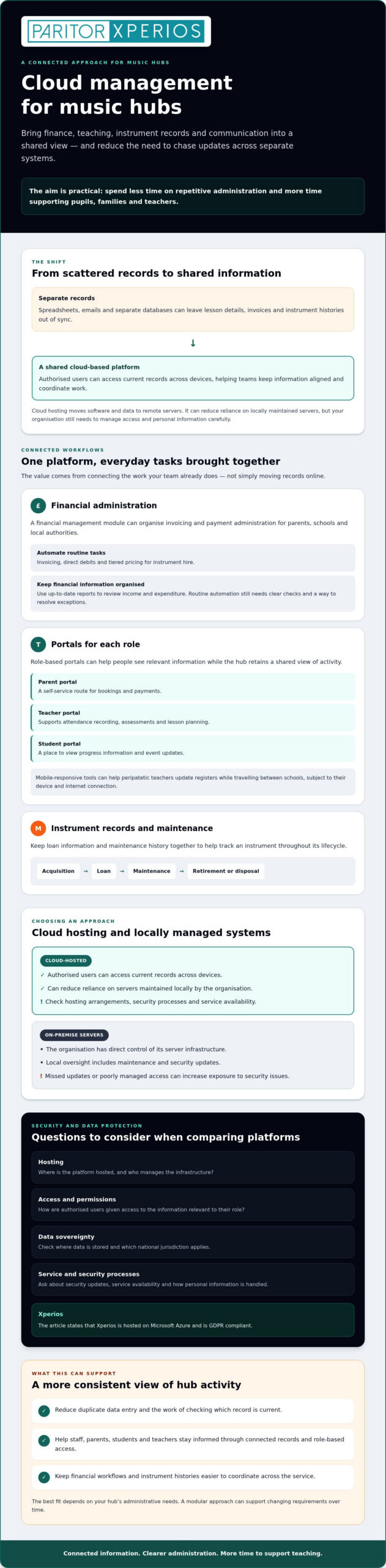
For a music hub, cloud management means more than storing files online. It’s a connected way to coordinate information and administration across teaching, finance and instrument management. A cloud-based platform hosts its software and data on remote servers, allowing authorised users to access current records across devices instead of relying on one office computer or shared drive. This is an example of cloud computing, with software delivered over the internet, often through a Software as a Service (SaaS) model.
This approach is useful when student details, lesson registers, invoices and instrument records are held in separate databases. A central system can give staff a consistent view of information, helping them keep records aligned and prepare reports. It can also support consistent administration across a wider network while allowing local teams to organise their work.
Why Traditional Systems Are Failing Modern Hubs
Manual data entry creates repeated work and opportunities for errors. A change to a pupil’s lesson or an instrument loan may need to be copied into several spreadsheets. Staff then have to check which version is current. Separate systems can also fragment communication: parents, office teams and peripatetic teachers may not see the same update at the same time.
On-premise servers give an organisation direct control, but they also require local oversight, including maintenance and security updates. If updates are missed or access is poorly managed, the system may be more exposed to security issues. Cloud hosting changes who manages the infrastructure, but it doesn’t remove your organisation’s responsibility to control access and handle personal information carefully.
The Core Benefits of a Cloud-First Approach
A well-chosen platform can reduce duplicate administration without making everyday work more complicated. For example, teachers can record attendance through a teacher portal, while office staff refer to the same information instead of chasing separate messages. Authorised users can work from the latest available records, whether they’re at a desk or travelling between schools.
- Adaptability: A scalable platform can accommodate changing student numbers and ensemble activity. Xperios uses tiered licensing to support different organisational needs.
- Access: Mobile-responsive tools can help peripatetic teachers update registers while on the move, subject to their device and internet connection.
- Hosting and continuity: Cloud hosting can reduce reliance on locally maintained servers. Ask providers about their hosting arrangements, security processes and service availability rather than assuming uninterrupted access.
For hubs considering cloud management for music hubs, the objective is not technology for its own sake. It’s having one dependable place to manage core information, reduce repetitive administration and give your team more time to support teaching and creative activity.
Essential Features of a Collaborative Cloud Ecosystem
The value of cloud management for music hubs comes from connecting everyday tasks, not simply moving records online. When finance, teaching, instruments and communication share a platform, information can be easier to use across different parts of the service. Your team spends less time matching records and more time supporting pupils, families and teachers.
Automating the Financial Lifecycle
A music school financial management system can organise invoicing and payment administration for different groups, including parents, schools and local authorities. A financial management module can automate tasks such as invoicing, direct debits and tiered pricing for instrument hire, reducing repetitive data entry and helping staff keep billing records consistent. Automated processes can also make it easier to follow up on outstanding payments, although they can’t guarantee when a payment will arrive.
Up-to-date financial reports help you review income and expenditure as part of planning. Instead of assembling figures from separate files, staff can use organised financial information to understand activity and inform decisions. Even when routine tasks are automated, clear processes for checking records and resolving exceptions remain important.
The Power of Integrated Portals
Portals work best when each person can access information relevant to their role, while the hub retains a shared view of activity. A parent portal can give families a self-service route for tasks such as bookings and payments. A teacher portal can support attendance recording, assessments and lesson planning. A student portal can provide a place to view progress information and event updates. Clear permissions and up-to-date records help keep communication useful and consistent.
A shared approach can reduce avoidable back-and-forth. For example, when a teacher records an attendance update, hub staff have a central record to refer to instead of relying on a separate message or spreadsheet. Parents can find relevant information through their portal, while students can stay connected to their learning and activities. Functions vary by platform, so check that the available tools fit your hub’s processes.
Instruments, Timetables and Ensembles
Instrument management should cover more than an asset list. Records of loans, returns and maintenance history help staff see where instruments are and what attention they may need. If a platform supports notifications, these can flag overdue returns or scheduled maintenance and help staff follow up on an instrument’s status.
For teaching teams, connected peripatetic teacher scheduling and ensemble management can bring schedules, locations and group activity into one administrative picture. This can help staff coordinate across schools and reduce the need to reconcile separate timetables manually. Explore Xperios management options to consider how linked financial, portal, instrument and scheduling tools could fit your service.
Cloud vs. Legacy Systems: A Comparison for Hub Leads
Choosing between a locally managed system and a cloud-based platform means weighing responsibilities, staff workflows and the support your hub needs. A legacy system may give your organisation direct oversight of local infrastructure, while a hosted platform shifts responsibility for maintaining that infrastructure to the provider. Neither option removes the need for clear processes, secure access and informed users.
- Local or legacy system: Your organisation oversees hardware, maintenance and security updates. Staff may also need to coordinate information across separate tools.
- Cloud-based platform: The provider hosts the software remotely, and authorised users access it online. Ask what the provider manages, how updates are communicated and which responsibilities remain with your organisation.
Operational Efficiency and Staff Time
Compare the work each system asks of your team. With a locally managed setup, staff may need to arrange hardware maintenance, oversee updates and resolve access issues. A cloud service can reduce some local infrastructure work, but confirm what support is included and who handles problems.
To understand the effect on daily administration, note how long your team spends on repeat tasks such as entering invoice details, correcting spreadsheet discrepancies and responding to routine queries. Review those workflows after introducing automation, using your own records to see where time is being redirected. The music service administration guidance can help you identify processes to review. Automation can ease repetitive work, but staff still need clear procedures for checking records and handling exceptions.
User Adoption and Ease of Use
A system only helps if people can use it confidently. Clear navigation and access suited to each role can make common tasks easier to learn. During evaluation, ask administrators, teachers and parents to try relevant workflows, such as recording attendance or finding a service update. Their feedback can show which parts of the interface are intuitive and where guidance may be needed.
Cloud access can support administrative teams working across different locations, provided users have suitable devices and an internet connection. Reducing repetitive data entry can make routine work less frustrating and leave more room for tasks that need judgement and care. This depends on configuring the system around your hub’s processes, rather than transferring old procedures unchanged.
When assessing cloud management for music hubs, consider the whole working model: infrastructure responsibilities, update processes, user experience and the time your team can devote to educational priorities. You can review Paritor’s music management information as one point of reference when comparing options.
Navigating Security, GDPR, and Data Sovereignty
Student and family records need careful handling, so choosing cloud management for music hubs means assessing both the software and its hosting arrangements. A provider’s use of a recognised cloud service does not, on its own, confirm where your data is stored or make your organisation compliant with data protection regulations. Ask where data is hosted, who can access it, how access is controlled and what support is available if an incident occurs.
Data sovereignty means storing data within a particular national jurisdiction. If your hub or local authority requires UK-based data storage, confirm the location and any arrangements for backups or processing with the provider. Also ask whether encryption protects data in transit and at rest, and whether multi-factor authentication is available. These controls can help protect sensitive records, but check how they apply to the platform and your users.
Review the provider’s GDPR compliance for music schools UK information alongside your own organisation’s data protection processes. Xperios is hosted on Microsoft Azure, and Paritor states that it is GDPR compliant. Your organisation should still check which responsibilities it retains, including setting appropriate access permissions and keeping its procedures up to date. To audit where personal details and payment card information reside across your existing infrastructure, visit EmberHound for specialised data discovery support.
The Microsoft Azure Standard
Xperios is hosted on Microsoft Azure, so hubs can use the cloud-hosted service without running the platform on their own local server. Hosting alone, however, is not a substitute for checking operational safeguards. Ask how backups and recovery are managed, how often security updates are applied, and how potential issues are monitored and communicated. Clear answers help you assess the service against your organisation’s security and continuity needs.
Implementing a Secure Transition
Moving records from a local authority database or legacy system needs careful planning. A structured transition can reduce disruption and help staff trust the new records. Before migration, agree who owns each data set, which fields need to transfer and how you’ll check accuracy. Plan the change with your provider and relevant local authority contacts, rather than assuming systems can transfer data in the same format.
- Prepare: Review records, remove duplicates where appropriate and document what must be retained.
- Test: Transfer a sample, then check key details such as pupil, teaching and instrument records with the teams who use them.
- Move in stages: Agree a timetable, responsibilities and a fallback plan. Keep access to the old system until the new records have been checked and signed off.
- Control access: Assign permissions by role, then review them as staff responsibilities change.
Ask Paritor about Xperios and secure cloud management to discuss hosting and transition considerations for your hub.
Evolving Your Music Hub with Xperios
Cloud management for music hubs works best when it can adapt to how your service runs today and support the changes you plan for tomorrow. Xperios is a cloud-based management platform for music services, with modules covering areas such as finance, instruments, ensembles and portals. Its tiered licensing supports different organisational needs, so you can consider which functions are relevant to your hub rather than treating administration as a one-size-fits-all process.
That’s the idea behind Evolve: move from disconnected, manual processes towards more organised administration at a pace that suits your service. Paritor has developed its software since 1993. A user-centred partnership matters too. Ask how feedback from music services informs development, and how proposed workflows can be assessed against your team’s needs before you change established processes.
Modules for Your Hub’s Work
Start with the activities that create the most day-to-day pressure. If instrument loans and maintenance records are difficult to keep aligned, explore instrument inventory management software. A clear record of loans, returns and maintenance history can help staff understand an instrument’s status and follow up on the next action.
For hubs coordinating ensembles and events across venues, ensemble management software can help organise relevant activity. Consider how the tools would fit alongside your existing schedules, staff responsibilities and communication methods.
Accurate, centralised records can also make it easier for your team to compile information for planning and reporting, including material required for Arts Council England. Before selecting a platform, check which reports it provides, what data they draw on and whether the outputs match your hub’s reporting needs. Don’t assume that a reference to analytics means a particular report is included.
A Partner in Your Hub’s Development
Software is only one part of a successful change. Ask what onboarding, training and ongoing support are available, who provides them and how they fit your team’s requirements. You can also ask how permissions are managed and how updates are communicated, so staff understand both their access and their responsibilities.
Involve administrators, teachers and other relevant users in the evaluation. Their feedback can help identify where a new process will save effort and where existing ways of working need to be considered. A measured transition gives your team time to build confidence while keeping the focus on the service’s educational and creative purpose.
As you evaluate options, match the Xperios modules to your hub’s priorities and consider how they could support more connected administration.
Make More Room for Music Education
Cloud management for music hubs is about more than replacing older systems. A shared platform can connect financial workflows, instrument records and communication, helping you reduce repetitive administration and give staff clearer information to work from. The right tools can also support better oversight of instrument loans and maintenance history.
Security deserves equal attention. Check where your data is hosted, how access is controlled and how your provider supports data protection. Xperios is hosted on Microsoft Azure and is GDPR compliant. It’s designed for the music education sector, with modules that can support your service as its needs develop.
Modernising administration doesn’t mean losing sight of what matters. It means giving your team dependable processes and more time for pupils, teachers and creative work. Explore Xperios cloud management with Paritor to discuss how its modules could support your music service.
Frequently Asked Questions
What is the primary benefit of cloud management for music hubs?
The primary benefit is bringing key administrative information and workflows into one accessible system. Instead of checking separate spreadsheets for invoices, lesson records or instrument loans, your team can work from shared information and reduce repeated data entry. This can make it easier to coordinate staff and communicate with families, freeing up time for teaching and music education. The benefits depend on choosing tools that fit your hub’s processes.
Is student data safe in a cloud-based management system?
Cloud hosting alone can’t guarantee that student data is safe. Check the provider’s hosting arrangements, access controls, data protection processes and safeguards, such as encryption and multi-factor authentication. Xperios is hosted on Microsoft Azure, and Paritor states that it is GDPR compliant. Your organisation also needs appropriate user permissions and procedures for handling personal information. Ask the provider how these controls work in practice and what responsibilities remain with your hub.
How does cloud software help with UK GDPR compliance?
Cloud software can support your data protection processes by centralising records and helping you control which users can access them. It doesn’t make an organisation compliant by itself. You remain responsible for how your hub collects, uses and manages personal information. Paritor states that Xperios is GDPR compliant. Before adopting any platform, review its data handling information and check that your own policies, access settings and staff practices align with your responsibilities under applicable data protection regulations.
Can cloud management software integrate with local authority accounting systems?
Integration depends on the accounting system, the data it needs to exchange and the platform’s technical options. Don’t assume compatibility based on a general product description. Ask the software provider and your local authority’s finance or IT team to confirm whether an integration is available, what information can be transferred and how it would be tested. Agree responsibilities for data accuracy and handling before relying on any connected workflow for financial reporting.
What happens to our data if we migrate from a legacy system?
Migration involves transferring agreed records from your existing system and checking them in the new platform. Before starting, identify which information should move, check for duplicates and confirm how key records will be validated. Paritor’s Xperios implementation and onboarding can include data migration from legacy systems. Ask who will manage each step, how errors will be resolved and how long you should retain access to the old system while you verify the new records.
How much does cloud management software for music hubs cost?
To assess whether a platform suits your hub, first define the work it needs to support. List the teams and users who need access, the modules required and any processes that must connect with existing systems. Then ask providers to explain how their platform can meet those needs and what information they need from you to confirm suitability. This gives you a clear basis for comparing functionality, implementation arrangements and ongoing support.
Is training provided for staff during the transition to the cloud?
Ask the provider what onboarding and training are included, who they are designed for and how they fit your implementation plan. Paritor’s Xperios offering includes structured onboarding programmes intended to help staff become proficient with the platform’s modules. Involve administrators and teachers early so training can focus on the tasks they carry out, such as recording attendance or managing instrument loans. Confirm how your team can raise questions as it begins using the system.
Does cloud management support instrument inventory tracking?
Yes, music service management platforms can include tools for instrument inventory and asset records. Xperios includes instrument management, supporting hubs with oversight of loans and maintenance history. Check that the system can record the details your team needs, such as an instrument’s current loan status, return information and maintenance record. Clear, consistently updated records can help staff follow an instrument through its lifecycle and identify where follow-up is needed.