

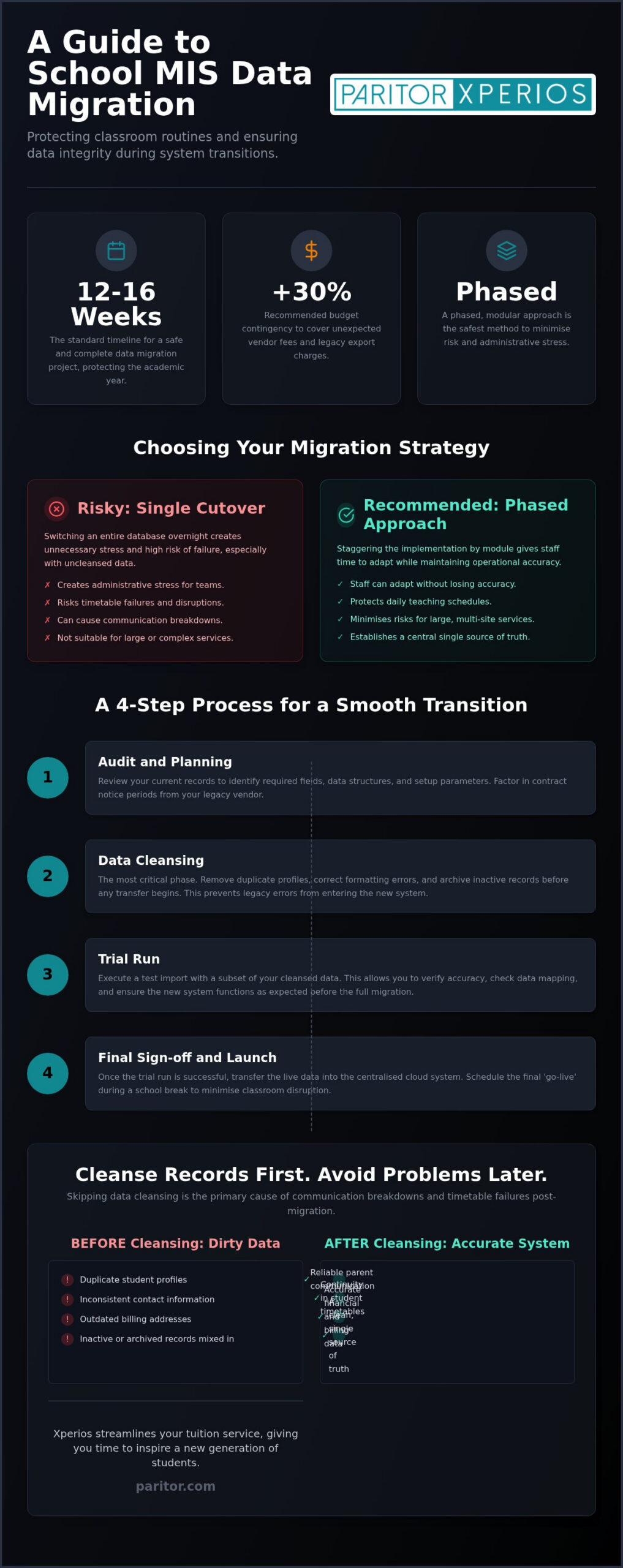
A standard school management software (School MIS) project of data migration for school management systems requires 12 to 16 weeks to execute safely without disrupting classroom operations. Cleaning up data (data cleansing) before mapping reduces transfer errors when you finish that work early. Proper planning keeps student records safe while protecting daily teaching schedules across your educational network.
Key Takeaways:
- Except when managing small databases with clean records, avoid single-phase cutovers to prevent administrative stress.
- Execute a trial run import to verify accuracy before transferring live data into the cloud.
- The article’s case evidence shows that uncleansed duplicate profiles frequently cause communication breakdowns and timetable failures.
A phased approach cuts risk in data migration for school management systems
You face a clear choice before any transfer begins: move everything in one cutover, or stage the work so teaching never stops. Three situations come up often. If you run a large multi-site service, stagger the go-live by module so administrative teams can adapt without losing daily accuracy. If you lead a smaller school with a compact database, complete cleansing first, then use a swift single-phase cutover during a break. If you operate a complex tuition network, choose a phased route hosted on Microsoft Azure so every record sits in a central single source of truth.
A phased transfer minimises risks when moving your data (data migration) to a new school management software. Client work shows that switching entire databases overnight creates unnecessary stress for administrative teams. Staggering your implementation by module gives staff enough time to adapt while you maintain operational accuracy.
You can review your infrastructure against the published system requirements and prepare early. Before transferring records, focus on cleaning up data so legacy errors never enter the new setup. Direct API transfers suit large education providers with complex configurations, whereas manual file uploads work well for smaller schools.
An eight-to-twelve-week timeline protects classroom routines
You need a calendar that respects term dates, not a rushed cutover that collides with lessons. A standard moving your data project usually takes between twelve and sixteen weeks to complete fully. Planning this transition carefully prevents operational disruptions during the academic year.
One recurring client pattern runs as a full arc. Incomplete student records and duplicate profiles were still sitting in the legacy database at launch planning, which threatened timetable continuity and parent communication. The team paused the cutover, cleansed Contacts and archives first, then moved the transfer into a school break. Live data landed cleanly, staff adapted to the new tools without losing classroom routines, and teaching time stayed protected.
- Audit and planning: Review your current records to identify required fields and setup parameters.
- Cleaning up data: Remove duplicate records and correct formatting errors before transfer.
- Trial run: Execute a test import with the music school software to verify accuracy.
- Final sign-off: Transfer live data into the centralised cloud system and launch.
Factor contract notice periods into your switch timeline so you are not trapped by an expiring agreement mid-project. Phased implementations fit large institutions with complex schedules, whereas smaller teams benefit from swift, single-phase transitions after cleansing. Paritor provides modular cloud tools like Xperios to help you manage these shifts, freeing time for teaching. Cloud structure and clear ownership keep student data under GDPR rules throughout.
Budget 30% extra and you avoid surprise MIS fees
Hidden exit costs catch schools after the contract is signed, so you should build contingency in before you commit. Budgeting an additional 30% over standard platform costs protects your UK school from unexpected vendor service charges during transition phases.
Insist on transparent service level agreement terms (SLA terms, which define guaranteed vendor support response times) before signing any contract. Hidden exit fees and data export penalties are a frequent surprise expense in software migration projects. Without clear vendor guarantees, getting your information back out becomes financially painful.
| Migration Fee Type | What It Covers | Budget Strategy |
|---|---|---|
| System Licence | Core cloud software access | Compare base platform quotes |
| Legacy Export | Extraction from old vendor | Reserve 30% contingency |
| Data Cleansing | Fixing duplicate records | Handle internally to save |
Older vendors often demand heavy additional payments simply to supply your database backups in a functional state. Cleaning up data before moving your data reduces the extraction work those vendors can charge you for, especially when you handle cleansing internally as the table suggests.
Use the Melded migration guide to plan your project timeline. Paritor helps schools manage these transitions with transparent, fixed expenses. Cloud hosting on Microsoft Azure keeps your centralised information safe under full GDPR compliance, and modular school management software options let you select only the features you need.
Cleanse records first so your new MIS stays accurate
Duplicate profiles and messy Contacts are the errors that surface on day one if you skip cleansing. Cleaning up data ensures your records are accurate before moving your data to a new school management software.
From administrative work, duplicate student profiles often cause serious communication breakdowns during software upgrades. Systematically auditing your current records prevents those errors from transferring into the fresh system.
First, standardise emergency Contacts, phone numbers and billing addresses across every department. Next, archive inactive student records you no longer need for regulatory compliance. Correctly mapping your custom fields means historic attendance and billing logs match your new database layout cleanly. You can read the music school business case to see how structured databases protect operational revenue over the long term.
Removing outdated information streamlines cloud operations and strengthens GDPR compliance across your organisation. Platforms such as Xperios rely on a single source of truth to automate daily administrative tasks. Time spent scrubbing spreadsheet columns now saves dozens of wasted hours later, and your staff gain immediate access to reliable information without sorting through redundant duplicates.
Negotiate SLA terms that secure your student data format
If export rights are vague, you can lose practical control of your own student files at the worst moment. Your contract must guarantee full ownership and easy extraction of student records in standard formats before migration begins. Negotiating service level agreements (SLAs) prevents vendor lock-in and protects your institution when moving your data.
Client negotiations often ignore export formats until the contract ends. Defining open file delivery up front stops software providers from locking your records inside proprietary databases. Demand full access to raw CSV or JSON exports within service level agreements (SLAs), which are legal service commitments, and ensure the contract outlines explicit exit terms.
Paritor builds modular cloud software on Microsoft Azure to keep your information safe and accessible. The design aim is software that does the hard administrative work so your team does not have to. Ask our team for a personalised quote to secure your cloud setup.
Direct core migration fails when legacy records stay dirty
A straight lift of the old database feels fast until broken fields land in the new core. Directly moving your data into a new school management software core without preparation risks transferring invalid records, broken structures and duplicate files.
Historical records often contain outdated formatting that corrupts new database fields. Moving legacy files without cleaning up data first forces your administrative team to spend months fixing avoidable errors. Transferring unverified records creates operational friction you could have prevented with a short audit.
A staged process works better. If you manage complex tuition networks, Paritor provides modular cloud tools like Xperios on Microsoft Azure to protect information under GDPR standards. Validate records before final transfer so you do not inherit chaos from the old system.
A dedicated manager keeps the migration project on track
Migration stalls when nobody owns the timeline, the field map, or the staff questions. Assigning a dedicated project manager ensures moving your data stays on track while protecting sensitive student records. Pick someone who understands administrative workflows and data protection rules.
Client work shows that choosing an administrator who knows daily school operations prevents costly delays. They spot missing records early and understand how data flows across departments. You need a leader who coordinates staff with clear authority.
Appointing a senior administrator as project lead keeps moving your data focused on real staff needs and helps resolve bottlenecks quickly. Technical skill alone is not enough: effective project managers must also communicate well, which reduces staff anxiety during system transitions. Assigning this role to an overworked IT technician usually fails, so give your chosen lead dedicated time away from regular duties. Data transfers demand full focus to limit security risks.
Paritor supports your team throughout the transition so the software reduces administrative burden securely. Talk with our advisers about how that support fits your staffing plan.
Frequently asked questions
What is a school MIS?
A school management software centralises administrative tasks, student records and timetables into one cloud platform. It serves as your single source of truth for operational data, helps automate daily routines, and protects sensitive information under GDPR standards.
Why are schools switching MIS systems?
Schools upgrade to replace outdated legacy tools with cloud hosting on secure environments such as Microsoft Azure. Modern platforms reduce administrative burden by automating billing and providing dedicated portals for parents, students and staff, which frees time for teaching.
Who should manage the migration project?
Your internal leadership team should partner directly with your software vendor to direct moving your data. Appointing a dedicated project lead keeps communication clear across departments. Paritor works with your team to guide the process.
How should I cleanse my data before migration?
Start cleaning up data by removing duplicate profiles, updating contact details and archiving inactive student records. Standardising formatting across legacy files prevents errors when you load entries into the new database, so your modular software can run efficiently from day one.
How long does a typical SMS migration take?
The timeline varies with institution size, current data quality and system configuration. Most implementations are phased over several weeks so daily teaching is not disrupted. Share your term dates and database size with us and we will outline a schedule that fits.
Moving your data safely in 2026
The same decisions you met at the start still decide the outcome: which transfer approach fits your network, how you place the twelve-to-sixteen-week plan inside the school year, whether the 30% contingency is in the budget, how thoroughly you cleanse, what export rights the SLA locks in, and who owns the project day to day. Careful planning makes moving your data predictable and secure. Cleaning up data before export stops legacy administrative errors reaching your new cloud system.
Incomplete student records cause the largest launch delays in client work you have already seen addressed above: resolve duplicate profiles early and you protect timetable continuity. Your core school management software needs accurate information to handle specialist music schedules. The Paritor technical team builds specialist administrative platforms that keep cloud records secure and compliant.
Review the Xperios pricing guide to explore complementary cloud solutions for your institution.